پیژندنه
This manual provides instructions for the setup, operation, and maintenance of your HyperX Cloud Alpha 2 Wireless Gaming Headset. Please read this manual thoroughly before using the product to ensure proper functionality and to maximize your user experience.

Image: HyperX Cloud Alpha 2 Wireless Gaming Headset with its RGB Base Station, showcasinد بشپړ محصول کڅوړه.
په بکس کې څه دي
- د بې سیمه گیمینګ Headset
- بیس سټیشن
- د جلا کولو وړ مایکروفون
- USB-C ته USB-C کیبل
- USB-C ته USB-A اډاپټر
- 3.5 mm Headset Audio Cable
- د چټک پیل لارښود
چمتو کول
1. د هیډسیټ چارج کول
Before initial use, fully charge the headset. Connect the headset to a power source using the provided USB-C to USB-C cable or USB-C to USB-A adapter. A full charge can provide up to 250 hours of battery life in 2.4GHz mode or 125 hours with simultaneous connection.

Image: A visual representation highlighting the headset's battery life capability of up to 250 hours on a single charge.
2. د بیس سټیشن سره نښلول
Connect the RGB Base Station to your PC or console using the appropriate USB cable. The base station acts as a central hub for audio control and connectivity.

Image: A hand interacting with the RGB Base Station, demonstrating its function as an audio control hub.
3. Software Installation (HyperX NGENUITY)
For full customization and optimal performance, download and install the HyperX NGENUITY software from the official HyperX website. This software allows for equalization adjustments, audio controls, and lighting customization for the RGB Base Station.
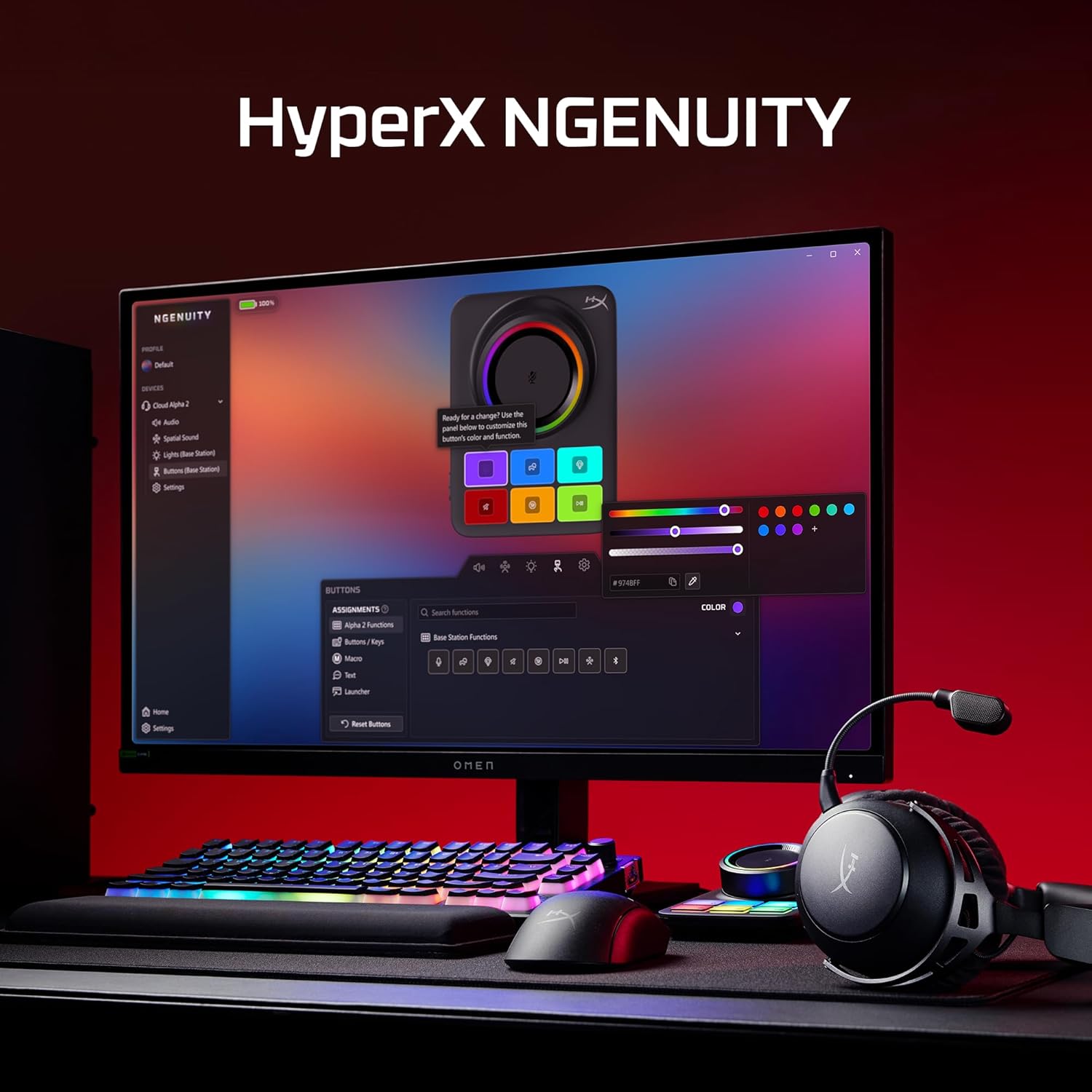
Image: A computer screen displaying the HyperX NGENUITY software, illustrating its interface for customizing headset and base station settings.
۲. د مایکروفون نښلول
Insert the detachable boom microphone into the designated port on the headset. Ensure it is securely connected for clear voice communication.

انځور: یو مفصل view of the detachable 10mm boom microphone, highlighting its position on the headset.
عملیاتي لارښوونې
د ارتباط طریقې
- ۲.۴GHz بېسیم: Connects to PC, PS5, PS4, Nintendo Switch, Mac via the Base Station for low-latency audio.
- بلوتوث: Connects to mobile devices for audio and calls.
- په ورته وخت کې اړیکه: The headset supports simultaneous 2.4GHz and Bluetooth connections, allowing you to listen to audio from two sources concurrently.
- ۳.۵ ملي متره تار: Use the included 3.5mm headset audio cable for wired connection to devices like Xbox.

Image: A user demonstrating the headset's ability to maintain simultaneous 2.4GHz and Bluetooth connections.

Image: Icons illustrating the headset's compatibility across multiple platforms including PC, PlayStation, Nintendo Switch, Mac, mobile devices, and Xbox via 3.5mm connection.
د هیډسیټ کنټرولونه
- حجم ویل: د آډیو آوټ پټ کچه تنظیموي.
- تteۍ غږول: Toggles microphone mute. An LED indicator on the boom mic shows mute status.
- ملټي بټن: د رسنیو پلې بیک او د زنګ مدیریت کنټرولوي.
- Wireless Mode Switch: Selects between 2.4GHz and Bluetooth modes.

انځور: یو مفصل view of the headset's onboard controls, including the volume wheel, mute button, multifunction button, and wireless mode switch.
د آډیو ځانګړتیاوې
The headset features 53mm dual-chamber drivers designed to provide clear audio with distinct bass and treble frequencies. Spatial audio can be enabled and customized through the HyperX NGENUITY software for an immersive sound experience.

Image: A visual representation of the headset's 53mm dual-chamber drivers in action, emphasizing sound clarity.
ساتنه
پاکول
- Use a soft, dry cloth to clean the headset and base station.
- د غوږونو لپاره، په نرمۍ سره د لږ څه سره مسح کړئamp که اړتیا وي، ټوکر یې واچوئ، او د کارولو دمخه یې په بشپړه توګه وچیدو ته پریږدئ.
- د سختو کیمیاوي موادو یا خړوبولو موادو کارولو څخه ډډه وکړئ.
ذخیره کول
Store the headset in a cool, dry place away from direct sunlight and extreme temperatures. When not in use, the headset's 90° rotating earcups allow for flat storage.

Image: The headset positioned to highlight its comfortable design and flexible earcups, suitable for storage.
د بیټرۍ پاملرنه
د بیټرۍ د ژوند اوږدولو لپاره، د هیډسیټ په مکرر ډول په بشپړ ډول چارج کولو څخه ډډه وکړئ. هیډسیټ په منظم ډول چارج کړئ، حتی که په دوامداره توګه نه کارول کیږي.
د ستونزو حل کول
غږ نشته / ټیټ غږ
- Ensure the headset is powered on and connected to the correct source (2.4GHz, Bluetooth, or 3.5mm).
- په هیډسیټ کې د حجم څرخ او په خپل وسیله کې د سیسټم حجم وګورئ.
- ډاډ ترلاسه کړئ چې ستاسو د عملیاتي سیسټم د غږ ترتیباتو کې سم آډیو آوټ پټ وسیله غوره شوې ده.
- For 2.4GHz connection, ensure the Base Station is properly connected and recognized by your system.
مایکروفون کار نه کوي
- Ensure the detachable boom microphone is securely inserted into the headset.
- Check if the microphone mute button on the headset is disengaged (LED indicator off).
- ډاډ ترلاسه کړئ چې ستاسو د عملیاتي سیسټم د غږ ترتیباتو او مخابراتو غوښتنلیکونو کې سم مایکروفون ان پټ وسیله غوره شوې ده.
- If using the internal microphone, ensure the boom mic is detached.
د ارتباط مسلې
- 2.4GHz: Ensure the Base Station is within range and free from interference. Try reconnecting the headset to the Base Station.
- بلوتوث: Ensure Bluetooth is enabled on your device and the headset is in pairing mode. Remove previous pairings and attempt to pair again.
- عمومي: هیډسیټ او وصل شوی وسیله دواړه بیا پیل کړئ.
Software (NGENUITY) Issues
- Ensure you have the latest version of HyperX NGENUITY installed.
- Check for firmware updates for both the headset and the Base Station within the NGENUITY software.
- If the software is not recognizing the device, try restarting the application or your computer.
مشخصات
| فیچر | تفصیل |
|---|---|
| د ماډل نوم | HyperX Cloud Alpha 2 - Wireless Gaming Headset |
| د ماډل شمیره | AJ5C7AA |
| د ارتباط ټیکنالوژي | 2.4 GHz Wireless, Bluetooth 5.2, 3.5 mm Jack |
| د بیسیم رینج | ۲۰ متره (بلوتوث) |
| چلوونکي | 53mm Dual-Chamber |
| د تعدد ځواب | 20 Hz |
| خنډ | 64 اوم |
| د بیټرۍ ژوند | Up to 250 hours (2.4GHz mode) |
| مایکروفون | Detachable 10mm Boom Mic, Internal Mics |
| مواد | Stainless steel, aluminum forks |
| د توکي وزن | 345 ګرامه (12.2 اونس) |
| ابعاد (LxWxH) | 7.24 x 3.6 x 8.11 انچه |
| د پلیټ فارم مطابقت | PC, PS5, PS4, Nintendo Switch, Mac, Mobile, Xbox (wired) |
د تضمین معلومات
For detailed warranty information regarding your HyperX Cloud Alpha 2 Wireless Gaming Headset, please refer to the official HyperX webسایټ یا د تضمین کارت چې ستاسو محصول سره شامل دی. د تضمین شرایط او مقررات ممکن د سیمې له مخې توپیر ولري.
ملاتړ
If you require further assistance or have questions not covered in this manual, please visit the official HyperX support website for FAQs, drivers, and contact information. You can also find additional resources and community forums there.
رسمي هایپر ایکس Webسایټ: www.hyperx.com/support


