1. پیژندنه
Thank you for choosing the RUIZU 64GB HiFi Lossless MP3 Player. This device is engineered to deliver a pure, high-resolution audio experience, supporting a wide range of lossless formats. Its compact design and intuitive touchscreen interface make it ideal for enjoying your music without distractions. This manual provides essential information for setting up, operating, and maintaining your player.
2. محصول ختم شوview
The RUIZU HiFi Lossless MP3 Player features a durable CNC-milled aluminum alloy body, ensuring both elegance and resilience. Designed for a dedicated audio experience, it operates exclusively with wired headphones, eliminating latency and interference associated with wireless connections. The 2-inch HD IPS touchscreen provides clear visuals and easy navigation.
۳.۱. فزیکي ځانګړتیاوې او ابعاد
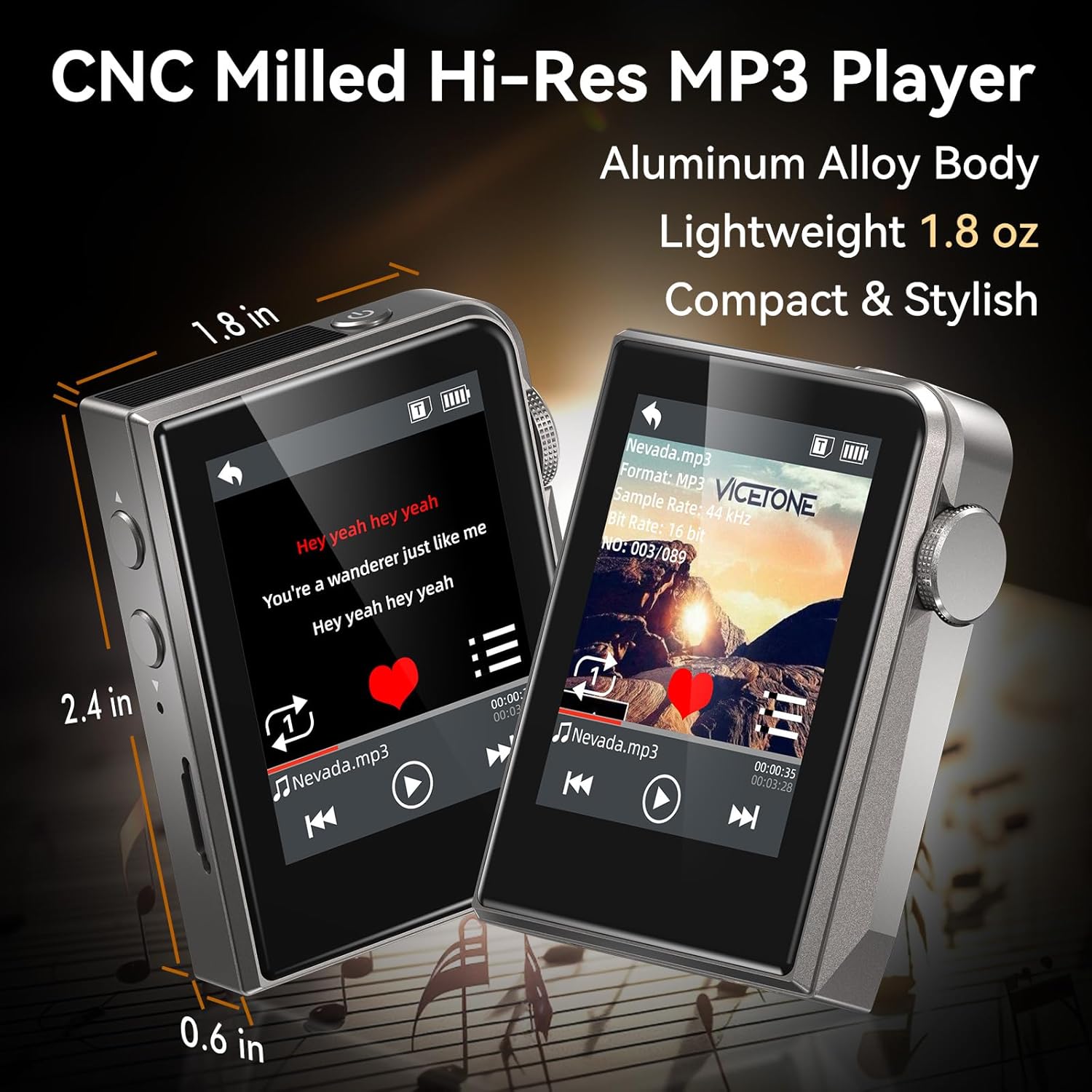
The RUIZU MP3 Player is compact and lightweight, measuring approximately 2.36 x 1.81 x 0.55 inches and weighing 1.76 ounces.
2.2. Wired Audio Design

The player supports advanced DAC decoding for high-resolution audio formats such as MP3, WMA, WAV, APE, FLAC, AAC, M4A, OGG, ALAC, DSF, and DFF, ensuring pure sound quality.
2.3. د بسته محتويات

The package includes the RUIZU 64GB Hi-res MP3 Player, 3.5mm wired headphones, a USB-C cable for charging and file transfer, a protective pouch, and this user manual.
3. ترتیب کول
3.1. د وسیلې چارج کول
Before first use, fully charge the MP3 player. Connect the provided USB-C cable to the player's USB-C port and the other end to a USB power adapter (not included) or a computer's USB port. The battery indicator on the screen will show charging status.
۵.۳. د موسیقۍ لیږدول Files
- Connect the MP3 player to your computer using the supplied USB-C cable.
- دا پلیر به ستاسو په کمپیوټر کې د لرې کولو وړ ډیسک ډرایو په توګه څرګند شي.
- خپل مطلوب آډیو کش کړئ او پریږدئ files (MP3, WAV, FLAC, APE, OGG, DSD256, etc.) into the player's internal storage or a connected microSD card folder.
- Safely eject the device from your computer before disconnecting the USB-C cable.
۳. د مایکرو ایس ډی کارت داخلول

The player supports microSD cards up to 128GB for expanded storage. Gently insert the card into the designated slot until it clicks into place.
4. عملیاتي لارښوونې
4.1. بریښنا فعال/بند
Press and hold the power button (usually on the side) to turn the player on or off.
4.2. بنسټیز نیویګیشن
The player features a 2-inch HD IPS touchscreen for navigation. Swipe to browse menus and tap to select options. The dedicated Home button allows for quick return to the main menu.
4.3. د میوزیک غږول

Access your music library through the 'Music' or 'Folder' options on the main screen. Select a song to begin playback. Use the on-screen controls for play/pause, skip forward/backward.
۲. د پلې بیک حالتونه
The player offers various playback modes:
- شفل: ټریکونه په ناڅاپي ترتیب سره غږوي.
- یو تکرار کړئ: اوسنۍ لار تکراروي.
- Folder Loop: Repeats all tracks within the current folder.
- پرله پسې: Plays tracks in order.
- All Loop: Repeats all tracks in the current playlist/library.
4.3.2. Equalizer (EQ)
Customize your sound experience using the built-in equalizer. Navigate to the 'Equalizer' setting to adjust frequency bands or select from preset options.
4.3.3. Playlists and Favorites
Create up to 4 favorite lists or organize your music into folders for easy access.
4.3.4. Skip Tracks with Screen Off
For convenience during activities like jogging, the player allows you to skip tracks using physical buttons even when the screen is off.
4.4. اضافي دندې
The player includes several utility functions:
- تمځاي: د وخت فعالیتونو لپاره.
- تقویم: Keep track of dates.
- د حجم حد: Set a maximum volume level for hearing protection.
- Date & Time Display: View اوسنی نیټه او وخت.
- د خوب وخت Automatically turn off the player after a set period.
- Power-Saving Shutdown: Configure automatic shutdown to conserve battery.
- ژبې: Supports 21 languages for the user interface.
5. ساتنه
- وسیله وچه وساتئ. د لندبل یا مایعاتو سره د مخ کیدو څخه ډډه وکړئ.
- سکرین او بدن د نرم او وچ ټوکر سره پاک کړئ. د کثافاتو پاکونکو څخه کار مه اخلئ.
- د سخت تودوخې څخه ډډه وکړئ.
- هڅه مه کوئ چې وسیله پخپله جلا کړئ یا ترمیم کړئ. دا به تضمین باطل کړي.
6. ستونزه حل کول
۶.۱. وسیله نه چالانېږي
- ډاډ ترلاسه کړئ چې بیټرۍ چارج شوې ده. پلیر د بریښنا سرچینې سره وصل کړئ او د بیا چالانولو هڅه کولو دمخه یې لږترلږه 30 دقیقو لپاره چارج کولو ته پریږدئ.
- که چیرې وسیله غیر ځواب ویونکې وي، نو د 10-15 ثانیو لپاره د بریښنا تڼۍ په فشارولو او نیولو سره د نرم ری سیٹ کولو هڅه وکړئ.
۲. د غږ نه راوتل
- Check if headphones are properly connected to the 3.5mm audio jack.
- Verify the volume level is not set to zero or muted.
- Test with a different pair of wired headphones to rule out headphone malfunction.
- غږ ډاډمن کړئ fileفایلونه خراب شوي نه دي او په ملاتړ شوي بڼه کې دي.
۶.۲. لیږدول نشي کېدای Files
- Ensure the USB-C cable is securely connected to both the player and the computer.
- په خپل کمپیوټر کې یو بل USB پورټ یا یو بل USB-C کیبل هڅه وکړئ.
- Restart your computer and the MP3 player.
- Check if your computer's operating system recognizes the device as a removable disk.
6.4. MicroSD Card Not Detected
- Ensure the microSD card is inserted correctly and fully seated in its slot.
- Try removing and reinserting the card.
- Test with a different microSD card to determine if the card itself is faulty.
- Ensure the card is formatted to a compatible file سیسټم (د مثال په توګه، FAT32).
7. مشخصات
| فیچر | مشخصات |
|---|---|
| برانډ | RUIZU |
| ماډل | 64GB HiFi Lossless MP3 Player |
| د حافظې د ذخیره کولو ظرفیت | 64 GB (Internal), expandable up to 128GB via Micro SD card |
| د سکرین اندازه | ۷۸۷ انچه |
| ټیکنالوژي ښکاره کول | LCD |
| د ارتباط ټیکنالوژي | Aux, USB (Wired only, No Bluetooth) |
| ځانګړي ځانګړتیاوې | Equalizer, Hi-Res Audio, Touch Screen |
| مطابقت لرونکې وسیلې | Headphones, Personal Computer |
| د رسنیو ډول | مایکرو ایس ډی |
| د توکي وزن | 4.9 اونس |
| بیټرۍ | ۱ غیر معیاري بیټرۍ (شامله ده) |
8. تضمین او ملاتړ
For warranty information and technical support, please refer to the official RUIZU webسایټ یا خپل پرچون پلورونکي سره اړیکه ونیسئ. د هر ډول تضمین ادعا لپاره د پیرود ثبوت په توګه د پیرود رسید وساتئ.


