1. پیژندنه
This manual provides essential information for the safe and efficient operation of your Haier QLED 4K UHD H55Q80FUX 55-inch Smart TV. Please read it thoroughly before using the product and retain it for future reference.
The Haier H55Q80FUX is a 55-inch QLED 4K UHD Smart TV featuring Google TV, Dolby Atmos, Dolby Vision, HDR 10+, a Smart Remote Control, Google Assistant, Bluetooth 5.1, DBX TV, and four HDMI 2.1 ports. It is designed for an immersive viewing and gaming experience with its frameless design and Gaming 120Hz DLG Accelerator.

انځور 1.1: مخکی view of the Haier QLED 4K UHD H55Q80FUX 55-inch Smart TV.
۲. په بکس کې څه دي؟
د خلاصولو پر مهال، ډاډ ترلاسه کړئ چې لاندې ټولې برخې شتون لري:
- د هایر QLED 4K UHD H55Q80FUX 55 انچه سمارټ تلویزیون
- د سمارټ ریموٹ کنټرول
- د بریښنا کیبل
- د کارونکي لارښود (دا لاسوند)
- TV Stand components (if applicable, for desktop placement)
3. ترتیب کول
۲. د سټینډ نصب کول (اختیاري)
If you intend to place the TV on a surface, attach the provided stand according to the instructions in the quick start guide. Ensure all screws are securely fastened.
۳. دیوال نصب کول (اختیاري)
For wall mounting, use a VESA compatible bracket (300 x 300 mm) and follow the bracket manufacturer's instructions. Professional installation is recommended.
3.3. د نښلولو بریښنا
Connect the power cable to the TV's power input and then to a suitable electrical outlet.
3.4. د ابتدايي ترتیب وزرډ
Upon first power-on, the TV will guide you through the initial setup process, including language selection, network connection (Wi-Fi or Ethernet), Google account login, and channel scanning.

Image 3.1: Diagram showing the dimensions of the Haier H55Q80FUX TV with and without stand. Without stand: 122.6 cm (width) x 71.9 cm (height) x 8.8 cm (depth). With stand: 122.6 cm (width) x 77.7 cm (height) x 27.7 cm (depth).
4. عملیاتي لارښوونې
4.1. Smart Remote Control
The included Smart Remote Control allows for intuitive navigation of the Google TV interface. It features dedicated buttons for popular streaming services and a built-in microphone for voice commands.
۲. د ګوګل تلویزیون انٹرفیس
Google TV organizes your favorite apps, movies, and shows from various streaming services into a single, personalized interface. Navigate using the remote control's directional pad and select button.

Image 4.1: Screenshot of the Google TV interface displaying various streaming applications and content recommendations.
4.3. Google Assistant Voice Control
Press the Google Assistant button on your Smart Remote and speak into the microphone to control your TV, search for content, get information, and manage smart home devices.
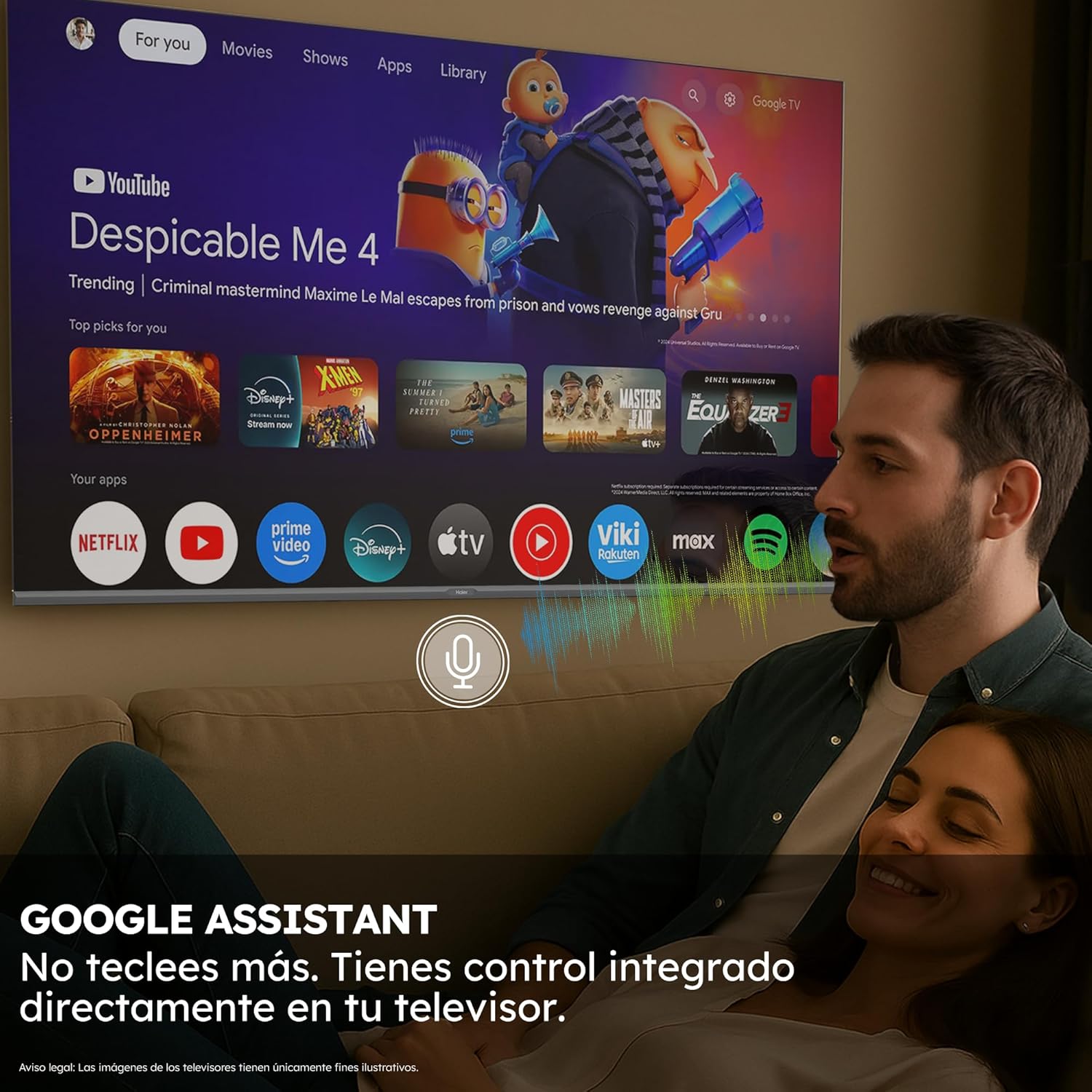
Image 4.2: A person using voice commands with the Google Assistant integrated into the Haier Smart TV.
۳. د انځور او غږ ترتیبات
Access the TV settings menu to adjust picture modes (e.g., Standard, Vivid, Movie, Game), brightness, contrast, color, and sound settings (e.g., Standard, Music, Movie, Speech). The TV supports Dolby Atmos for immersive audio and Dolby Vision for enhanced picture quality.

Image 4.3: Diagram illustrating the layers of QLED technology, showing how Quantum Dots produce vibrant colors and enhanced brightness.

Image 4.4: Visual representation of Dolby Atmos and Dolby Vision, with a TV displaying a wave scene and sound ripples emanating from its base, symbolizing immersive audio and superior image quality.
4.5. ارتباط
- HDMI2.1: Connect gaming consoles, Blu-ray players, and other high-definition devices to the four HDMI 2.1 ports for optimal performance, especially for 4K 120Hz gaming.
- USB: د میډیا پلی کولو لپاره د USB بندرونو څخه کار واخلئ files د بهرني ذخیره کولو وسیلو څخه.
- بلوتوث 5.1: Pair Bluetooth-enabled devices such as headphones, game controllers, or soundbars wirelessly.
- وای فای/ایترنیټ: Connect to your home network for internet access and streaming services.

Image 4.5: Close-up of an HDMI 2.1 cable being connected to a TV port, highlighting the high-speed data transfer capabilities.
۵. د لوبو ځانګړتیاوې
The Haier H55Q80FUX is equipped with a Gaming 120Hz DLG Accelerator, which enhances motion clarity and response time for a smoother gaming experience in 2K resolution. HDMI 2.1 support further optimizes frame delivery for next-generation video games.

Image 4.6: Comparison of Gaming 120Hz vs. Standard 60Hz refresh rates, showing a blurred image at 60Hz and a clear, sharp image at 120Hz, demonstrating improved motion clarity for gaming.
4.7. MEMC Technology
Motion Estimation, Motion Compensation (MEMC) technology focuses on movement and maintains the sharpness of moving images, reducing motion blur in fast-paced scenes.
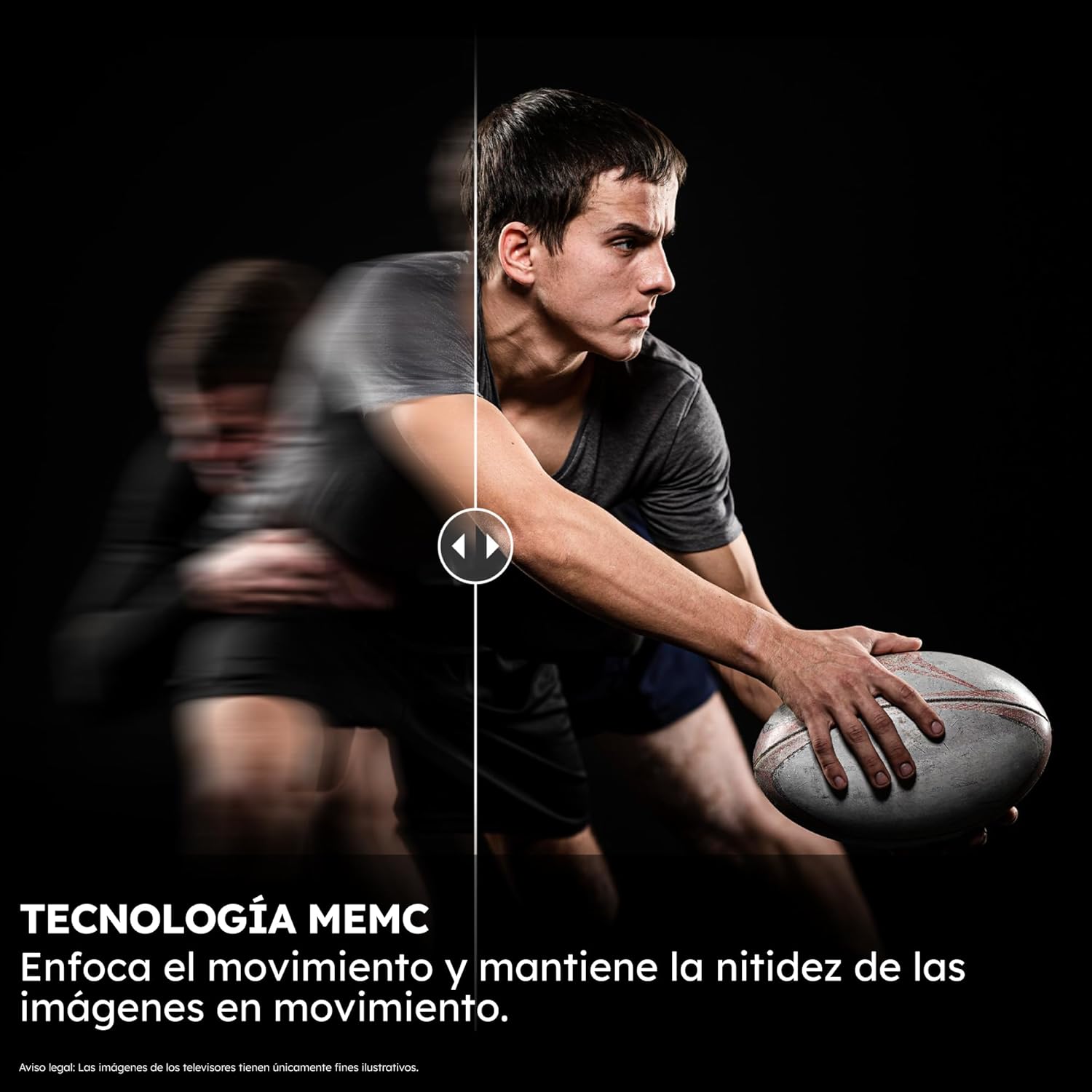
Image 4.7: Split image demonstrating MEMC technology, with one side showing motion blur and the other showing a clear, sharp image of a moving object.
5. ساتنه
۳. د پردې پاکول
په نرمۍ سره سکرین د نرم، لینټ نه پاک ټوکر سره پاک کړئ. د سختو نښو لپاره، یو څه لږampټوکر د اوبو یا ځانګړي سکرین کلینر سره ومینځئ. د سخت کیمیاوي موادو یا خړوبونکي موادو څخه ډډه وکړئ.
۲. د تلویزیون د بدن پاکول
Use a soft, dry cloth to clean the TV's frame and back panel. Do not use liquid cleaners directly on the TV.
5.3. د سافټویر تازه معلومات
ډاډ ترلاسه کړئ چې ستاسو د تلویزیون سافټویر د غوره فعالیت او امنیت لپاره تازه دی. تلویزیون ممکن تاسو ته د تازه معلوماتو غوښتنه وکړي، یا تاسو کولی شئ د ترتیباتو مینو له لارې په لاسي ډول وګورئ.
6. ستونزه حل کول
If you encounter issues with your Haier Smart TV, refer to the following common solutions:
- ځواک نشته: Ensure the power cable is securely connected to both the TV and the power outlet. Try a different outlet.
- انځور/غږ نشته: د ننوتلو سرچینه وګورئ. ډاډ ترلاسه کړئ چې بهرني وسایل فعال دي او په سمه توګه وصل دي.
- ریموټ ځواب نه ورکوي: د ریموټ کنټرول بیټرۍ بدل کړئ. ډاډ ترلاسه کړئ چې د ریموټ او تلویزیون ترمنځ هیڅ خنډ شتون نلري.
- د شبکې د اتصال ستونزې: خپل روټر او موډیم بیا پیل کړئ. تلویزیون خپل وای فای شبکې سره بیا وصل کړئ یا د ایترنیټ کیبل اتصال وګورئ.
- د انځور کیفیت مسایل: Adjust picture settings. Ensure the content source is of high quality.
For more complex issues, consult the Haier support webسایټ یا د پیرودونکي خدمت سره اړیکه ونیسئ.
7. مشخصات
| فیچر | مشخصات |
|---|---|
| د ماډل شمیره | 36200116 |
| د سکرین اندازه | ۷۸۷ انچه |
| ټیکنالوژي ښکاره کول | QLED |
| قرارداد | 4K (3840 x 2160) |
| د تازه کولو نرخ | ۶۰ هرټز (د لوبو ۱۲۰ هرټز DLG سرعت کوونکی) |
| ځانګړي ځانګړتیاوې | Bluetooth 5.1, Dolby Atmos, Dolby Vision, GAMING 120HZ DLG ACCELERATOR, Google TV, QLED 4K UHD Technology |
| ارتباط | Bluetooth, Ethernet, HDMI (x4, HDMI 2.1), USB, Wi-Fi |
| ابعاد (پرته ولاړ) | 122.6 x 71.9 x 8.8 سانتي متره |
| ابعاد (د موقف سره) | 122.6 x 77.7 x 27.7 سانتي متره |
| وزن | 11.8 کیلو ګرامه |
| د VESA ماونټ مطابقت | 300 x 300 mm |
| د انرژي موثریت ټولګي | F |
| د برېښنا مصرف (SDR) | 77 kWh/1000h |
| د بریښنا مصرف (HDR) | 110 kWh/1000h |
| عملیاتي سیسټم | ګوګل تلویزیون |
| RAM | 2GB |
| ROM | 32GB |

Image 7.1: EU Energy Label for Haier H55Q80FUX, showing energy efficiency class F and power consumption values. For more details, visit د EPREL ډیټابیس.
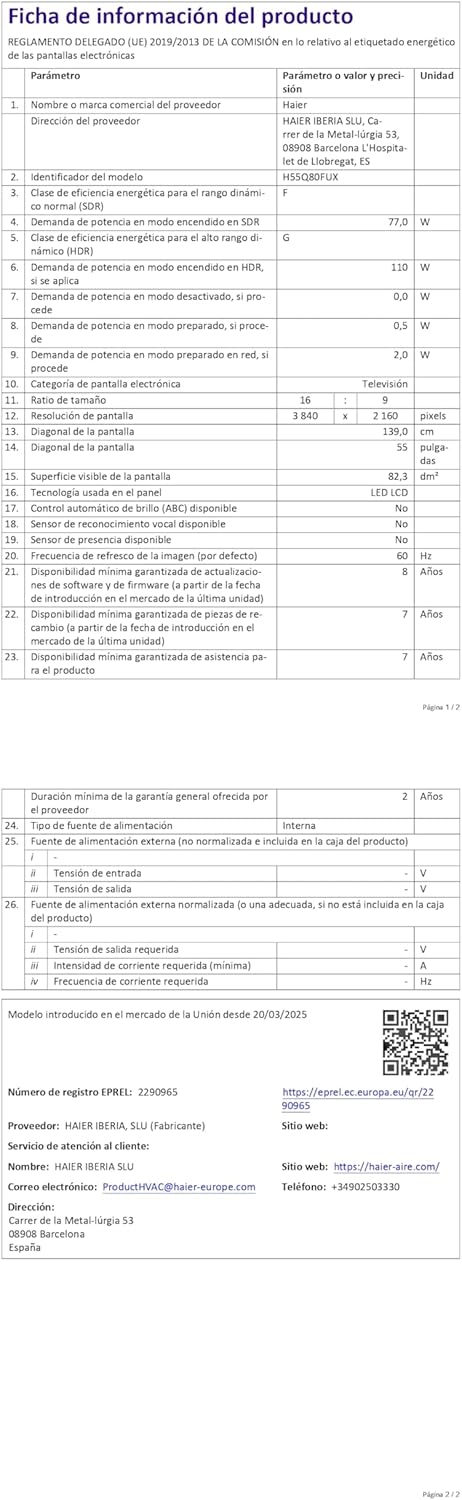
Image 7.2: Product information sheet for Haier H55Q80FUX, detailing various technical parameters. For more details, visit د EPREL ډیټابیس.

Image 7.3: Visual representation of the TV's internal components, highlighting 2GB RAM and 32GB ROM for enhanced performance and storage.
8. تضمین او ملاتړ
8.1. د تضمین معلومات
The Haier H55Q80FUX Smart TV comes with a minimum general warranty of 2 years from the date of purchase. Please retain your proof of purchase for warranty claims.
8.2. د پیرودونکي ملاتړ
For technical assistance, warranty service, or product inquiries, please contact Haier customer support:
- جوړونکی: هایر
- د پیرودونکو خدمت: HAIER IBERIA SLU
- بریښنالیک: product.hvac@haier-europe.com
- Webسایټ: https://haier-sine.com/


