1. پیژندنه
Thank you for choosing the Parsonver G01 GPS Smart Watch. This manual provides essential information for the proper setup, operation, and maintenance of your device. Please read it carefully to ensure optimal performance and longevity of your smartwatch.

Image: The Parsonver G01 Smart Watch displayed with various outdoor activity scenes, highlighting its versatile use.
2. د بسته محتويات
د کڅوړې د پرانیستلو پر مهال، ډاډ ترلاسه کړئ چې ټول توکي شتون لري:
- 1x Parsonver G01 Smart Watch
- ۱x مقناطیسي چارج کیبل
- 1x د کارونکي لارښود

Image: An illustration detailing the package contents, including the smartwatch, charging cable, and user manual.
3. د تنظیم کولو لارښود
۲.۲ د سمارټ واچ چارج کول
Before initial use, fully charge your Parsonver G01 Smart Watch. The device features a 520mAh battery, providing extended usage time.
- د ساعت په شا کې د چارج کولو تماسونو سره د مقناطیسي چارج کولو کیبل وصل کړئ.
- د کیبل USB-A پای په معیاري USB بریښنا اډاپټر (شامل نه دی) یا د کمپیوټر USB پورټ سره وصل کړئ.
- د ساعت ښودنه به د چارج کولو حالت په ګوته کړي. بشپړ چارج معمولا شاوخوا 2 ساعته وخت نیسي.

انځور: سمارټ واچ د خپل مقناطیسي چارج کولو کیبل سره وصل دی، چې د چارج کولو پروسې او د بیټرۍ د ژوند شاخصونه ښیې.
۳.۳ د اپلیکیشن نصب او جوړه کول
د خپل سمارټ واچ بشپړ فعالیت خلاصولو لپاره، په خپل سمارټ فون کې د ملګري اپلیکیشن ډاونلوډ او نصب کړئ.
- Scan the QR code provided in the quick start guide or search for "Glory Fit" in your smartphone's app store (compatible with iOS 9.0/Android 5.0 or above).
- Install the "Glory Fit" application.
- اپلیکیشن پرانیزئ او د حساب جوړولو یا ننوتلو لپاره په سکرین کې لارښوونې تعقیب کړئ.
- ډاډ ترلاسه کړئ چې ستاسو په سمارټ فون کې بلوتوټ فعال دی.
- In the app, navigate to the device pairing section and select your Parsonver G01 Smart Watch from the list of available devices.
- په خپل سمارټ فون او ساعت دواړو کې د جوړه کولو غوښتنه تایید کړئ.
4. عملیاتي لارښوونې
4.1 بنسټیز نیویګیشن
The Parsonver G01 features a 1.95-inch HD touchscreen for intuitive interaction.
- پورته / ښکته سوائپ: چټکو ترتیباتو یا خبرتیاو ته لاسرسی ومومئ.
- کیڼ/ښي خوا ته سوپ کړئ: د ویجټونو او اصلي دندو له لارې حرکت وکړئ.
- ټایپ: یو توکي غوره کړئ یا یو عمل تایید کړئ.
- د غاړې تڼۍ فشار ورکړئ: کور سکرین ته بیرته راشئ یا بریښنا فعال/بند کړئ.
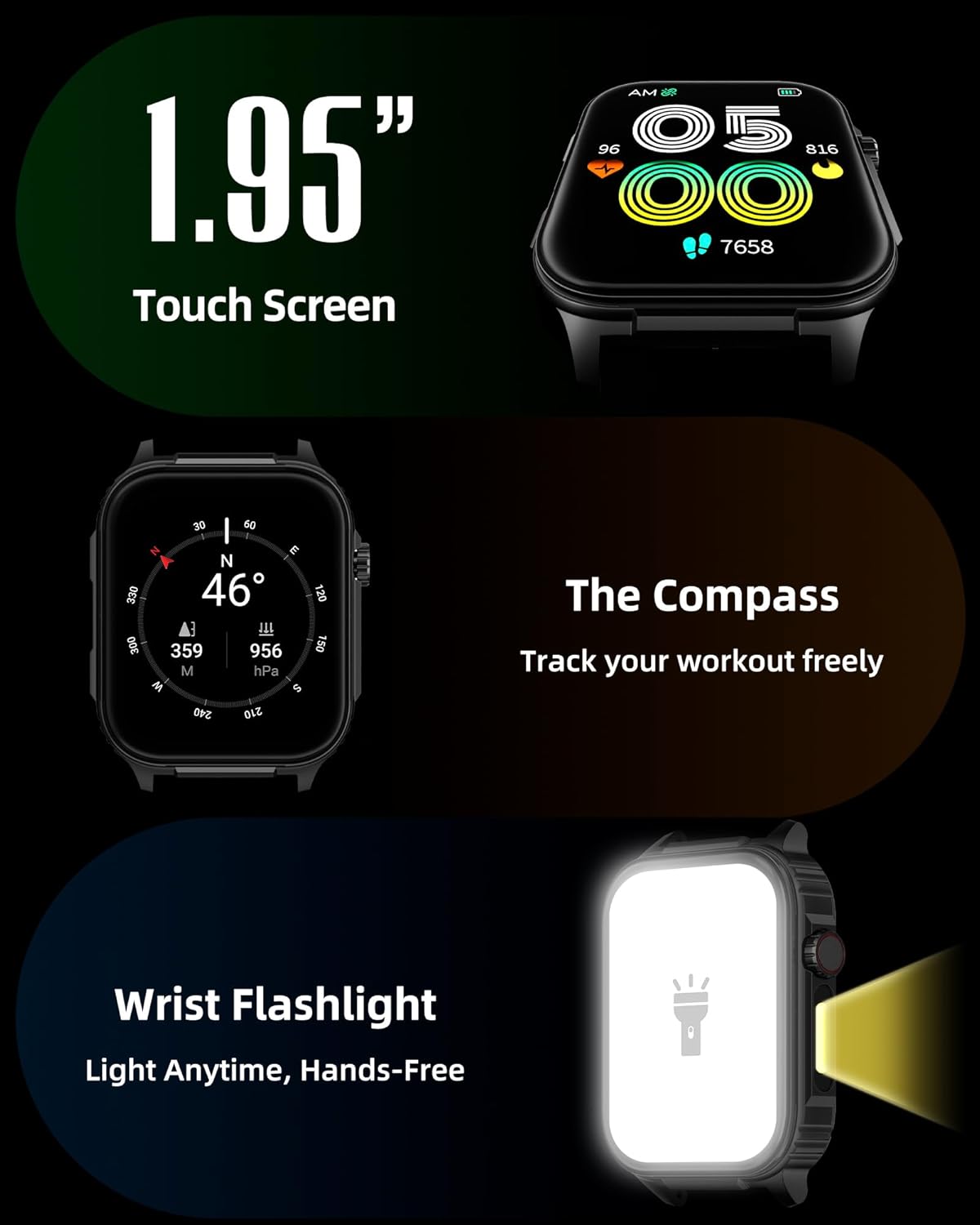
انځور: یو مفصل view of the smartwatch screen, illustrating its 1.95-inch size, along with icons for compass and flashlight functions.
4.2 Bluetooth Calls and Smart Notifications
Stay connected by making and receiving calls directly from your wrist and receiving instant notifications.
- زنګ وهل: Once paired via Bluetooth 5.3, access the call function on your watch to dial numbers or select contacts.
- تلیفونونه ترلاسه کول: Incoming calls will display on the watch screen, allowing you to answer or reject them.
- خبرتیاوې: The watch provides vibration alerts for SMS, WhatsApp, Facebook, and other app notifications. Note: Direct replies from the watch are not supported.

Image: A man on a mountain trail interacting with his Parsonver G01 Smart Watch to manage a Bluetooth call, with notification icons floating above.

Image: The smartwatch screen showing incoming messages and app notifications, demonstrating its smart notification feature.
4.3 د څار مخونه
Personalize your watch with over 400 available watch faces or create your own custom designs.
- Access the watch face market through the "Glory Fit" app.
- Browse and download various styles, from classic to modern.
- Use the DIY function to upload custom photos and create unique watch faces.

انځور: د سمارټ واچ سکرین ښودنهasing a variety of watch face designs, illustrating the customization options.
4.4 Built-in GPS and Compass
Track your outdoor activities and navigate with precision, even without your phone.
- د GPS تعقیب: The built-in GPS accurately records your route, distance, and pace during outdoor workouts like running, hiking, and cycling. Ensure you are in an open area for optimal GPS signal acquisition.
- کمپاس: Utilize the integrated compass for navigation and orientation during your adventures.

Image: A cyclist wearing the Parsonver G01 Smart Watch, with the watch display showing GPS tracking data and a map.

Image: Hikers on a mountain trail, with the smartwatch displaying compass and GPS navigation features.
4.5 د LED فلش لائټ
The integrated LED flashlight provides convenient illumination when needed.
- Access the flashlight function from the quick settings menu or a dedicated shortcut.
- The flashlight provides hands-free lighting for various situations.

Image: The smartwatch with its LED flashlight illuminated, demonstrating its utility in dark environments.
4.6 سپورت موډونه
The watch supports over 100 built-in sports modes to track your physical activities.
- Select your desired sport from the activity menu.
- The watch will track metrics such as calories burned, steps, distance, and heart rate in real-time.
- Examples include running, cycling, yoga, hiking, football, and more.

Image: An athlete tying shoelaces, with the smartwatch displaying various sports tracking metrics like steps, calories, distance, and heart rate.

Image: A visual representation of the smartwatch's extensive range of over 100 built-in sports modes, including running, football, and cycling.
4.7 د روغتیا څارنه
The Parsonver G01 provides comprehensive health monitoring features to help you maintain a healthy lifestyle.
- د زړه ضربان څارنه: د زړه ضربان ۲۴/۷ دوامداره تعقیب.
- د وینې اکسیجن (SpO2) څارنه: Track your blood oxygen levels in real-time.
- د خوب څارنه: د خوب تحلیل کويtages (deep, light, awake) to provide insights into your sleep quality.
- Stress and Mood Monitoring: ستاسو د فشار کچه درک او اداره کولو کې مرسته کوي.
- بې ځایه یادونه: د بې فعالیتۍ مودې وروسته تاسو ته د حرکت کولو هڅونه درکوي.
- د تنفسي تمرینونه: Guided breathing sessions to help reduce stress.

Image: A collage illustrating the smartwatch's 24-hour health monitoring capabilities, including sleep, stress, heart rate, and blood oxygen tracking.

Image: A man sleeping, with the smartwatch on his wrist, and a graphic showing detailed sleep analysis data.
۴.۶ نورې عملي دندې
The Parsonver G01 includes a variety of additional features to assist with daily tasks:
- د الارم ساعت: ډیری الارمونه تنظیم کړئ.
- ټایمر او سټاپ واچ: For precise timing.
- محاسب: د ریاضي اساسي دندې.
- تقویم: View dates and schedule.
- د موسیقۍ کنټرول: Play, pause, skip tracks on your connected phone.
- د هوا وړاندوینه: د هوا په اړه په ریښتیني وخت کې تازه معلومات ترلاسه کړئ.
- د غږ همکار: Interact with your phone's voice assistant.
- د ریموټ کیمرې کنټرول: د خپل تلیفون کیمره له لرې څخه چالان کړئ.
- تلیفون پیدا کړئ: خپل ورک شوی سمارټ فون ومومئ.
- له خوبه پاڅېدل: Automatically activate the screen when you raise your wrist.

Image: A display of various practical functions on the smartwatch, including alarm, timer, stopwatch, calculator, calendar, music control, and weather.
5. ساتنه
۲.۷ د اوبو مقاومت
The Parsonver G01 Smart Watch has an IP68 waterproof rating, meaning it is resistant to dust and can withstand immersion in water up to 1.5 meters for 30 minutes. It is suitable for daily splashes, hand washing, and light rain.
مهمه یادونه:
- The IP68 rating does not make the watch suitable for swimming, showering, or sauna use. Exposure to hot water, steam, or high-pressure water jets may compromise the water resistance.
- د اوبو لاندې د تڼیو د فشارولو څخه ډډه وکړئ.
- If the watch gets wet, dry it thoroughly before charging or using the touchscreen.

Image: A hand wearing the smartwatch under running water, illustrating its IP68 waterproof capabilities for everyday use.
Clean پاکول او پالنه
- ساعت او تسمه په منظم ډول د نرم او وچ ټوکر سره پاک کړئ.
- د اړتیا په صورت کې، یو څه لږ کارولamp cloth with mild soap, then rinse and dry thoroughly.
- د سختو کیمیاوي موادو، خړوبونکو پاکوونکو یا محلولونو کارولو څخه ډډه وکړئ، ځکه چې دا کولی شي د ساعت پای او اجزاو ته زیان ورسوي.
- د چارج کولو تماسونه پاک او له کثافاتو څخه پاک وساتئ ترڅو د مناسب چارج ډاډ ترلاسه شي.
6. ستونزه حل کول
If you encounter issues with your Parsonver G01 Smart Watch, refer to the following common solutions:
- ساعت نه چالانېږي: ډاډ ترلاسه کړئ چې ساعت په بشپړه توګه چارج شوی دی. لږترلږه د 30 دقیقو لپاره یې چارجر سره وصل کړئ.
- د سمارټ فون سره جوړه نشي کیدی:
- ډاډ ترلاسه کړئ چې ستاسو په تلیفون او ساعت کې بلوتوټ فعال دی.
- ډاډ ترلاسه کړئ چې ساعت ستاسو د تلیفون د بلوتوث رینج کې دی.
- ساعت او تلیفون دواړه بیا پیل کړئ.
- Check if the "Glory Fit" app has necessary permissions on your phone.
- د GPS ناسم معلومات:
- ډاډ ترلاسه کړئ چې تاسو په یوه خلاصه بهرنۍ سیمه کې یاست چې پاکه هوا ولري view د غوره سپوږمکۍ استقبال لپاره د آسمان څخه.
- Allow sufficient time for the watch to acquire a GPS signal before starting an activity.
- Screen lights up during sleep: This can be caused by wrist movements activating the raise-to-wake feature. You may be able to disable or adjust the sensitivity of the raise-to-wake feature in the watch settings or the companion app.
- د بیټرۍ لنډ ژوند:
- Frequent use of GPS, Bluetooth calls, and continuous health monitoring can consume more battery.
- Reduce screen brightness or shorten screen-on time.
- غیر ضروري خبرتیاوې غیر فعال کړئ.
- Compass inaccuracy: Calibrate the compass if available in the watch settings or app. Ensure no strong magnetic fields are nearby.
If the issue persists, consult the FAQ section within the "Glory Fit" app or contact customer support.
7. مشخصات
| فیچر | مشخصات |
|---|---|
| د ماډل شمیره | G01 |
| د سکرین اندازه | ۷۸۷ انچه |
| د ښودلو ډول | Full Touch Screen HD |
| د بیټرۍ ظرفیت | 520 mAh لیتیم پولیمر |
| د بیټرۍ ژوند | 7-10 ورځې |
| ولاړ وخت | تر 40 ورځو پورې |
| د چارج کولو وخت | Approx. 2 Hours (Magnetic Fast Charging) |
| ارتباط | بلوتوث 5.3 |
| د عملیاتي سیسټم مطابقت | iOS 9.0 / Android 5.0 or above |
| د اوبو د مقاومت درجه | IP68 |
| جوړ شوي ځانګړتیاوې | GPS, Compass, LED Flashlight |
| د روغتیا څارنه | Heart Rate, Blood Oxygen, Sleep, Stress, Mood |
| د سپورت طریقې | ۴۲+ |
| د توکي وزن | 47 ګرامه (1.66 اونس) |
| د حافظې د ذخیره کولو ظرفیت | 256 MB |
8. تضمین او ملاتړ
Parsonver is committed to providing reliable products and dedicated customer support. For any questions, technical assistance, or warranty inquiries, please refer to the contact information provided with your purchase or visit the official Parsonver webسایټ