1. پیژندنه
Welcome to your new ECHTPower PC Gaming Controller. This manual provides essential information for setting up, operating, maintaining, and troubleshooting your controller. Please read it thoroughly to ensure optimal performance and longevity of your device.

Image 1: ECHTPower PC Gaming Controller with its dedicated charging dock.
2. کلیدي ځانګړتیاوې
- د هال اغیزې جوی سټیکونه: Designed to eliminate joystick drift, providing precise and reliable control.
- ۱۰۰۰ هرټز د رایې ورکولو کچه: Experience ultra-fast input registration for competitive gameplay via 2.4GHz wireless or wired connection.
- د اسانه چارج کولو اساس: Easily charge your wireless controller by placing it on the included docking station.
- د څو پلیټ فارم مطابقت: Seamlessly works with PC, Nintendo Switch, iOS, and Android devices using Bluetooth, 2.4G wireless, or USB-C wired connections.
- 800mAh بیټرۍ: په یوه چارج کې تر ۹ ساعتونو پورې د لوبې کولو وخت چمتو کوي.
- Customizable Turbo & Vibration: Adjust three turbo levels and four vibration settings for a personalized gaming experience.
- متحرک RGB رڼا: Choose from 9 colors and 4 lighting modes to customize the controller's appearance.
- Durable Gel Buttons: Conductive gel buttons are tested for 1 million clicks, ensuring long-lasting performance.

انځور ۲: تفصیلي view of the Hall Effect Joysticks, highlighting their precision.

Image 3: Visual representation of the controller's 1000Hz polling rate for fast response.

Image 4: The controller demonstrating universal compatibility with various gaming devices.

Image 5: The controller resting on its charging base, indicating charging functionality.

Image 6: An illustration highlighting the three-level turbo speed feature.
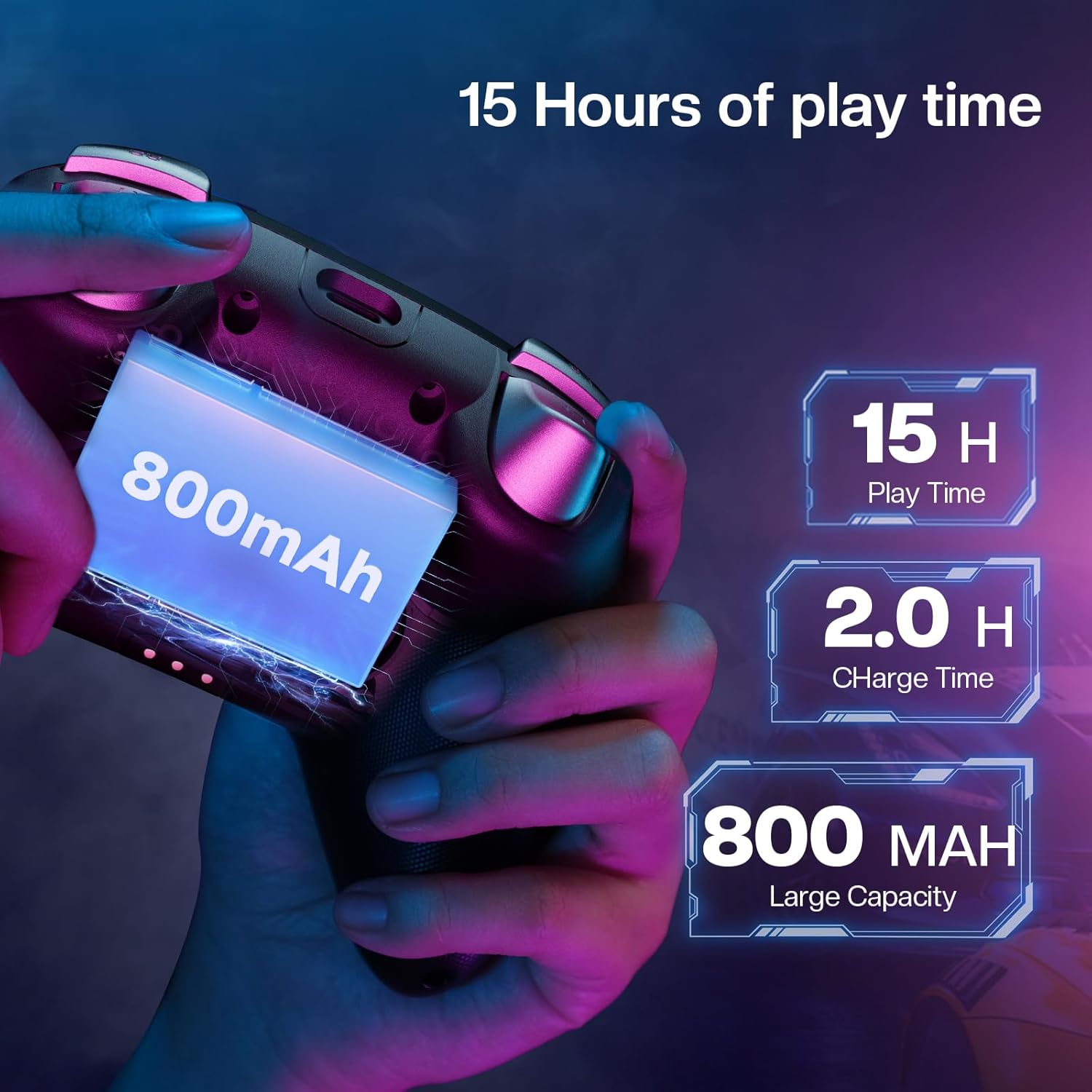
Image 7: Graphic showing the four levels of adjustable vibration feedback.

Image 8: An image illustrating the 800mAh battery and 15-hour playtime.

Image 9: The controller showcasing its dynamic RGB lighting around the joysticks.
3. د تنظیم کولو لارښود
3.1. د بسته محتويات
- ECHTPower PC Gaming Controller
- د چارج کولو ډاک
- د USB-C چارج کیبل
- ۲.۴ جي بېسیم رسیور (یو ایس بي ډونګل)
- د کارن لارښود
3.2. د کنټرولر چارج کول
The controller can be charged using the included charging dock or directly via a USB-C cable.
د چارج کولو ډاک کارول
- Connect the USB-C cable to the charging dock and a power source.
- Place the controller onto the charging dock, ensuring the contact points align.
- The indicator light on the dock will illuminate to show charging status.
Direct USB-C Charging
Connect the USB-C cable directly to the controller's port and to a power source. The controller's indicator lights will show charging status.
3.3. د کنټرولر سره نښلول
2.4G Wireless Connection (for PC/Android TV/Laptop/Switch)
- Locate the 2.4G wireless receiver (USB dongle) stored in the charging dock.
- رسیور په خپل وسیله کې موجود USB پورټ کې ولګوئ.
- Switch the mode button on the back of the controller to the '2.4G' setting.
- Press the Home button on the controller to power it on. The controller will automatically connect.
Bluetooth Connection (for Android/iOS/Steam Deck)
- Switch the mode button on the back of the controller to the 'BT' setting.
- On your device, go to Bluetooth settings and search for "ECHTPower Controller".
- Select the controller to pair.
Wired Connection (for PC/Android TV/Steam Deck)
- Connect the USB-C cable from the controller to your device.
- کنټرولر به په اتوماتيک ډول وپیژندل شي.
Video 1: Official ECHTPower video demonstrating the unboxing, charging, and initial setup of the PC Gaming Controller with its charging dock.
4. عملیاتي لارښوونې
4.1. بریښنا فعال/بند
Press and hold the Home button located in the center of the controller to power it on or off.
4.2. د حالت بدلول
Use the physical switch on the back of the controller to select the desired connection mode: 2.4G for wireless dongle, BT for Bluetooth, or Switch for Nintendo Switch compatibility.
۲. د ټربو فعالیت
The controller features three adjustable turbo levels. To activate, press the Turbo button (often labeled 'T') and the desired action button simultaneously. Repeat this action to cycle through turbo speeds (e.g., 8 shots/s, 16 shots/s, 21 shots/s) or to deactivate the turbo function for that button.
۴. د وایبریشن تنظیم کول
Four vibration settings are available. Refer to the included quick start guide for specific button combinations to adjust the vibration intensity to your preference.
۸. د RGB رڼا تنظیمول
The controller offers 9 colors and 4 lighting modes (Rainbow Flow, Steady, Breathing, Off) for its dynamic RGB lighting. Use the dedicated RGB button or specific button combinations (refer to the quick start guide) to cycle through these options and personalize your setup.
5. ساتنه
To ensure the longevity and optimal performance of your ECHTPower controller, please follow these maintenance guidelines:
- Keep the controller clean by regularly wiping it with a dry, soft cloth.
- Avoid exposing the controller to extreme temperatures, high humidity, or direct sunlight.
- Do not use harsh chemicals, solvents, or abrasive materials for cleaning, as these can damage the surface.
- Store the controller in a safe place when not in use, preferably on its charging dock to prevent damage.
- Avoid dropping the controller or subjecting it to strong impacts, which can affect internal components.
6. ستونزه حل کول
6.1. Controller Not Connecting
- Ensure the mode switch on the back of the controller is set correctly for your target device (2.4G, BT, or Switch).
- For 2.4G connection, verify the USB receiver is securely plugged into an available USB port on your device.
- For Bluetooth connection, ensure Bluetooth is enabled on your device and the controller is in pairing mode.
- هڅه وکړئ چې کنټرولر او خپل وسیله دواړه بیا پیل کړئ.
- Ensure the controller battery is sufficiently charged.
6.2. Input Lag or Disconnections
- Move closer to the wireless receiver or Bluetooth-enabled device to reduce potential interference.
- Ensure no other wireless devices are operating nearby on the same frequency, which could cause interference.
- For 2.4G connections, try plugging the receiver into a different USB port on your device.
- Ensure the controller is fully charged, as low battery can affect wireless performance.
6.3. Joysticks Drifting
- The Hall-Effect joysticks are designed to prevent drift. If you experience drift, ensure the controller firmware is up to date. Check ECHTPower's official webد هر ډول شته فرم ویئر تازه معلوماتو لپاره سایټ.
- Perform a controller calibration if available through your device's operating system or game settings.
6.4. Lights Not Working
- ډاډ ترلاسه کړئ چې کنټرولر فعال دی.
- Cycle through the RGB lighting modes using the dedicated button or button combinations (refer to the quick start guide).
- Check the controller's battery level.
7. تخنیکي مشخصات
| فیچر | تفصیل |
|---|---|
| د ماډل شمیره | EP01BK |
| ارتباط | بلوتوث، ۲.۴ جي بېسیم، USB-C وایرډ |
| د رای ورکولو کچه | 1000Hz (2.4GHz/Wired) |
| جویسټکس | Hall-Effect (No Drift) |
| د بیټرۍ ظرفیت | 800mAh |
| د لوبې وخت | تر 15 ساعتونو پورې |
| د چارج کولو وخت | تقریبا 2 ساعته |
| مطابقت | Windows, Nintendo Switch, iOS, Android, Steam Deck |
| تڼۍ | Durable Gel Buttons (1 Million Clicks) |
| وایبریشن | د 4 تنظیم وړ کچه |
| توربو | د 3 تنظیم وړ کچه |
| د RGB رڼا | ۸ رنګونه، ۳ حالتونه |
| د محصول ابعاد | 5.91 x 4.33 x 2.36 انچه |
| د توکي وزن | 9.88 اونس |
8. د تضمین معلومات
ECHTPower products typically come with a manufacturer's warranty. For detailed warranty terms and conditions, please refer to the warranty card included in your product packaging or visit the official ECHTPower webسایټ. د هر ډول تضمین ادعا لپاره د پیرود ثبوت وساتئ.
Optional protection plans are available for purchase separately to extend coverage beyond the standard manufacturer's warranty.
9. د پیرودونکي ملاتړ
For further assistance, technical support, or inquiries regarding your ECHTPower PC Gaming Controller, please contact ECHTPower customer service.
- Visit the official ECHTPower store on Amazon: ECHTPower Store
- Refer to the contact information provided in your product packaging for direct support channels.
We are dedicated to providing quality game accessories and personalized service to enhance your gaming experience.


