1. پهview
The Element 32-inch 720p HD Xumo Smart TV offers reliable performance and smart functionality in a compact design. Ideal for smaller spaces such as kitchens, dorm rooms, guest rooms, or offices, this television combines a clear HD display with a versatile smart platform and modern connectivity options.
Key features include a 720p resolution display, a 120Hz effective refresh rate for smooth motion, and the integrated Xumo OS for access to numerous streaming applications and free live channels. Connectivity is robust with multiple HDMI ports, USB, LAN, Bluetooth, and Apple AirPlay support. The TV also comes with a voice remote for convenient navigation.
۲. په بکس کې څه دي؟
Upon unboxing your Element 32-inch Xumo Smart TV, please ensure all the following components are present:
- 32-inch Element Xumo TV
- Voice Remote + 2 AAA batteries
- TV Stand & Screws
- د چټک پیل لارښود

Image: The contents of the TV box, showing the 32-inch television, its remote control, two stand feet, and a bag of screws for assembly. Dimensions of the TV are also displayed.
3. ترتیب کول
۴.۱ د تلویزیون سټینډ سره نښلول
- د تلویزیون سکرین په احتیاط سره په نرم او پاک سطح کې کیږدئ ترڅو د سکریچونو مخه ونیول شي.
- د تلویزیون په ښکته برخه کې د اړونده سکرو سوري سره د هر سټینډ پښه تنظیم کړئ.
- Secure each stand foot using the provided screws. Ensure they are tightened firmly but do not overtighten.
- په احتیاط سره تلویزیون پورته کړئ او په یوه مستحکم او هواره سطحه یې کېږدئ.
Alternatively, the TV supports VESA mounting for wall installation (wall mount hardware sold separately).
3.2 د بریښنا نښلول
Connect the power cord to the TV's power input and then plug it into a standard electrical outlet. A pilot light on the TV will indicate that it is receiving power.
3.3 Initial Setup (Xumo OS)
د لومړي ځل لپاره د بریښنا په فعالولو سره، تلویزیون به تاسو ته د لومړني تنظیم پروسې له لارې لارښوونه وکړي. پدې کې شامل دي:
- د ژبې انتخاب: خپله غوره ژبه غوره کړئ.
- د شبکې پیوستون: Connect the TV to your home Wi-Fi network or via an Ethernet cable.
- Xumo OS Account Setup: Follow on-screen prompts to set up or log in to your Xumo OS account. This is necessary to access smart features and apps.
- د چینل سکین: که چیرې انتن وصل کړئ، تلویزیون به د شته چینلونو لپاره سکین وکړي.

Image: The Element 32-inch Xumo Smart TV is shown on a wooden TV stand, displaying its smart interface with various streaming app icons.
4. ارتباطات
The Element Xumo Smart TV provides a variety of ports for connecting external devices:
- د HDMI پورټونه (۴): Connect high-definition devices such as Blu-ray players, gaming consoles, or cable/satellite boxes. One HDMI port supports eARC (enhanced Audio Return Channel) for simplified audio connections to compatible soundbars or AV receivers.
- د USB پورټ (۱۰): د USB ذخیره کولو وسایل سره وصل کړئ view عکسونه واخلئ، موسیقي واورئ، یا ویډیوګانې وګورئ.
- د LAN (ایترنیټ) پورټ: د تار لرونکي انټرنیټ اتصال لپاره.
- Audio Out (Optical) / Headphone Jack: د بهرني آډیو سیسټمونو یا هیډفونونو سره د نښلولو لپاره.
- Composite Input / Analog Tuner: For connecting older devices or an antenna.
5. ستاسو د تلویزیون چلول
5.1 ریموٹ کنټرول
The included voice remote allows for intuitive control of your TV. It features dedicated buttons for popular streaming services and a microphone for voice commands.
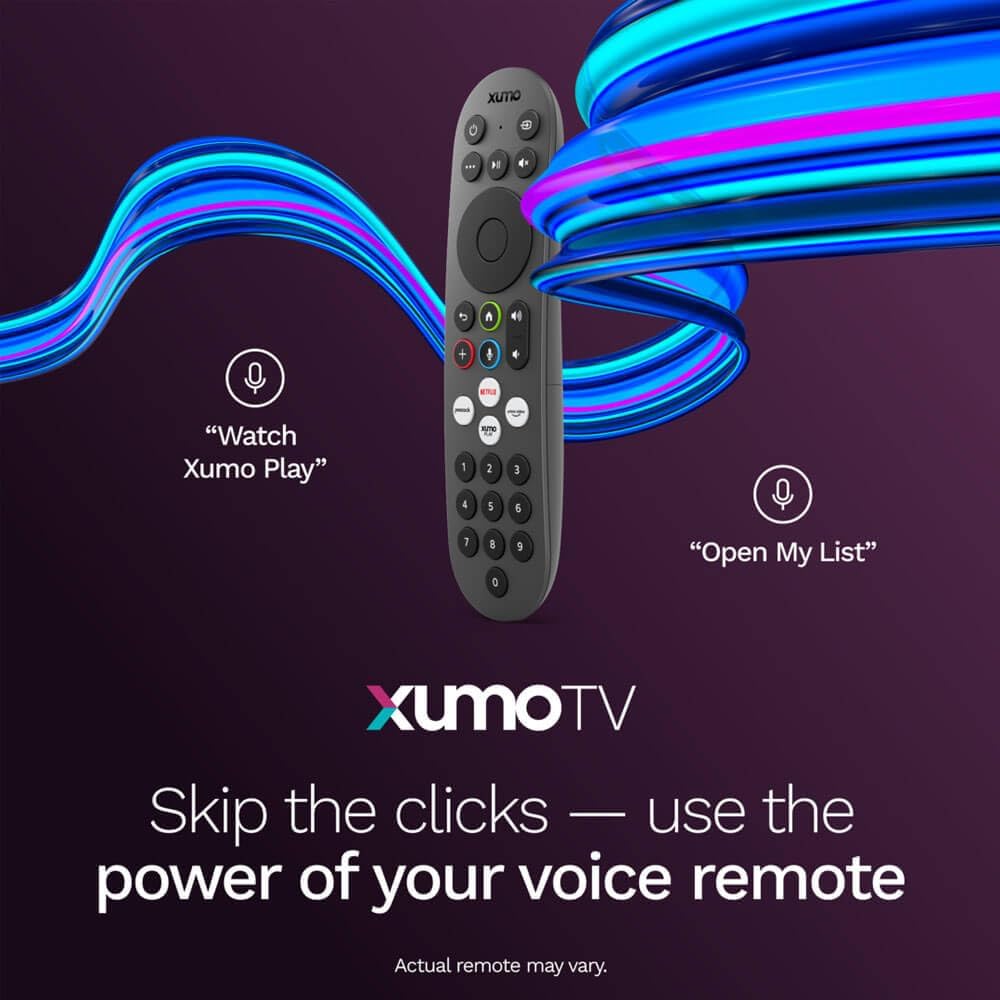
Image: A close-up of the Element Xumo Smart TV voice remote, highlighting its various buttons including a microphone for voice commands and quick access buttons for streaming services.
5.2 Smart Features & Streaming (Xumo OS)
The Xumo OS provides access to over 250 preloaded apps and more than 750 free live channels. You can:
- د منځپانګې لټون: Use the unified search function to find content across all your installed apps.
- My List: Curate your personal watchlist for easy access to your favorite shows and movies.
- Free On-Demand Libraries: Explore a wide selection of free on-demand content.
- د غږ کنټرول: Use the voice remote to navigate, search, and control your TV hands-free.

Image: The Xumo TV interface showing a selection of popular streaming applications and content recommendations.
۴.۲ د انځور او غږ ترتیبات
Your TV delivers a crisp 720p HD display with a 120Hz effective refresh rate, minimizing motion blur for clear visuals. Dolby Audio processing enhances the sound experience. You can adjust picture and sound settings via the TV's menu to suit your preferences.
- د انځور طریقې: Select from various preset picture modes (e.g., Standard, Vivid, Movie, Sports) or customize settings like brightness, contrast, and color.
- د غږ طریقې: Choose from different sound modes (e.g., Standard, Music, Movie, Speech) or adjust bass and treble levels.
5.4 Apple AirPlay & Home Support
Seamlessly stream content or mirror your screen from your iPhone, iPad, or Mac directly to your Element TV using Apple AirPlay. With Apple Home support, you can integrate your TV into your Apple smart home ecosystem for convenient control.
6. ساتنه
To ensure the longevity and optimal performance of your Element Xumo Smart TV, follow these maintenance guidelines:
- د سکرین پاکول: په نرمۍ سره سکرین د نرم، وچ، لینټ نه پاک ټوکر سره پاک کړئ. د سختو نښو لپاره، په نرمۍ سرهampټوکر د اوبو یا د سکرین ځانګړي پاکولو محلول سره ومینځئ (هیڅکله په مستقیم ډول په سکرین مه سپری کوئ).
- د کابینې پاکول: د تلویزیون کابینې پاکولو لپاره نرم، وچ ټوکر وکاروئ. د کثافاتو پاکوونکو یا محلولونو کارولو څخه ډډه وکړئ.
- وینټیلیشن: ډاډ ترلاسه کړئ چې د تلویزیون په شا کې د هوا د تودوخی دروازې بندې نه وي ترڅو د ډیر تودوخې مخه ونیول شي.
- کله چې په استعمال کې نه وي بریښنا بند کړئ: کله چې تلویزیون نه کاروئ نو بند یې کړئ ترڅو انرژي خوندي کړئ او عمر یې اوږد کړئ.
7. ستونزه حل کول
If you encounter any issues with your Element Xumo Smart TV, refer to the following common troubleshooting tips:
- ځواک نشته: وګورئ چې د برېښنا تار په خوندي ډول د تلویزیون او برېښنايي ساکټ دواړو سره نښلول شوی دی. ډاډ ترلاسه کړئ چې ساکټ فعال دی.
- انځور/غږ نشته: Verify that the correct input source is selected. Check all cable connections (HDMI, antenna, etc.) for secure fit.
- ریموټ کار نه کوي: په ریموټ کنټرول کې د AAA بیټرۍ بدل کړئ. ډاډ ترلاسه کړئ چې د ریموټ او د تلویزیون د IR سینسر ترمنځ هیڅ خنډ شتون نلري.
- د شبکې د اتصال ستونزې: Restart your Wi-Fi router. Check the TV's network settings to ensure it's connected to the correct network and the password is entered correctly.
- Smart App Problems: Try restarting the app. If the issue persists, clear the app's cache or reinstall it. Ensure your TV's software is up to date.
For persistent issues, please contact Element customer support.
8. مشخصات
| فیچر | مشخصات |
|---|---|
| د ماډل شمیره | E300AE32C |
| د سکرین اندازه | ۷۸۷ انچه |
| د ښودلو ریزولوشن | ۷۲۰ مخونه (۱۳۶۶x۷۶۸) |
| د تازه کولو نرخ | 60 Hz (120Hz Effective) |
| د اړخ نسبت | 1.78:1 |
| عملیاتي سیسټم | Xumo OS |
| ارتباط | 3x HDMI (1x eARC), 1x USB, LAN (Ethernet), Optical Audio Out, Headphone Jack, Composite Input, Wi-Fi, Bluetooth |
| ځانګړي ځانګړتیاوې | Bezel-Less Design, Built-In Speaker, Voice Remote, Apple AirPlay & Home Support |
| TV with Stand Dimensions (W x H x D) | ۸۳.۸" x ۵۵.۷" x ۴۴.۱" |
| TV without Stand Dimensions (W x H x D) | ۸۳.۸" x ۵۵.۷" x ۴۴.۱" |
| د توکي وزن | 8.8 پونډه |
9. تضمین او ملاتړ
The Element 32-inch 720p HD Xumo Smart TV comes standard with a د جوړونکي 2 کلن تضمین. دا تضمین د عادي استعمال لاندې موادو او کاریګرۍ نیمګړتیاوې پوښي. مهرباني وکړئ د تضمین ادعاوو لپاره د پیرود ثبوت وساتئ.
For technical support, warranty inquiries, or further assistance, please refer to the contact information provided in your Quick Start Guide or visit the official Element Electronics webسایټ


