1. محصول ختم شوview او ځانګړتیاوې
The DANFI AUDIO DF TE-2017 is a versatile record player designed for an enhanced audio experience. It combines vintage aesthetics with modern functionality, offering multiple playback and recording options.
- 3-Speed Belt Drive Turntable: Supports 33 1/3, 45, and 78 RPM vinyl records.
- د بې سیم بلوتوت ارتباط: Stream music wirelessly from compatible devices.
- USB Recording & Playback: Convert vinyl to digital formats (MP3/WAV) and play music from USB drives (up to 64GB).
- جوړ شوي سټیریو سپیکرونه: Dual speakers with EQ technology for clear sound.
- AUX داخلول: Connect external audio sources via a 3.5mm cable.
- RCA Line-Out: بهرنۍ سره وصل شئ amplifiers or powered speakers for expanded audio.
- د اتوماتیک بند فعالیت: Automatically stops the turntable at the end of a record.
- Removable Dust Cover: د ټرنټ میز او ریکارډونه د دوړو څخه ساتي.

انځور 1.1: اوورview of the DANFI AUDIO DF TE-2017 Record Player with key features highlighted.
۲. په بکس کې څه دي؟
ټولې برخې په احتیاط سره خلاصې کړئ او ډاډ ترلاسه کړئ چې لاندې توکي پکې شامل دي:
- DANFI AUDIO DF TE-2017 Record Player
- Power Cord & Adapter (100-240V~)
- د RPM اډیپټر
- د بدلولو ستنه
- د ګرځېدو وړ سلیپ میټ
- د کارونکي لارښود (دا لاسوند)
۴. د تنظیم لارښوونې
- د ټرنټیبل خلاص کړئ: Remove all packaging materials and place the turntable on a stable, flat surface.
- Install the Slipmat: د ټرنټیبل په پلیټ کې د احساس شوي سلپ میټ ځای په ځای کړئ.
- د سټایلس محافظ لرې کړئ: Carefully remove the white plastic stylus protector from the needle.
- بریښنا وصل کړئ: Plug the power adapter into the DC 5V/1A port on the back of the turntable and then into a wall outlet.
- Position Dust Cover: Ensure the clear dust cover is properly seated on its hinges. It can be left open or closed during playback.

Image 3.1: The DANFI AUDIO DF TE-2017 Record Player ready for use.
4. عملیاتي لارښوونې
۶.۱ د وینیل ریکارډونو غږول
- پاور آن: Rotate the 'VOLUME' knob clockwise to turn on the turntable.
- د فونو حالت غوره کړئ: Press the 'MODE' button until 'PHO' is displayed on the LED screen.
- د ځای ریکارډ: Place a vinyl record on the turntable platter. For 45 RPM records, use the included adapter.
- سرعت ټاکل: Adjust the speed switch (33, 45, or 78 RPM) to match your record's speed.
- Enable/Disable Auto-Stop: The auto-stop switch is located near the tonearm. Set it to 'ON' for the turntable to stop automatically at the end of the record, or 'OFF' for continuous play.
- د ټونرمې موقعیت: Gently lift the tonearm using the cueing lever. Move the tonearm over the desired track on the record.
- ښکته ټونرما: Slowly lower the tonearm onto the record using the cueing lever. The music will begin to play.
- حجم تنظیم کړئ: د غږ کچه تنظیمولو لپاره د 'حجم' نوب وکاروئ.
- پلے بیک ودروئ: At the end of the record (if auto-stop is off), or to stop manually, gently lift the tonearm using the cueing lever and return it to its rest.

Image 4.1: Proper placement of the tonearm on a vinyl record.
4.2 بلوتوث حالت
- پاور آن: Rotate the 'VOLUME' knob clockwise to turn on the turntable.
- د بلوتوټ حالت غوره کړئ: Press the 'MODE' button until 'BT' is displayed on the LED screen. The turntable will emit an audible tone indicating it's in pairing mode.
- جوړه وسیله: On your Bluetooth-enabled device (smartphone, tablet, etc.), search for 'TE-2017' in the Bluetooth settings and select it to pair.
- موسيقي غږول: Once paired, you can stream music from your device through the turntable's speakers. Use the play/pause and track skip buttons on the turntable or your device.
Video 4.2.1: Demonstration of the DANFI AUDIO DF record player in pink, showcasing its Bluetooth functionality and ease of use.
۶.۵ USB ثبت او پلې بیک
- د USB ډرایو داخل کړئ: Insert a USB flash drive (up to 64GB) into the USB port on the front panel.
- Record Vinyl: While playing a vinyl record in Phono mode, press the 'M' (Mode) button until 'REC' appears on the display. The recording will begin. Press 'M' again to stop recording and save the file.
- Play USB Audio: Press the 'MODE' button until 'USB' is displayed. The turntable will automatically play audio files from the USB drive. Use the control buttons (play/pause, skip) to navigate tracks.

Image 4.3.1: Visual guide for USB recording from vinyl.
4.4 AUX داخلول
Connect external audio devices (e.g., MP3 players, smartphones without Bluetooth) to the 'AUX' input jack on the front panel using a 3.5mm audio cable. Press the 'MODE' button until 'AUX' is displayed to play audio from the connected device.
4.5 RCA Line-Out
For enhanced sound, connect the 'RCA OUT' ports on the back of the turntable to an external amplifier or powered speakers using RCA cables. Ensure proper left and right channel connections.
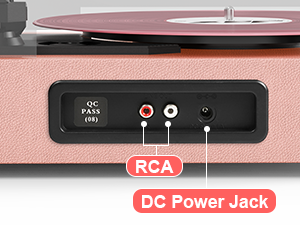
Image 4.5.1: Rear panel connections for RCA output and power.
5. ساتنه
- د سټایلس پاکول: سټایلس په منظم ډول د نرم برش سره په نرمۍ سره پاک کړئ، له شا څخه مخ ته برش کړئ.
- د پاکولو ریکارډونه: Use a carbon fiber brush or a record cleaning solution to keep your vinyl records free of dust and debris.
- د دوړو پوښ پاملرنه: Wipe the dust cover with a soft, dry cloth. Avoid abrasive cleaners.
- Turntable Surface: Clean the turntable's surface with a soft, slightly damp ټوکر
- د ستنې بدلول: The stylus (needle) should be replaced after approximately 300-500 hours of playback to maintain sound quality and prevent damage to your records.
6. ستونزه حل کول
- ځواک نشته: Ensure the power adapter is securely connected to both the turntable and a working wall outlet. Check the 'VOLUME' knob is turned on.
- غږ نشته: Verify the volume is turned up. If using external speakers, ensure they are powered on and correctly connected via RCA. If in Bluetooth mode, confirm successful pairing.
- Skipping Records: Ensure the record is clean and free of dust. Check that the turntable is on a stable, level surface. The stylus might need cleaning or replacement.
- د بلوتوټ جوړه کولو مسلې: Make sure the turntable is in 'BT' mode. Ensure your device's Bluetooth is enabled and within range. Try unpairing and re-pairing the device.
- USB Recording Failure: Check that the USB drive is formatted correctly (FAT32) and has sufficient space. Ensure the capacity is less than 64GB.
7. مشخصات
| فیچر | مشخصات |
|---|---|
| د محصول ابعاد | 14.1 x 11.2 x 4.9 انچه |
| د توکي وزن | ۲.۴۵ پونډه |
| د ماډل شمیره | ټیک-ایکسومکس |
| برانډ | دانفي آډیو DF |
| اعظمي گردش سرعت | ۷۸ RPM (د ۳۳ ۱/۳، ۴۵، ۷۸ RPM ملاتړ کوي) |
| ځانګړي ځانګړتیاوې | AUX Input, Built-In Bluetooth Receiver, Digital Recorder, Dust Cover, RCA Output |
| مواد | انجنیري لرګي |
| رنګ | رڼا ګلابي |
| مطابقت لرونکې وسیلې | هیډفون، MP3 پلیر، شخصي کمپیوټر، سمارټ فون، ټابلیټ |
8. تضمین او ملاتړ
For warranty information and customer support, please refer to the documentation included with your product or contact DANFI AUDIO DF directly through their official webسایټ یا د پیرودونکو خدماتو چینلونه. د تضمین ادعاوو لپاره د پیرود رسید وساتئ.
آنلاین ملاتړ: لیدنه وکړئ DANFI AUDIO DF Store on Amazon د اضافي محصول معلوماتو او ملاتړ سرچینو لپاره.


