1. ابتدايي ترتیب
This section guides you through the initial setup of your DOOGEE Tab A9 Pro tablet.
1.1 د بسته محتويات
ډاډ ترلاسه کړئ چې ټول توکي په کڅوړه کې شتون لري:
- 1x DOOGEE Tab A9 Pro Tablet
- 1x ډول-C USB کیبل
- 1x چارجر
- 1x Stylus (VIP Edition)
- 1x Tempered Film (VIP Edition)
- 1x Bluetooth Mouse (VIP Edition)
- 1x Leather Protective Cover (VIP Edition)
- 1x Bluetooth Keyboard (VIP Edition)
- 1x د بسته بندۍ بکس
- 1x د کارونکي لارښود

Image: DOOGEE Tab A9 Pro tablet shown with its complete set of accessories, including a stylus, tempered film, Bluetooth mouse, leather protective cover, and Bluetooth keyboard.
۴.۱ د ټابلیټ چارج کول
Before first use, fully charge the tablet. Connect the Type-C USB cable to the tablet's USB port and the charger to a power outlet. The tablet supports a maximum charging current of 10W.
1.3 بریښنا کول / بندول
- د فعالولو لپاره: د بریښنا تڼۍ فشار ورکړئ او ونیسئ تر هغه چې د DOOGEE لوګو څرګند شي.
- د بریښنا بندولو لپاره: Press and hold the power button, then select "Power off" from the options on the screen.
1.4 ابتدايي ترتیب
Upon first power-on, follow the on-screen prompts to configure your tablet. This includes selecting your language, connecting to a Wi-Fi network, setting up your Google account, and configuring security options.

انځور: مخ او شا view of the DOOGEE Tab A9 Pro tablet, highlighting its sleek design and camera placement.
2. عملیاتي لارښوونې
This section provides guidance on using the core features of your DOOGEE Tab A9 Pro tablet.
۳.۱ د Android ۱۵ انٹرفیس نیویګیټ کول
The tablet runs on Android 15. Familiarize yourself with gestures and navigation:
- پورته کښته کول: د اپلیکیشن دراز ته لاسرسی ومومئ.
- ښکته سویپ: چټکو ترتیباتو او خبرتیاو ته لاسرسی ومومئ.
- ټایپ: توکي غوره کړئ.
- اوږد پریس: د شرایطو مینو ته لاسرسی ومومئ یا عکسونه حرکت وکړئ.
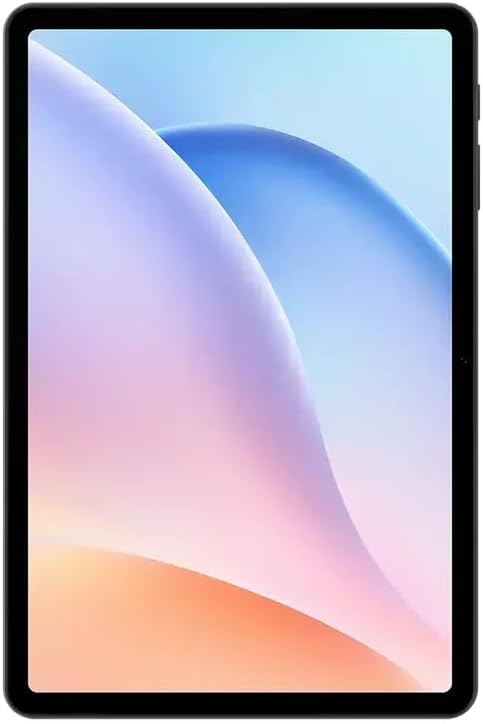
انځور: مخکینۍ برخه view of the DOOGEE Tab A9 Pro tablet, showcasing its 10.1-inch IPS HD display.
۳.۳ د وای فای او بلوتوث اتصال
To connect to Wi-Fi or Bluetooth devices:
- ورتګ ترتیبات.
- وټاکئ شبکه او انټرنیټ د وای فای لپاره یا وصل شوي وسایل د بلوتوث لپاره.
- Toggle Wi-Fi or Bluetooth on and select the desired network or device to connect.
The tablet supports Wi-Fi 802.11 a/b/g/n/ac (2.4GHz/5GHz) and Bluetooth 5.0.
۳.۳ د کیمرې کارول
The tablet features a 5MP front camera and an 8MP rear camera with flash. Open the Camera app to capture photos and videos. Video recording supports FHD 30fps.
2.4 External Storage (TF Card)
The tablet includes a TF card slot, supporting up to 2TB of external storage. Insert a compatible TF card to expand your device's memory for photos, videos, and documents.
2.5 د پردیو سره نښلول
The VIP Edition includes a Bluetooth keyboard and mouse. Pair these devices via Bluetooth settings for enhanced productivity. The tablet also supports OTG (On-The-Go) functionality via its Type-C USB port for connecting other USB devices, and has a 3.5mm earphone jack.
3. ساتنه
Proper maintenance ensures the longevity and optimal performance of your DOOGEE Tab A9 Pro.
۵.۱ د ټابلیټ پاکول
- د سکرین او بدن پاکولو لپاره نرم، لینټ نه لرونکی ټوکر وکاروئ.
- د سختو کیمیاوي موادو، خړوبونکو پاکوونکو، یا ایروسول سپرې کارولو څخه ډډه وکړئ.
- د سختو داغونو لپاره، لږ څهampد اوبو سره ټوکر.
3.2 د بیټرۍ پاملرنه
The tablet is equipped with a 6580mAh battery. To maximize battery life:
- د سخت تودوخې څخه ډډه وکړئ.
- بیټرۍ په مکرر ډول مه پریږدئ چې په بشپړه توګه وچه شي.
- د غوره چارج کولو لپاره چمتو شوي چارجر وکاروئ.

Image: Visual representation of the DOOGEE Tab A9 Pro's 6580mAh battery, highlighting its capacity and 10W fast charging capability.
3.3 د سافټویر تازه معلومات
په منظم ډول د سافټویر تازه معلومات وګورئ او نصب کړئ ترڅو ډاډ ترلاسه کړئ چې ستاسو ټابلیټ وروستي ځانګړتیاوې، امنیتي پیچونه، او د فعالیت ښه والی لري. لاړ شئ ترتیبات> سیسټم> د سیسټم تازه کول.
4. ستونزه حل کول
دا برخه هغه عامې ستونزې په ګوته کوي چې تاسو ممکن د خپل DOOGEE Tab A9 Pro سره مخ شئ.
۶.۱ ټابلیټ نه چالانېږي
- ډاډ ترلاسه کړئ چې ټابلیټ په کافي اندازه چارج شوی دی. لږترلږه د 30 دقیقو لپاره یې چارجر سره وصل کړئ.
- Try a forced restart by holding the power button for 10-15 seconds.
۴.۲ د وای فای اتصال مسلې
- وګورئ چې ایا وای فای په ترتیباتو کې فعال شوی دی.
- خپل وای فای روټر بیا پیل کړئ.
- د ټابلیټ په ترتیباتو کې شبکه هیره کړئ او بیا وصل شئ.
- ډاډ ترلاسه کړئ چې تاسو د وای فای سیګنال په حد کې یاست.
۵.۳ ورو فعالیت
- غیر ضروري پس منظر غوښتنلیکونه بند کړئ.
- د ایپسونو لپاره د کیش ډیټا پاک کړئ.
- ډاډ ترلاسه کړئ چې د ذخیره کولو کافي ځای شتون لري.
- ټابلیټ بیا پیل کړئ.
۴.۲ سکرین بې ځوابه
- Perform a forced restart.
- If the issue persists, consider a factory reset (خبرداری: دا به ټول معلومات له منځه یوسي).
5. تخنیکي مشخصات
Detailed specifications for the DOOGEE Tab A9 Pro tablet.

Image: Infographic detailing the 10.1-inch IPS HD display features, including 1280x800 resolution, 80.2% screen-to-body ratio, and 16.7 million screen colors.
| فیچر | مشخصات |
|---|---|
| ماډل | د ډوګي ټب A9 پرو |
| عملیاتي سیسټم | Android 15 |
| ابعاد | 242.5 x 160.9 x 9.7 mm |
| وزن | 512 ګرامه |
| د سکرین اندازه | 10.1 انچه |
| د ښودلو ډول | IPS LCD HD Display |
| قرارداد | 1280 x 800 پکسله |
| PPI | 149 |
| د سکرین او بدن تناسب | 80.2% |
| پروسیسر (CPU) | Unisoc T310 Octa-core (1x Arm Cortex-A75 @2.0GHz, 3x Arm Cortex-A55 @1.8GHz) |
| Graphics (GPU) | بازو مالي-G52 |
| RAM | 4GB LPDDR4 (with 16GB virtual RAM expansion, total 20GB) |
| داخلي ذخیره (ROM) | 128GB eMMC |
| د پراخیدو وړ ذخیره | TF Card Slot, up to 2TB |
| وای فای | 802.11 a / b / g / n / ac (2.4GHz / 5GHz) |
| بلوتوث | بلوتوث 5.0 |
| مخکینۍ کیمره | 5MP |
| شاته کیمره | ۱۳ میګاپکسله د فلش سره |
| د بیټرۍ ظرفیت | 6580mAh |
| چارج کول | 10W Max Charging Current, Type-C USB |
| آډیو جیک | 3.5mm |
| سینسرونه | د جی سینسر |
| نور ځانګړتیاوې | OTG support, Bluetooth keyboard connection support |
6. تضمین او ملاتړ
Your DOOGEE Tab A9 Pro comes with a warranty and access to customer support.
6.1 د تضمین معلومات
The DOOGEE Tab A9 Pro includes a د 12 میاشتو تضمین د پیرود نیټې څخه. دا تضمین د عادي استعمال لاندې د تولید نیمګړتیاوې او نیمګړتیاوې پوښي. دا د ناوړه ګټې اخیستنې، پیښو، غیر مجاز ترمیمونو، یا عادي خرابوالي او اوښکو له امله رامینځته شوي زیانونه نه پوښي. مهرباني وکړئ د تضمین ادعاوو لپاره د پیرود ثبوت وساتئ.
6.2 د پیرودونکي ملاتړ
For technical assistance, warranty claims, or further inquiries, please contact DOOGEE customer support through their official website or the retailer where the product was purchased. Have your product model and purchase details ready when contacting support.


