1. پیژندنه
Welcome to the user manual for your new TCL 55C6K 55-inch 4K QLED Mini LED Smart Google TV. This television combines advanced display technologies like 4K resolution, QLED, and Mini LED with a high 144Hz refresh rate for exceptional visual clarity and smoothness. Enjoy immersive audio with the integrated Onkyo 2.1 Hi-Fi sound system and Dolby Atmos. Powered by Google TV, it offers a smart and intuitive user experience with access to a wide range of applications and voice control capabilities. This manual provides essential information for setup, operation, maintenance, and troubleshooting to ensure you get the most out of your television.
2. د خوندیتوب معلومات
Before operating your television, please read all instructions carefully. Keep this manual for future reference. Adhere to all warnings and instructions marked on the product.
- د بریښنا سرچینه: Only use the power cord supplied with the TV. Ensure the voltage ستاسو د محلي بریښنا رسولو سره سمون لري.
- وینټیلیشن: د هوا د جریان لارې مه بندوئ. د تلویزیون شاوخوا کافي ځای پریږدئ ترڅو د هوا جریان مناسب وي ترڅو د ډیر تودوخې مخه ونیول شي.
- اوبه او رطوبت: تلویزیون باران یا رطوبت ته مه ښکاره کوئ. هغه شیان چې د مایعاتو څخه ډک وي، لکه ګلدانونه، په تلویزیون کې مه ځای پر ځای کوئ.
- پاکول: د پاکولو دمخه تلویزیون خلاص کړئ. نرم او وچ ټوکر وکاروئ. د مایع پاکوونکو یا ایروسول پاکوونکو څخه کار مه اخلئ.
- ځای په ځای کول: تلویزیون په یوه مستحکم او هموار سطحه کېږدئ. د لمر په مستقیم رڼا یا د تودوخې سرچینو ته نږدې یې مه کیږدئ.
- ماشومان: ماشومان وڅارئ ترڅو دوی په تلویزیون یا سټینډ باندې د ختلو مخه ونیسي.
- خدمت کول: د دې محصول پخپله خدمت کولو هڅه مه کوئ. ټول خدمتونه وړ خدماتي پرسونل ته راجع کړئ.
3. د بسته محتويات
ډاډ ترلاسه کړئ چې ټول توکي په کڅوړه کې شتون لري:
- TCL 55C6K 55-inch 4K QLED Mini LED Smart Google TV
- ریموټ کنټرول
- د بریښنا کیبل
- د کارونکي لارښود (دا لاسوند)
- د تضمین کارت
- د تلویزیون سټینډ اجزا (که چیرې تطبیق شي)
4. ترتیب کول
4.1 پیک کول
Carefully remove the TV from its packaging. It is recommended to have two people for this process due to the size and weight of the unit. Retain the packaging materials for future transport or servicing.
۱.۲ د سټینډ نصبول / دیوال نصب کول
د سټینډ نصب کول:
- Place the TV screen-down on a soft, flat surface (e.g., a blanket or foam) to prevent damage.
- د چمتو شوي پیچونو په کارولو سره د تلویزیون په ښکته برخه کې ټاکل شوي سلاټونو سره د سټینډ اجزا وصل کړئ. ډاډ ترلاسه کړئ چې دوی په خوندي ډول تړل شوي دي.
دیوال نصبول:
If you plan to wall mount your TV, please refer to the separate wall mount instruction manual provided with your wall mount kit. Ensure you use a VESA-compatible mount and follow all safety guidelines. Professional installation is recommended.

Figure 4.2.1: TCL 55C6K TV Dimensions
4.3 د نښلولو وسایل
Your TCL 55C6K TV offers various connectivity options. Refer to the image below for port locations.

شکل 4.3.1: اړخ View د بندرونو سره
- د HDMI پورټونه (x4): Connect Blu-ray players, gaming consoles, soundbars, and other HDMI-enabled devices. Supports ARC/eARC on one port and VRR 2.1 for enhanced gaming.
- د USB پورټ (x1): Connect USB storage devices for media playback. Supports VRR 3.0.
- RF په (x1): Connect an antenna or cable for digital broadcast reception (DVB-T/T2/S/S2).
- د LAN پورټ (x1): د تار لرونکي انټرنیټ اتصال لپاره د ایترنیټ کیبل وصل کړئ.
- Digital Audio Out (Optical) (x1): Connect to an external audio receiver or sound system for high-quality digital audio.
- وای فای: Built-in 5G Wi-Fi for wireless internet connectivity.
- بلوتوث: Version 5.4 for connecting wireless headphones, speakers, or other Bluetooth devices.
4.4 ابتدايي پاور آن
- د بریښنا کیبل تلویزیون او بیا د بریښنا سایټ سره وصل کړئ.
- په ریموټ کنټرول یا پخپله تلویزیون کې د بریښنا تڼۍ فشار ورکړئ.
- د لومړني تنظیم بشپړولو لپاره په سکرین کې لارښوونې تعقیب کړئ، پشمول د ژبې انتخاب، د شبکې اتصال، او د ګوګل تلویزیون حساب تنظیم کول.
5. عملیاتي لارښوونې
5.1 ریموټ کنټرول اوورview
The remote control allows you to navigate the TV's features. Familiarize yourself with the buttons for power, volume, channel, input selection, and smart TV functions.
5.2 Google TV Interface and Smart Features
Your TCL 55C6K runs on Google TV, providing a personalized and intuitive smart TV experience.
- نیویگیشن: Use the directional pad and OK button on your remote to browse content and settings.
- اطلاقات: Access pre-installed apps like Netflix, YouTube, and Amazon Prime Video. Download more apps from the Google Play Store.
- د غږ کنټرول: Use the built-in Google Assistant for voice commands. The TV supports Far Field Voice Control, allowing you to use voice commands without the remote.
- Chromecast Built-in & AirPlay 2: له خپل سمارټ فون یا ټابلیټ څخه مستقیم تلویزیون ته مینځپانګه کاسټ کړئ.
- Other Smart Features: Time Shift, EPG (Electronic Program Guide), Recording, Sleep Timer, OSD Multi-language, Favorite Channel List, Channel Editor, PVR (Personal Video Recorder), Parental Control.
5.3 د عکس تنظیمات
خپل اصلاح کړئ viewد مختلفو انځورونو ترتیباتو سره تجربه.
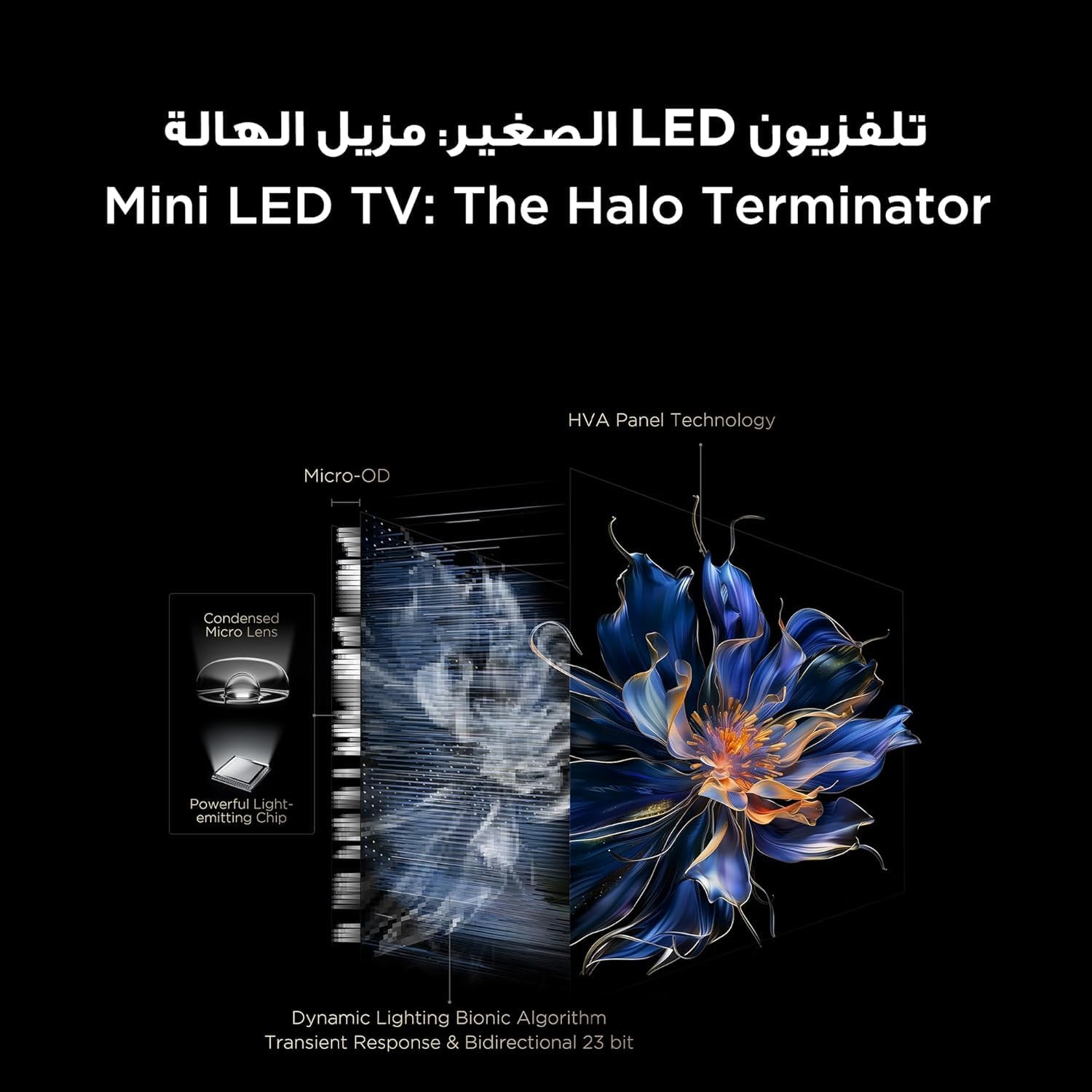
Figure 5.3.1: TV Feature Overview
- د انځور طریقې: Standard, Sports, Filmmaker Mode, Film, Game, Smart Game.
- د HDR ټیکنالوژي: Supports Dolby Vision IQ, HDR 10+, and HLG for enhanced contrast and color.
- د QLED ښودنه: Enjoy over a billion hues of vivid color with 93% DCI-P3 color space.
- Mini LED Backlight: Precise dimming zones for deep blacks and high brightness.
- MEMC: Motion Estimation, Motion Compensation for smoother fast-moving scenes.
- iMax Contrast Enhancer: Improves contrast for a more dynamic picture.
- د رنګ حرارت: Adjust between Normal, Cool, and Warm settings.

Figure 5.3.2: QLED Color Technology

Figure 5.3.3: Mini LED Technology
5.4 د غږ تنظیمات
Experience rich and immersive audio with your TV's advanced sound system.
- آډیو ټیکنالوژي: Features Dolby Atmos and DTS Virtual X for multi-dimensional sound.
- Onkyo 2.1 Hi-Fi Audio: Integrated Onkyo sound system with 10W x 2 speakers and a 20W subwoofer for powerful and clear audio.
- د غږ طریقې: Dynamic, Standard, Film, Music, Voice, Game, Sports.

Figure 5.4.1: Onkyo 2.1 Sound System
۴.۳ د لوبو ځانګړتیاوې
The TCL 55C6K is designed for an enhanced gaming experience.
- ۱۴۴ هرتز د اصلي تازه کولو کچه: Enjoy ultra-smooth motion for fast-paced games.
- VRR (متغیر ریفریش نرخ): د سکرین د څرخېدو او ټکان له منځه وړلو لپاره د لوبې د چوکاټ نرخ سره د سکرین د تازه کولو کچه همغږي کوي.
- د فری سنک پریمیم پرو: په لوړ فعالیت کې مایع، له اوښکو پاک لوبه وړاندې کوي.
- ALLM (د اتومات ټیټ ځنډ حالت): کله چې د لوبې کنسول کشف شي، تلویزیون په اتوماتيک ډول د ټیټ ځنډ حالت ته بدلوي، د ننوتلو ځنډ کموي.
- د لوبې ماسټر: A dedicated suite of gaming features for optimal performance.

Figure 5.5.1: 144Hz Native Refresh Rate
6. ساتنه
6.1 خپل تلویزیون پاک کړئ
- سکرین: په نرمۍ سره سکرین د نرم، لینټ نه پاک ټوکر سره پاک کړئ. د سختو نښو لپاره، یو څه لږampټوکر په اوبو یا ځانګړي سکرین پاکونکي سره ومینځئ (ډاډ ترلاسه کړئ چې دا د تلویزیون سکرینونو لپاره خوندي دی) او په نرمۍ سره یې ومینځئ. هیڅکله مایع مستقیم په سکرین مه سپری کوئ.
- چوکاټ: د تلویزیون چوکاټ او سټینډ پاکولو لپاره نرم، وچ ټوکر وکاروئ.
- تل د پاکولو دمخه تلویزیون د بریښنا له ساکټ څخه خلاص کړئ.
6.2 د سافټویر تازه معلومات
Your TV may receive software updates to improve performance and add new features. It is recommended to keep your TV connected to the internet to receive these updates automatically. You can also manually check for updates in the TV's settings menu.
7. ستونزه حل کول
که تاسو په خپل تلویزیون کې ستونزې سره مخ شئ، لاندې عامې ستونزې او حل لارې وګورئ:
| ستونزه | احتمالي حل |
|---|---|
| هیڅ ځواک نشته | Check if the power cable is securely connected to the TV and the power outlet. Ensure the power outlet is working. Try a different outlet. |
| انځور نشته، خو غږ شته | د ننوتلو سرچینه وګورئ. ډاډ ترلاسه کړئ چې وصل شوی وسیله فعاله ده او په سمه توګه کار کوي. یو بل HDMI کیبل هڅه وکړئ. |
| غږ نشته، خو انځور شته | Check the volume level and mute status. Ensure external audio devices are connected correctly and powered on. Check audio output settings on the TV. |
| ریموټ کنټرول کار نه کوي | بیټرۍ بدل کړئ. ډاډ ترلاسه کړئ چې د ریموټ او د تلویزیون د IR سینسر ترمنځ هیڅ خنډ شتون نلري. |
| د شبکې د پیوستون ستونزې | خپل روټر او موډیم بیا پیل کړئ. د وای فای پټنوم وګورئ. که شتون ولري د تار لرونکي ایترنیټ اتصال هڅه وکړئ. |
| د انځور کیفیت ستونزې (د مثال په توګه، تیاره، تحریف شوې) | Check the source resolution. Adjust picture settings (brightness, contrast, sharpness). Ensure the TV's software is up to date. |
If the problem persists after trying these solutions, please contact TCL customer support or your retailer for further assistance.
8. مشخصات
Detailed technical specifications for the TCL 55C6K TV:
| فیچر | مشخصات |
|---|---|
| د ښودلو اندازه | 55 انچه |
| قرارداد | ۳۸۴۰ x ۲۱۶۰ (۴K الټرا ایچ ډي) |
| ټیکنالوژي ښکاره کول | QLED Mini LED |
| د اړخ نسبت | 16:9 |
| Viewزاویه | 178 درجې |
| د تازه کولو نرخ | ۱۴۴ هرټز (اصلي) |
| VRR Support | 144Hz, FreeSync Premium Pro |
| د HDR ملاتړ | ډولبي ویژن IQ، HDR 10+، HLG |
| داخلي حافظه | 32 جي بي |
| عملیاتي سیسټم | ګوګل تلویزیون |
| د آډیو سیسټم | Onkyo 2.1 Hi-Fi Audio |
| د آډیو تولید ځواک | ۵ x ۵۰ واټ (سپیکرې) + ۱۰۰ واټ (سب ووفر) |
| آډیو ټیکنالوژي | Dolby Atmos, DTS Virtual X |
| د HDMI بندرونه | 4 (ARC/eARC, VRR 2.1 compatible) |
| USB بندرونه | 1 (VRR 3.0 compatible) |
| ارتباط | Wi-Fi 5G, Bluetooth 5.4, LAN, RF In, Digital Audio Out (Optical) |
| د بریښنا رسول | 220-240V / 50-60Hz |
| د بریښنا مصرف (عملیات) | 220W |
| د بریښنا مصرف (ستونزه) | 0.5W |
| Dimensions (without stand, WxHxD) | 1229 x 713 x 55.9 mm |
| Dimensions (with stand, WxHxD) | 1229 x 776 x 297 mm |
| خالص وزن | 12.4 کیلو ګرامه |
| ناخالص وزن | 16.3 کیلو ګرامه |
| د اصلي هیواد | مصر |
9. تضمین او ملاتړ
9.1 د تضمین معلومات
Your TCL 55C6K television comes with a 2-year full free warranty from the date of purchase. Please refer to the warranty card included in your package for detailed terms and conditions. Keep your proof of purchase for warranty claims.
9.2 د پیرودونکي ملاتړ
For technical assistance, troubleshooting beyond this manual, or warranty service, please contact TCL customer support. You can find contact information on the warranty card or the official TCL website for your region. When contacting support, please have your TV model number (55C6K) and serial number ready.


