پیژندنه
Thank you for choosing the Pamray 32 Inch Computer Desk. This manual provides detailed instructions for the assembly, operation, and maintenance of your new desk. Please read this manual thoroughly before assembly and retain it for future reference.

Image: The Pamray 32 Inch Computer Desk, fully assembled, featuring a black desktop and four integrated fabric drawers on the left side.
د خوندیتوب معلومات
مهرباني وکړئ د محصول د ټپي کیدو یا زیان څخه د مخنیوي لپاره لاندې خوندیتوب احتیاطي تدابیر په پام کې ونیسئ:
- د غونډې پیل کولو دمخه ډاډ ترلاسه کړئ چې ټولې برخې شتون لري او زیانمن شوي ندي.
- میز په نرم او پاک سطحه کې راټول کړئ ترڅو د سکریچونو مخه ونیول شي.
- د راټولولو پرمهال پیچونه ډیر مه ټینګوئ، ځکه چې دا ممکن مواد زیانمن کړي.
- کوچني برخې له ماشومانو څخه لرې وساتئ ترڅو د ټکولو خطرونو څخه مخنیوی وشي.
- په میز مه ودریږه یا کېنه.
- Distribute weight evenly across the desktop and within drawers. The maximum weight recommendation for the desktop is 150 pounds. Each drawer supports up to 10 pounds.
- په منظم ډول ټول فاسټینرونه وګورئ ترڅو ډاډ ترلاسه شي چې دوی کلک پاتې دي.
د بسته محتويات
Before starting assembly, verify that all components listed below are included in your package. Refer to the included accessory bag for specific hardware.
- د ډیسکټاپ پینل
- Left Support Frame (with drawer housing)
- د حق ملاتړ چوکاټ
- Cross Braces (X-shape)
- د تنظیم وړ پښې پیډونه
- د ټوکر درازونه (x4)
- د اسمبلۍ هارډویر (پیچونه، د ایلن رنچ، او نور)
- د لارښوونې لارښود
د مجلس لارښوونې
Assembly is required for this product. Clear instructions and all necessary tools are provided in the accessory bag. For a visual guide, scan the QR code on the packaging to access comprehensive installation videos.
1 ګام: اجزا چمتو کړئ
Unpack all components and lay them out on a clean, soft surface to prevent damage. Identify each part using the provided labels and the parts list.
Step 2: Attach Support Frames
Secure the left and right support frames to the desktop panel using the designated screws. Ensure the drawer housing on the left frame is correctly oriented.

Image: An assembled Pamray desk in a home office setting, illustrating the overall structure and placement of the drawer unit.
Step 3: Install Cross Braces
Attach the "X" shaped back braces between the support frames. These braces enhance the desk's stability. Do not overtighten.

انځور: یو مفصل view of the X-shaped metal cross brace, providing structural support to the desk frame.
څلورم ګام: د تنظیم وړ پښې پیډونه ضمیمه کړئ
Screw the adjustable leg pads into the bottom of each leg. These pads protect your floor and allow for minor leveling adjustments on uneven surfaces.
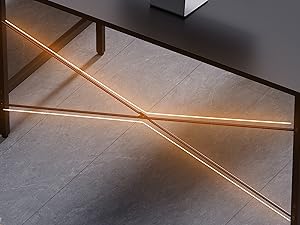
Image: A close-up of the desk's legs, showing the adjustable leg pads designed to protect flooring and stabilize the desk.
دریم ګام: د ټوکر درازونه دننه کړئ
Unfold the four fabric drawers and insert them into the designated slots within the left support frame. Ensure they slide smoothly.

انځور: نږدې انځور view of the four fabric drawers, partially pulled out to show their storage capacity.

Image: The fabric drawers shown with various items stored inside, demonstrating their practical use for organization.
د کارونې لارښوونې
This desk is designed for use as a computer desk, office desk, study table, or vanity. Its compact size makes it suitable for small spaces.
- د ډیسټاپ کارول: Place your computer, monitor, and other work essentials on the desktop. The surface is designed to be waterproof.
- د دستګاه ذخیره: Utilize the four fabric drawers for organizing office supplies, documents, or personal items. Each drawer can hold up to 10 lbs.
- کچه کول: If the desk wobbles, adjust the leg pads at the bottom of each leg until the desk is stable.

Image: Water droplets on the desk surface, illustrating its waterproof property for easy cleaning and spill resistance.
ساتنه
To ensure the longevity and appearance of your Pamray desk, follow these maintenance guidelines:
- پاکول: د ډیسټاپ او فلزي چوکاټ د نرم، ډ سره پاک کړئamp cloth. Avoid harsh chemicals or abrasive cleaners. For the fabric drawers, spot clean with a mild detergent if necessary.
- ساتنه: Avoid placing hot items directly on the desktop. Use coasters for drinks.
- بندونکي: ټول پیچونه او بولټونه په دوره یي ډول وګورئ ترڅو ډاډ ترلاسه شي چې دوی کلک دي. که اړتیا وي نو بیا یې ټینګ کړئ.
- چاپیریال: Keep the desk in a dry environment and avoid prolonged exposure to direct sunlight or extreme temperatures.
د ستونزو حل کول
| ستونزه | احتمالي لامل | د حل لاره |
|---|---|---|
| مېز په لړزېدو دی. | نا مساوي فرش یا خلاص فاسټینرونه. | د پښو پیډونه تنظیم کړئ تر هغه چې میز مستحکم وي. ټول د اسمبلۍ پیچونه وګورئ او ټینګ کړئ. |
| درازونه په اسانۍ سره نه ښویېږي. | Improper installation or obstruction. | Ensure drawers are fully unfolded and correctly inserted. Check for any items obstructing the drawer path. |
| ورکې برخې. | د بسته بندۍ تېروتنه. | Contact Pamray customer service immediately with your purchase details. |
مشخصات
- نښه: Pamray
- ماډل: S12
- د محصول ابعاد (W x D x H): ۱.۳۵" x ۳.۷۱" x ۳.۷۱" (۳.۴۳ سانتي متره x ۹.۴۲ سانتي متره x ۹.۴۲ سانتي متره)
- رنګ: تور
- بنسټیز مواد: فلزي
- د غوره موادو ډول: د FSC تصدیق شوی لرګی
- د توکي وزن: 16.4 پونډه (7.44 kg)
- د دستګاه شمیر: ۴ (ټوکر)
- Maximum Desktop Weight Recommendation: 150 پونډه (68 kg)
- Maximum Drawer Weight Recommendation: 10 Pounds (4.5 kg) per drawer
- مجلس ته اړتیا ده: هو
- ځانګړي ځانګړتیاوې: Compact design, X-shape back brace for stability, adjustable leg pads, waterproof desktop.

Image: A diagram illustrating the precise dimensions of the Pamray 32 Inch Computer Desk and its drawers.
د پیرودونکي خدمت او ملاتړ
Your satisfaction is our priority. If you encounter any issues regarding the desk's quality or during use, please do not hesitate to contact us. We are committed to providing prompt and effective solutions.
For assistance, please visit the Pamray store on Amazon or use the messaging assistant feature. You can typically find contact options on the product's Amazon page under the seller information.
د پیرودونکي خدمت سره څنګه اړیکه ونیسئ:
- په ایمیزون کې د محصول پاڼې ته لاړ شئ.
- Click on the seller's name (e.g., "Xstone" or "Pamray Store").
- Look for a "Ask a question" or "Contact Seller" option.

Image: A visual guide demonstrating the process of contacting Pamray customer service through the Amazon platform.


