
پیژندنه
This manual provides essential information for the setup, operation, and maintenance of your Hyperkin The Competitor Wired Controller. Designed for precision and performance, this controller is compatible with Xbox Series X|S, Xbox One, and Windows PC. Please read this manual thoroughly before use to ensure optimal performance and longevity of your device.
د بسته محتويات
ډاډ ترلاسه کړئ چې ټول توکي ستاسو په کڅوړه کې شتون لري:
- Hyperkin The Competitor Wired Controller
- د جلا کولو وړ USB-C کیبل
- د چټک پیل لارښود
- Swappable Stick Caps (Domed & Concave)

Image: Contents of the Hyperkin The Competitor package, including the controller, cable, and documentation.
چمتو کول
The Hyperkin The Competitor Wired Controller offers plug-and-play functionality for supported platforms.
Connecting to Xbox Series X|S or Xbox One:
- ډاډ ترلاسه کړئ چې ستاسو د ایکس بکس کنسول فعال دی.
- Connect the detachable USB-C cable to the USB-C port on the top of the controller.
- د کیبل USB-A پای په خپل Xbox کنسول کې موجود USB پورټ کې ولګوئ.
- کنټرولر به په اتوماتيک ډول وصل شي او د کارولو لپاره چمتو وي.
Connecting to PC (Windows):
- ډاډ ترلاسه کړئ چې ستاسو کمپیوټر فعال دی.
- Connect the detachable USB-C cable to the USB-C port on the top of the controller.
- د کیبل USB-A پای په خپل کمپیوټر کې موجود USB پورټ سره وصل کړئ.
- Windows will automatically detect and install the necessary drivers. The controller will be ready for use once the installation is complete.
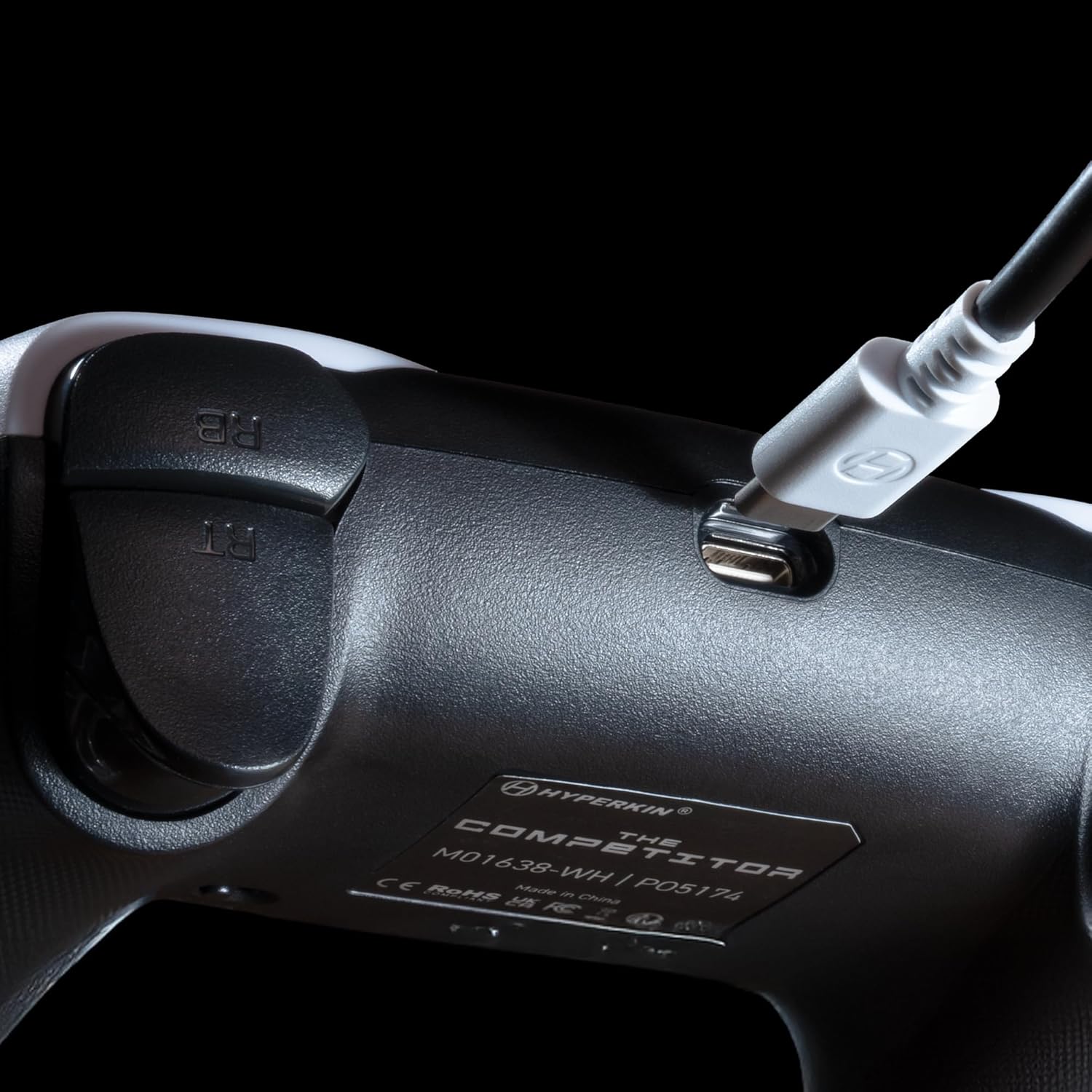
انځور: نږدې انځور view of the USB-C port on the Hyperkin The Competitor controller, illustrating the connection point for the detachable cable.
د کنټرولر چلول
Familiarize yourself with the key features and controls of your Hyperkin The Competitor controller.
کلیدي ځانګړتیاوې:
- د هال اغیزې جوی سټیکونه: Experience drift-free accuracy and magnetic precision for ultra-smooth movement and long-lasting durability.
- د هڅونې محرکونه: Provides immersive and reliable haptic feedback for enhanced gameplay.
- Symmetrical Analog Stick Layout: Offers a balanced and comfortable design, supporting precision play.
- Segmented Traditional D-pad: Delivers ultra-responsive control and satisfying feedback for pinpoint accuracy.
- د پروګرام وړ شاته تڼۍ: Two customizable rear buttons for on-the-fly remapping to suit your playstyle.
- وقف شوی خاموش تڼۍ: Quickly mute your microphone during gameplay.
- Swappable Stick Caps: Customize your feel with included Domed and Concave stick caps.
- Anti-Friction Gates & Metal Glide Rings: Engineered for ultra-smooth control and reduced wear.

Image: Diagram highlighting the Hall Effect Sticks and the Symmetrical Twin Stick Layout of the controller.

Image: Diagram illustrating the Hall Effect Impulse Triggers and the location of the programmable Back Buttons.

انځور: تفصیلي views of the Traditional Segmented D-Pad, the interchangeable Dome and Concave stick caps, and the Metal Glide Rings.
Programming Back Buttons:
Specific instructions for programming the back buttons are typically found in the Quick Start Guide included with your product or on the Hyperkin official support website. Generally, this involves a combination of holding a program button and pressing the desired back button and the button you wish to map.
ساتنه
د خپل کنټرولر د اوږد عمر او غوره فعالیت ډاډمن کولو لپاره، د ساتنې دا لارښوونې تعقیب کړئ:
- پاکول: د کنټرولر د پاکولو لپاره نرم، وچ ټوکر وکاروئ. د سختې خاورې لپاره، لږ څهampټوکر د اوبو سره ومینځئ. د سختو کیمیاوي موادو یا د کثافاتو پاکوونکو کارولو څخه ډډه وکړئ.
- ذخیره کول: کنټرولر په یخ او وچ ځای کې د مستقیم لمر وړانګو او سختې تودوخې څخه لرې وساتئ.
- د کیبل پاملرنه: Avoid sharply bending or twisting the USB-C cable. Always grasp the connector, not the cable, when plugging or unplugging.
- له څاڅکو ډډه وکړئ: کنټرولر د څاڅکو او اغیزو څخه خوندي کړئ، کوم چې کولی شي داخلي برخو ته زیان ورسوي.
د ستونزو حل کول
If you encounter issues with your Hyperkin The Competitor controller, try the following steps:
- کنټرولر ځواب نه ورکوي:
- ډاډ ترلاسه کړئ چې د USB-C کیبل په خوندي ډول د کنټرولر او کنسول/پی سی دواړو سره وصل دی.
- هڅه وکړئ چې کنټرولر په بل USB پورټ کې ولګوئ.
- خپل کنسول یا کمپیوټر بیا پیل کړئ.
- که امکان ولري، کنټرولر په بل مطابقت لرونکي وسیله کې ازموینه وکړئ.
- Buttons/Joysticks Not Working Correctly:
- ډاډ ترلاسه کړئ چې د تڼیو یا جوی سټیکونو شاوخوا هیڅ کثافات نه وي.
- Perform a system update on your console or PC to ensure the latest drivers are installed.
- If using on PC, check controller calibration settings in your operating system.
- Audio Issues (Mic Mute Button):
- Ensure the dedicated mute button is not activated.
- Check your in-game or system audio settings.
If problems persist after attempting these steps, please contact Hyperkin customer support for further assistance.
مشخصات
| د ماډل شمیره | M01638-WH |
| مطابقت | د ایکس بکس لړۍ ایکس|ایس، ایکس بکس ون، کمپیوټر (وینډوز) |
| ارتباط | Wired (Detachable USB-C to USB-A cable) |
| جویسټکس | د هال اغیزه |
| محرکونه | د تحرک محرکات |
| ترتیب | Symmetrical Analog Sticks |
| ډي-پډ | Segmented Traditional D-pad |
| تڼۍ | ABXY, Menu, View, Share, Xbox Guide, 2 Programmable Back Buttons, Dedicated Mic Mute Button |
| اصلاح کول | Swappable Stick Caps (Domed & Concave) |
| ابعاد | 6.25 x 2.5 x 5 انچه |
| وزن | 15.6 اونس |
تضمین او ملاتړ
د تضمین معلومات:
Warranty details for the Hyperkin The Competitor Wired Controller are typically provided with your product packaging or can be found on the official Hyperkin webسایټ. مهرباني وکړئ د هر ډول تضمین ادعا لپاره د پیرود ثبوت وساتئ.
د پیرودونکي ملاتړ:
For technical assistance, troubleshooting, or further inquiries, please visit the official Hyperkin support page or contact their customer service directly. Refer to the contact information provided in your product's Quick Start Guide or on the Hyperkin webسایټ


