1. پیژندنه
Thank you for choosing the Baseus E20 True Wireless Earbuds. These earbuds are designed to provide a high-quality audio experience with powerful bass, clear calls, and reliable connectivity. This manual will guide you through the setup, operation, and maintenance of your new earbuds.
۲. په بکس کې څه دي؟
- Baseus E20 True Wireless Earbuds (Left and Right)
- د چارج کولو قضیه
- د USB-C چارج کیبل
- د کارن لارښود

Image: Baseus E20 True Wireless Earbuds shown inside their charging case, highlighting key features like powerful bass, IPX5 water resistance, 33 hours listening time, and environmental noise cancellation.
3. محصول ختم شوview
۳.۱ د غوږ بډ اجزا
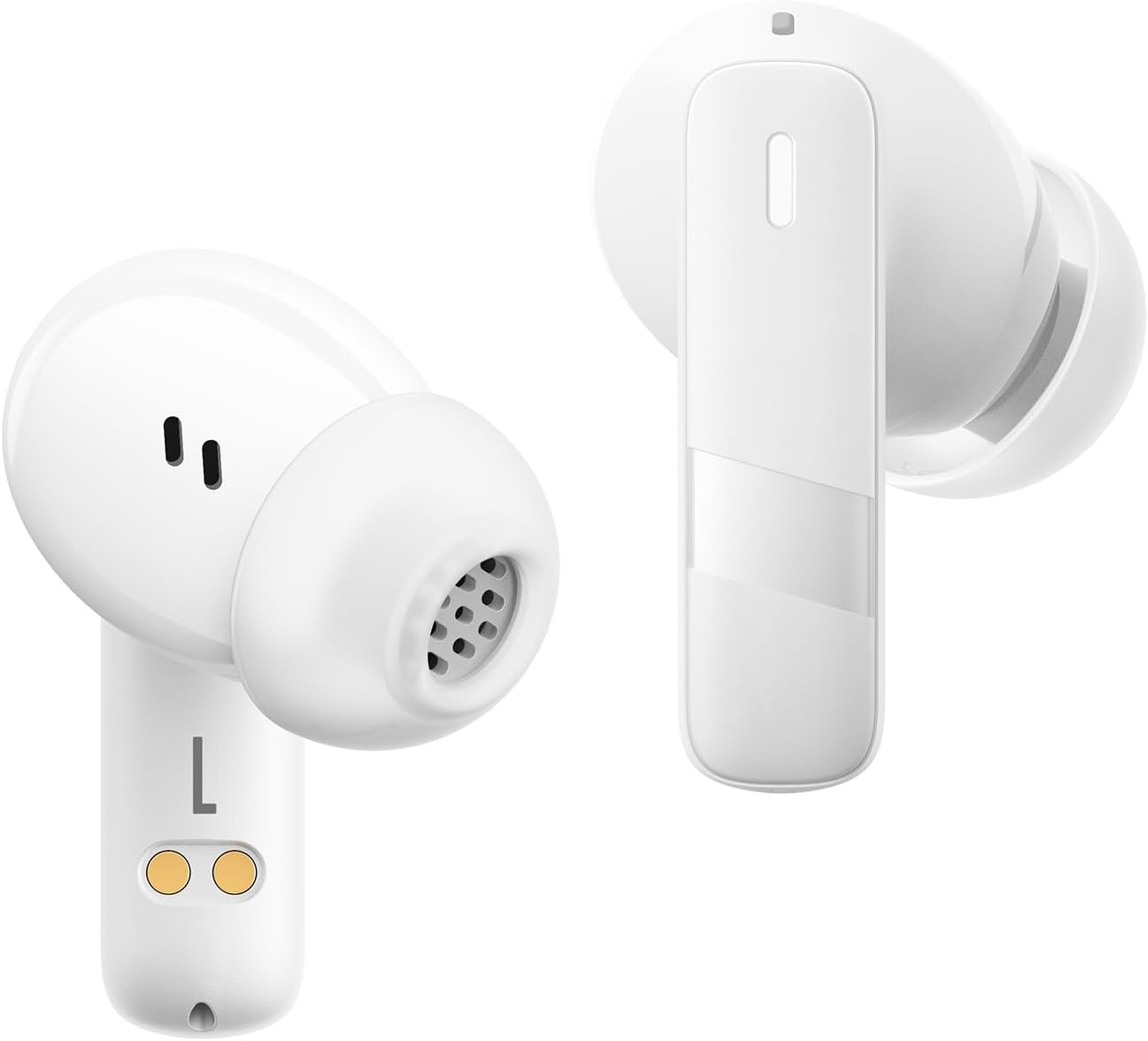
انځور: نږدې انځور view of the Baseus E20 True Wireless Earbuds, showing the ergonomic design, speaker grille, and charging contacts.
- د ټچ کنټرول ساحه: د پلې بیک، زنګونو او حالتونو اداره کولو لپاره.
- مایکروفون: For calls and voice commands (2 ENC Mics).
- سپیکر: Delivers audio (12mm drivers).
- د اړیکو چارج کول: په کیس کې د غوږونو د چارج کولو لپاره.
د چارج کولو قضیه
- د چارج کولو بندر: د کیس چارج کولو لپاره د USB-C پورټ.
- د رڼا شاخص: د چارج کولو حالت او د بیټرۍ کچه ښیې.
4. ترتیب کول
۴.۱ د ایربډز او کیس چارج کول
د لومړي ځل کارولو دمخه، د غوږ بډونه او د چارج کولو قضیه په بشپړه توګه چارج کړئ.
- د غوږ بډونه د چارج کولو په بکس کې ځای په ځای کړئ. ډاډ ترلاسه کړئ چې د چارج کولو اړیکې سره سمون لري.
- د USB-C چارج کولو کیبل د کیس د چارج کولو پورټ او د بریښنا سرچینې سره وصل کړئ.
- The indicator light on the case will show the charging status. Once fully charged, the light will indicate completion or turn off.

Image: The Baseus E20 charging case is shown connected to a USB-C charging cable, illustrating the charging process and highlighting the 33-hour total listening time.
4.2 د بلوتوټ جوړه کول
Pair your Baseus E20 earbuds with your device for the first time.
- د چارج کولو قضیه پرانیزئ. د غوږ بډونه به په اتوماتيک ډول د جوړې کولو حالت ته ننوځي، او د دوی د شاخص څراغونه به روښانه شي.
- په خپل وسیله (سمارټ فون، ټابلیټ، لپ ټاپ) کې، بلوتوث فعال کړئ.
- لټون "Baseus E20" in the list of available Bluetooth devices and select it to connect.
- Once connected, the earbud indicator lights will turn off or show a steady light, and you will hear a confirmation tone.
یادونه: After the initial pairing, the earbuds will automatically connect to the last paired device when taken out of the case, provided Bluetooth is enabled on the device.

Image: A detailed diagram illustrating the Bluetooth 5.3 chip, emphasizing a more stable and efficient connection for the Baseus E20 earbuds.
5. عملیاتي لارښوونې
The Baseus E20 earbuds feature intuitive touch controls. The following table outlines the common functions:

Image: A visual guide to the touch control areas on the Baseus E20 earbuds, detailing single, double, and triple tap functions for various operations.
| عمل | فعالیت |
|---|---|
| Double Tap (L or R) | Answer/Hang up Call, Play/Pause Music |
| Triple Tap (L or R) | د غږ معاون فعال کړئ |
| Long Press (L or R) | Cycle Noise Cancellation Modes (Default > Normal > Transparency) |
| Long Press (L or R) | Cycle Spatial Audio Modes (Music Mode > Theater Mode > Normal) |
یادونه: Specific functions may vary slightly depending on your connected device and operating system.
۶.۳ د زنګ وهلو مدیریت
- ځواب / پای کال: په هر ایربډ دوه ځله ټایپ کړئ.
- زنګ رد کړئ: د 2 ثانیو لپاره هر یو ایربډ فشار ورکړئ او ونیسئ.

Image: An internal diagram of the Baseus E20 earbud highlighting the dual-mic Environmental Noise Cancellation (ENC) system for clear calls.
5.2 د میوزیک غږ
- پلی کول / ودرول: په هر ایربډ دوه ځله ټایپ کړئ.
5.3 د غږ مرسته
- د غږ همکار فعاله کړئ: په هر غوږۍ کې درې ځله ټایپ کړئ.
۴.۲ د شور کنټرول طریقې
The Baseus E20 earbuds offer different noise control modes:
- Noise Cancellation (Default): د اوریدلو د یوې عمیقې تجربې لپاره د محیطي شور کموي.
- نورمال حالت: Standard audio playback without active noise control.
- د روڼتیا حالت: تاسو ته اجازه درکوي چې د آډیو اوریدو پرمهال خپل شاوخوا چاپیریال واورئ.
د طریقو له لارې د سایکل چلولو لپاره: هر یو غوږۍ اوږد فشار ورکړئ.
6. ساتنه
6.1 پاکول
- Regularly clean the earbuds, especially the ear tips and speaker grilles, with a soft, dry, lint-free cloth.
- ډاډ ترلاسه کړئ چې د چارج کولو ستونزو مخنیوي لپاره په غوږونو او کیس دواړو کې د چارج کولو تماسونه پاک او وچ دي.
- Do not use abrasive materials, solvents, or harsh chemicals.
6.2 ذخیره کول
- اییربډونه د چارج کولو په قضیه کې ذخیره کړئ کله چې کارول نه وي ترڅو د دوی ساتنه وکړي او چارج یې وساتي.
- په خورا تودوخې یا لوړ رطوبت کې د ذخیره کولو څخه ډډه وکړئ.
۵.۲ د اوبو مقاومت (IPX5)
The Baseus E20 earbuds are IPX5 water-resistant, meaning they can withstand splashes and sweat. They are not designed for submersion in water or exposure to pressurized water jets. Ensure earbuds are dry before placing them back in the charging case to prevent damage.

Image: The Baseus E20 earbuds and charging case are depicted with water splashing around them, illustrating their IPX5 water-resistant capability for reliable performance in various conditions.
7. ستونزه حل کول
| ستونزه | احتمالي حل |
|---|---|
| Earbuds نه جوړیږي |
|
| د یو غوږ بډ څخه هیڅ غږ نشته |
|
| د چارج قضیه نه چارج کول |
|
| د تلیفون کیفیت خراب دی |
|
8. مشخصات
| فیچر | تفصیل |
|---|---|
| د ماډل نوم | E20 |
| بلوتوث نسخه | 5.3 |
| د موټر چلوونکي اندازه | 12mm |
| د لوبې ټول وخت | تر 33 ساعتونو پورې (د چارج کولو قضیې سره) |
| Earbuds Playback Time | تر اتو ساعتونو پورې (یو ځل چارج) |
| د اوبو مقاومت | IPX5 |
| مایکروفون | 2 ENC Mics for Clear Calls |
| د کنټرول ډول | ټچ کنټرول |
| د چارج کولو بندر | USB-C |
| د توکي وزن | 3.2 اونس |
| مطابقت لرونکې وسیلې | Cellphones, Laptops, Tablets, Devices with Bluetooth Audio Capability (iOS, Android, Windows, Mac OS, Switch) |

Image: A cutaway diagram illustrating the 12mm PU diaphragm driver, emphasizing its role in producing strong and accurate ultra-low frequencies for powerful bass.
9. محصول ختم شوview ویډیو
ویډیو: یو رسمي اوورview of the Baseus E20 True Wireless Earbuds, demonstrating features such as touch controls, powerful bass, IPX5 water resistance, 33-hour battery life, ENC for clear calls, and Bluetooth 5.3 connectivity. The video shows the earbuds in various usage scenarios, including listening to music, making calls, and being used in different weather conditions.
10. تضمین او ملاتړ
Baseus products come with a standard manufacturer's warranty. For detailed warranty information, product support, or service inquiries, please refer to the warranty card included in your product packaging or visit the official Baseus webسایټ. د تضمین ادعاوو لپاره د پیرود ثبوت په توګه د پیرود رسید وساتئ.
آنلاین ملاتړ: د نورو مرستو لپاره، مهرباني وکړئ لیدنه وکړئ په ایمیزون کې د بیسوس رسمي پلورنځی یا د دوی چارواکي webسایټ


