1. پیژندنه
This manual provides essential information for the safe and efficient operation of your Telefunken 50FTV825 50-inch 4K UHD Smart Fire TV. Please read these instructions thoroughly before using the television and retain them for future reference.
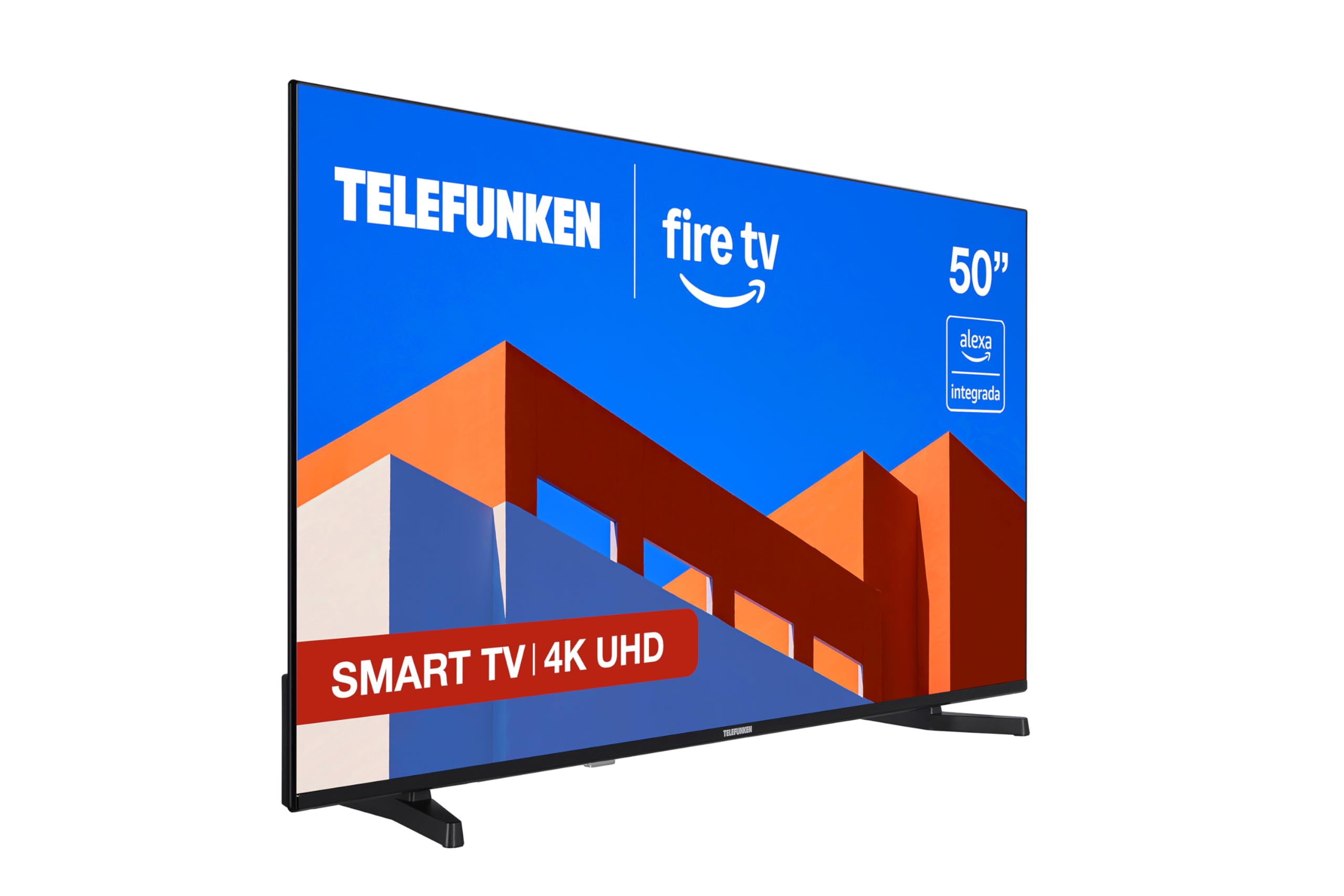
انځور: مخکینۍ برخه view of the Telefunken 50FTV825 50-inch 4K UHD Smart Fire TV.
2. د خوندیتوب معلومات
د دې ټلویزیون کارولو پرمهال تل د خوندیتوب لومړني احتیاطي تدابیر تعقیب کړئ ترڅو د اور، بریښنا شاک او ټپي کیدو خطر کم کړئ.
- تلویزیون باران یا رطوبت ته مه ښکاره کوئ.
- ډاډ ترلاسه کړئ چې د تلویزیون شاوخوا مناسب هوا ورکول.
- د اخبارونو، مېز ټوکرانو، یا پردې په څېر شیانو سره د هوا د جریان لارې مه بندوئ.
- تلویزیون په بې ثباته ګاډو، سټینډونو، ټریپوډونو، قوسونو یا میزونو کې مه کېږدئ.
- د برېښنا د طوفانونو پر مهال یا کله چې د اوږدې مودې لپاره نه کارول کیږي، تلویزیون خلاص کړئ.
- ټول خدمتونه وړ خدمت پرسونل ته راجع کړئ.
۲. په بکس کې څه دي؟
د بکس خلاصولو پر مهال ډاډ ترلاسه کړئ چې ټولې برخې شتون لري:
- Telefunken 50FTV825 50-inch 4K UHD Smart Fire TV
- ریموټ کنټرول
- بیټرۍ (د ریموټ کنټرول لپاره)
- د کارونکي لارښود (دا لاسوند)
4. ترتیب کول
۱. د سټینډ یا دیوال نصب کول
Carefully place the TV face down on a soft, flat surface. Attach the stand using the provided screws, ensuring it is securely fastened. If wall-mounting, follow the instructions provided with your VESA-compatible wall mount (sold separately).
۲. د بریښنا او وسایلو نښلول
- د برېښنا تار له تلویزیون سره وصل کړئ او بیا د برېښنا رسۍ سره وصل کړئ.
- Connect external devices (e.g., cable box, gaming console, Blu-ray player) to the HDMI ports.
- For internet access, connect an Ethernet cable to the LAN port or prepare for Wi-Fi setup.
۱. د بریښنا ابتدايي فعالول او تنظیمولو وزرډ
Press the power button on the remote control. The TV will guide you through the initial setup process, including language selection, network connection, and Fire TV account login.
5. Operating Your Telefunken Fire TV
۶.۲. د اور وژنې تلویزیون انٹرفیس
Your TV features an integrated Fire OS, providing access to a wide range of streaming services and applications. Navigate the home screen using the remote control to browse content from Netflix, Prime Video, Disney+, and more.

Image: The Fire TV home screen displaying available streaming applications.
۳. د الیکسا غږ کنټرول
The remote control includes an integrated Alexa button. Press and hold this button to activate voice commands. You can ask Alexa to:
- چینلونه بدل کړئ یا حجم تنظیم کړئ.
- لټون movies, TV shows, or music.
- د مطابقت لرونکي سمارټ کور وسایل کنټرول کړئ.
- د هوا حالت وګورئ یا معلومات ترلاسه کړئ.

Image: Close-up of the remote control highlighting the Alexa voice button.
۳.۴. د ایپل ایر پلی
Utilize Apple AirPlay to stream content directly from your iPhone, iPad, or Mac to the television. This allows for easy sharing of photos, videos, and screen mirroring without complex configurations.
۳. د انځور او غږ ښه والی
- 4K UHD + HDR10: Experience stunning visuals with four times the resolution of Full HD, enhanced by HDR10 for vibrant colors and deep contrasts.
- دولبي آډیو: Enjoy immersive and clear sound quality, bringing movies, series, and games to life.
- MEMC: Motion Estimation, Motion Compensation technology ensures smoother motion in fast-paced scenes.
6. ساتنه
۳. د پردې پاکول
په نرمۍ سره سکرین د نرم، وچ، لینټ نه پاک ټوکر سره پاک کړئ. د سختو نښو لپاره، په نرمۍ سرهampټوکر د اوبو یا ځانګړي سکرین کلینر سره ومینځئ. د سخت کیمیاوي موادو یا خړوبونکي موادو کارولو څخه ډډه وکړئ.
۲. د کابینې پاکول
د تلویزیون کابینه په نرم او وچ ټوکر سره پاک کړئ. په کابینه کې مستقیم مایع یا ایروسول کلینر مه کاروئ.
6.3. د سافټویر تازه معلومات
Your Fire TV will periodically receive software updates. Ensure your TV is connected to the internet to receive these updates, which improve performance and add new features.
7. ستونزه حل کول
که تاسو په خپل تلویزیون کې ستونزې سره مخ شئ، لاندې عام حلونو ته مراجعه وکړئ:
| ستونزه | احتمالي لامل | د حل لاره |
|---|---|---|
| هیڅ ځواک نشته | Power cord not connected, power outlet not working. | د بریښنا د تار اتصال وګورئ. د بل وسیلې سره د آوټ لیټ ازموینه وکړئ. |
| انځور نشته، خو غږ شته | د ننوتلو ناسمه سرچینه غوره شوې ده. | د سمې سرچینې غوره کولو لپاره په ریموټ کې د 'ان پټ' تڼۍ فشار ورکړئ. |
| غږ نشته، خو انځور شته | Volume is muted or too low. External audio device issues. | Unmute or increase volume. Check connections to external audio systems. |
| ریموټ کنټرول کار نه کوي | Batteries are dead or incorrectly inserted. Obstruction between remote and TV. | بیټرۍ بدل کړئ. ډاډ ترلاسه کړئ چې د تلویزیون د IR سینسر سره د لید روښانه کرښه شتون لري. |
| د وائی فای اتصال مسلې | Incorrect password, router issues, TV too far from router. | Re-enter Wi-Fi password. Restart router. Move TV closer to router or use Ethernet. |
For further assistance, please contact Telefunken customer support.
8. مشخصات
| فیچر | تفصیل |
|---|---|
| برانډ | ټیلیفونکن |
| د ماډل شمیره | 50FTV825 |
| د سکرین اندازه | ۷۸۷ انچه |
| ټیکنالوژي ښکاره کول | LED |
| قرارداد | 4K UHD (3840 x 2160) |
| د تازه کولو نرخ | 120 Hz |
| عملیاتي سیسټم | د اور وژنې عملیاتي سیسټم |
| ځانګړي ځانګړتیاوې | Alexa Compatible, Bezel-less Design, VESA Wall Mountable, HDR - HLG, Smart TV |
| د ارتباط ټیکنالوژي | بلوتوث، ایترنیټ، HDMI، USB، وای فای |
| د اړخ نسبت | 16:9 |
| د محصول ابعاد (W x D x H) | 112 x 26.1 x 68.6 سانتي متره |
| د محصول وزن | 9.56 کیلو ګرامه |
| د اصلي هیواد | ترکیه |
| د انرژۍ موثریت درجه بندي (SDR) | E |
| د انرژۍ موثریت درجه بندي (HDR) | G |
For detailed energy information, refer to the product information sheet and energy label:

Image: Product Information Sheet detailing technical specifications and energy consumption.
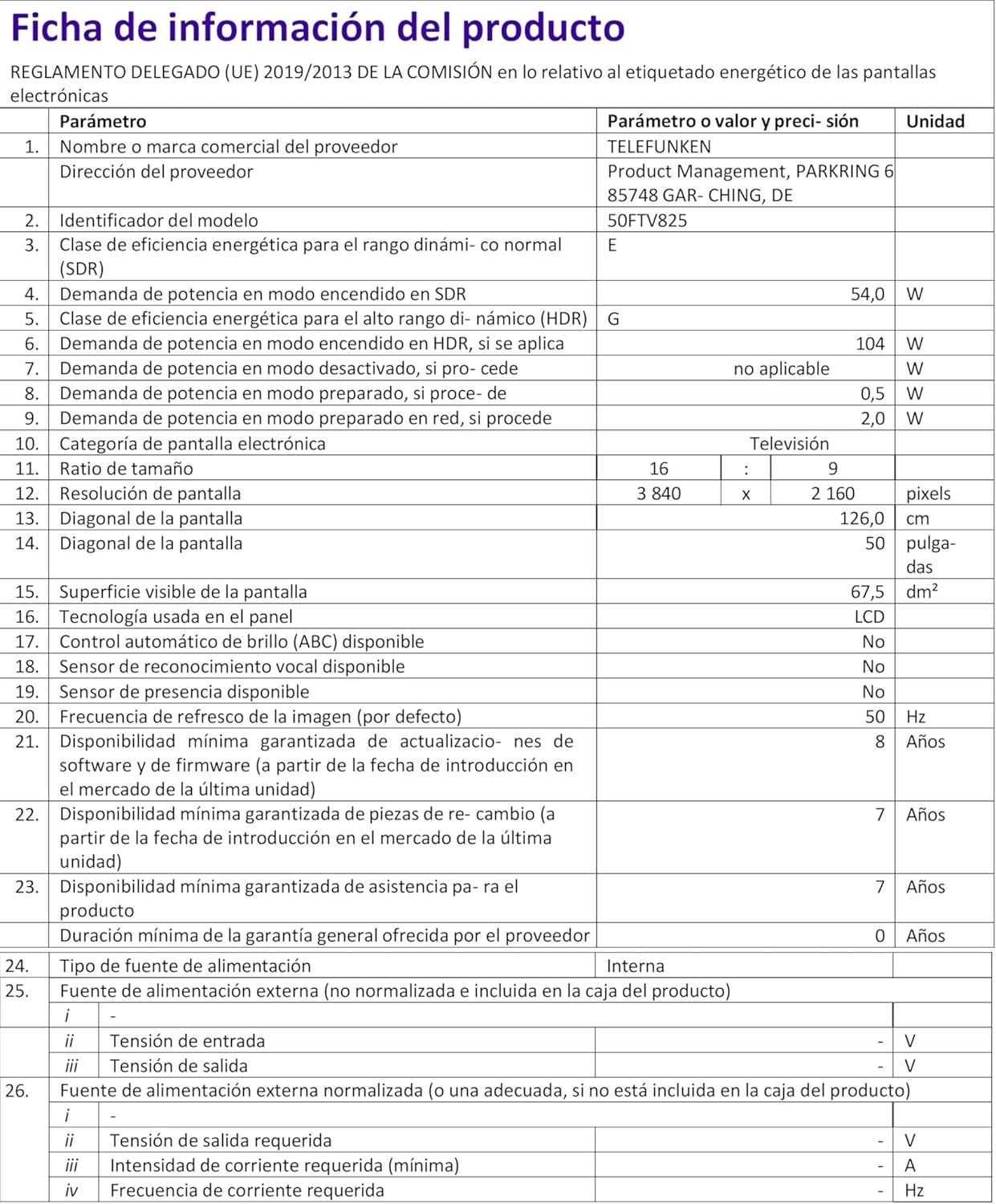
Image: Energy Efficiency Label showing ratings for SDR and HDR modes.
Additional energy information can be found at: https://eprel.ec.europa.eu/qr/2400040
9. تضمین او ملاتړ
Your Telefunken 50FTV825 television comes with a standard manufacturer's warranty. Please refer to the warranty card included in your packaging for specific terms and conditions, including warranty duration and coverage details.
For technical support, troubleshooting assistance beyond this manual, or warranty claims, please contact Telefunken customer service through their official webسایټ یا ستاسو د تضمین اسنادو کې چمتو شوي د اړیکو معلومات.


