1. پیژندنه
This manual provides detailed instructions for the installation, operation, and maintenance of your WEILAILIFE AHD Recorder. This 8-channel, 5-megapixel (5MP) Digital Video Recorder (DVR) system includes a built-in 4TB hard disk drive, offering high-resolution video surveillance and remote monitoring capabilities. It is designed to provide reliable security for your home or business.
کلیدي ځانګړتیاوې عبارت دي له:
- ۱۵ میګاپکسله الټرا-های ریزولوشن: Captures clear video at 2592 x 1944 pixels, ensuring detailed surveillance.
- سوپر نایټ ویژن: Equipped with IR-LEDs for automatic infrared mode activation in low light, providing clear visibility up to 20 meters at night.
- د IP67 هوا مقاومت: Durable construction designed to withstand extreme weather conditions (-40°C to 60°C), suitable for both indoor and outdoor use.
- H.265 ویډیو کمپریشن: Advanced compression technology that allows for more than double the recording time compared to H.264, while maintaining video quality.
- وړیا موبایل اپلیکیشن: لرې viewing and control via the "Honestview" or "Eseecloud" app for iOS and Android devices, with no monthly fees.
2. د تنظیم کولو لارښود
2.1 د بسته محتويات
د نصبولو پیل کولو دمخه، مهرباني وکړئ تصدیق کړئ چې ټولې برخې شتون لري:
- WEILAILIFE 5MP HD-Analog 8-Channel Network Video Recorder with 4TB HDD (x1)
- DVR Power Supply (x1)
- HDMI کیبل (x1)
- ۱ متره LAN کیبل (x۱)
- ریموټ کنټرول (x1)
- USB موږک (x1)
- لارښود لارښود (x1)
2.2 د هارډویر اتصال
د خپل DVR سیسټم سره د نښلولو لپاره دا ګامونه تعقیب کړئ:
- کیمرې وصل کړئ: Attach up to 8 AHD cameras (sold separately) to the "VIDEO IN" ports (V1-V8) on the back of the DVR.
- مانیټر وصل کړئ: Use the provided HDMI cable to connect the DVR to a monitor or TV. Alternatively, use a VGA cable for VGA-compatible displays.
- موږک وصل کړئ: د DVR شاته د USB پورټونو څخه یو ته د USB موږک ولګوئ.
- د نښلولو شبکه: د لرې پرتو لپاره viewing, connect the DVR to your router using the provided LAN cable.
- بریښنا وصل کړئ: Plug the DVR power supply into the DC12V port and then into a power outlet. The system will power on automatically.
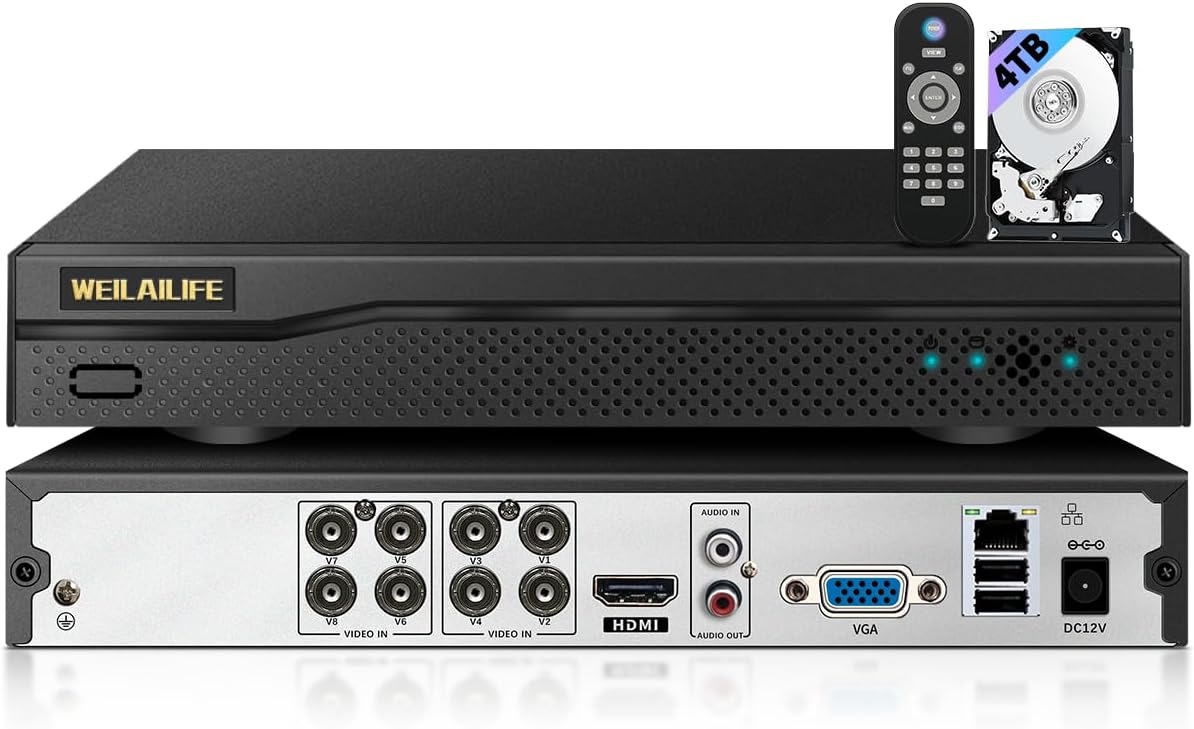
انځور: مخ او شا view of the WEILAILIFE AHD Recorder, illustrating the various connection ports for cameras, display, network, and power, along with the included remote control and 4TB hard drive.
2.3 Remote Monitoring Setup
To access your security system remotely:
- اپلیکیشن ډاونلوډ کړئ: وړیا "صادق" ډاونلوډ کړئview" or "Eseecloud" app from the App Store (iOS) or Play Store (Android) on your smartphone or tablet.
- ایپ نصب کړئ: د اپلیکیشن نصبولو لپاره د پردې پر لارښوونو تعقیب کړئ.
- ننوتل / راجستر کول: اپلیکیشن خلاص کړئ او یو حساب جوړ کړئ یا لاګ ان شئ که تاسو دمخه لرئ.
- وسیله اضافه کړئ: Follow the app's instructions to add your DVR device. This typically involves scanning a QR code on the DVR or manually entering its ID.
- View ژوندی فیډ: یوځل چې وصل شو ، تاسو کولی شئ view live camera feeds and manage settings from your mobile device.

Image: Illustration of remote monitoring capabilities, showing the security camera feed accessible on various devices including smartphones, tablets, and computers via the dedicated mobile application.
3. عملیاتي لارښوونې
۶.۱ اساسي ثبت کول
The DVR is pre-configured to record continuously. The 4TB hard drive provides ample storage, and older footage will be automatically overwritten when the disk is full, ensuring continuous recording.
۵.۳ د حرکت کشف او خبرتیاوې
The system supports motion detection, which can trigger alerts and recording. You can customize motion detection areas to focus on specific zones and avoid false alarms from irrelevant movements.
- Setting Detection Areas: Access the DVR's menu using the USB mouse. Navigate to the motion detection settings and define the specific areas you wish to monitor. Areas outside the defined zone will be ignored.
- د خبرتیا خبرتیا: When motion is detected, the system can send push notifications to your mobile app and/or email alerts. Ensure your network connection is stable for timely notifications.

Image: A visual representation of the motion detection feature, showing a person being detected by a camera, triggering both an app notification and an email alert.
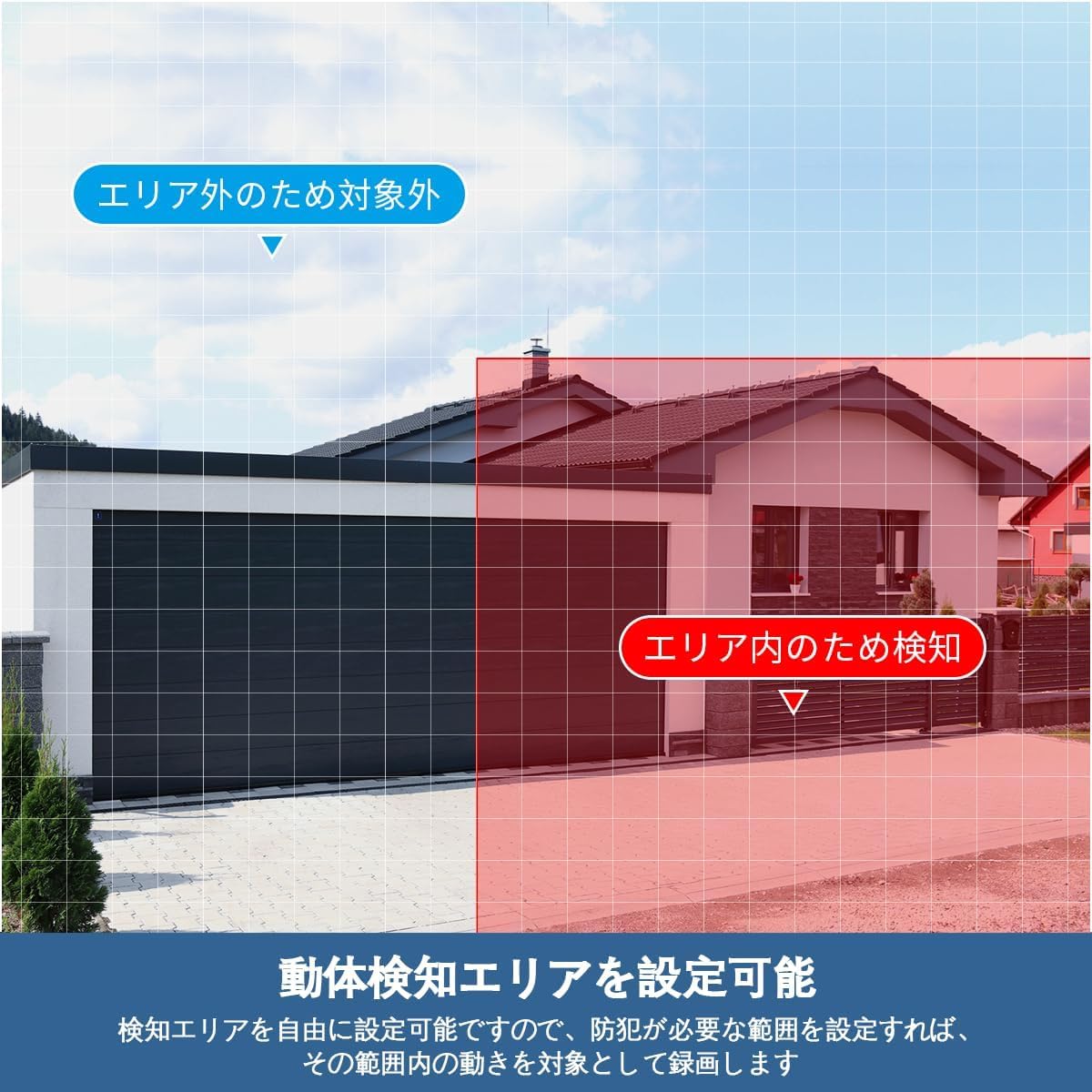
انځور: یو پخوانیample of setting a motion detection area, highlighting how users can specify regions for active surveillance while ignoring others.
3.3 Day/Night Vision
The cameras automatically switch between day (color) and night (infrared black and white) modes based on ambient light conditions. This ensures continuous surveillance regardless of the time of day.

Image: A split image demonstrating the automatic day/night switching capability, with one side showing a clear color image during the day and the other showing a clear black-and-white infrared image at night.
3.4 د ریموټ کنټرول عملیات
The included remote control allows for convenient navigation and control of the DVR system when connected to a monitor.

Image: A user operating the DVR system with a remote control, displaying multiple camera feeds on a television screen, demonstrating the ease of control.
4. ساتنه
۵.۲ د هارډ ډرایو مدیریت
The DVR utilizes H.265 compression technology to maximize storage efficiency on the 4TB hard drive. When the hard drive reaches its capacity, the system automatically overwrites the oldest data to ensure continuous recording without manual intervention.
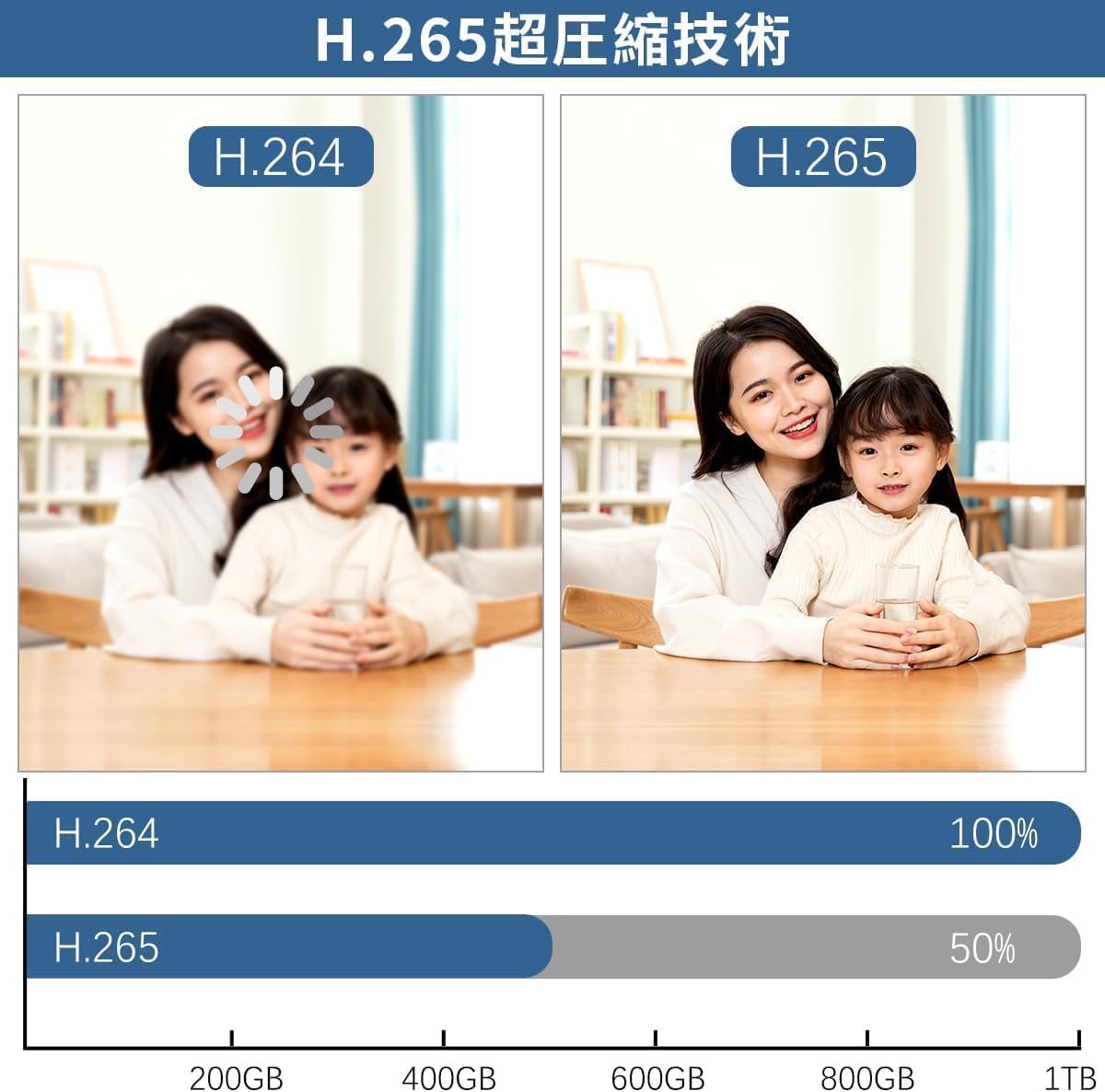
Image: A comparison illustrating the efficiency of H.265 video compression, demonstrating that it requires significantly less storage space (approximately 50% less) than H.264 for equivalent video quality.
۶.۳ د هوا مقاومت
The cameras are rated IP67 for dust and water resistance, allowing them to operate reliably in various weather conditions, including rain and snow. Regular cleaning of the camera lenses with a soft, damp cloth is recommended to ensure clear image quality.

Image: The IP67 waterproof and dustproof rating of the camera, depicted functioning effectively under various weather conditions such as rain, snow, and direct sunlight, highlighting its robust design.
5. ستونزه حل کول
If you encounter issues with your WEILAILIFE AHD Recorder, please refer to the following common solutions:
- د ویډیو ښودنه نشته:
- ډاډ ترلاسه کړئ چې DVR فعال دی او د بریښنا اډاپټر په خوندي ډول وصل دی.
- Check HDMI/VGA cable connections between the DVR and the monitor.
- Verify that the monitor input source is correctly selected (e.g., HDMI1, VGA).
- Confirm that cameras are properly connected to the DVR's video input ports.
- نه ثبتول:
- Check the hard drive status in the DVR's system settings to ensure it is detected and functioning.
- Verify recording schedules and settings in the DVR menu.
- د لرې لاسرسي مسلې:
- ډاډ ترلاسه کړئ چې DVR د LAN کیبل او ستاسو روټر له لارې انټرنیټ سره وصل دی.
- Check your network connection and router settings.
- Confirm that the "Honestview" or "Eseecloud" app is updated to the latest version.
- Re-add the device in the app if connection issues persist.
- د حرکت کشف کار نه کوي:
- Review motion detection settings in the DVR menu, including sensitivity and detection areas.
- ډاډ ترلاسه کړئ چې د کیمرې لینز پاک او له خنډونو څخه پاک دی.
که دا ګامونه ستاسو ستونزه حل نه کړي، مهرباني وکړئ د پیرودونکو ملاتړ سره اړیکه ونیسئ.
6. مشخصات
| فیچر | مشخصات |
|---|---|
| برانډ | WEILAILIFE |
| د ماډل شمیره | WEILAI-AHDNVR4TB |
| د ویډیو حل | 5 Megapixels (2592 x 1944) |
| د چینل شمیره | 8 چینلونه |
| د ذخیره کولو ظرفیت | ۲ ټې بي هارډ ډرایو (جوړ شوی) |
| د ویډیو کمپریشن | H.265 |
| USB بندرونه | 2 |
| مطابقت لرونکې وسیلې | Cameras, Smartphones, Tablets, TVs, Laptops |
| رنګ | تور |
| د محصول ابعاد | 26 x 7 x 18 سانتي متره |
7. تضمین او ملاتړ
WEILAILIFE is committed to providing high-quality products and excellent customer service. Your WEILAILIFE AHD Recorder comes with a د 24 میاشتو کیفیت تضمین.
For any inquiries, issues, or support needs during consideration or use, please do not hesitate to contact us. Our dedicated support team is available to assist you.
د اړیکو معلومات:
- د بریښنالیک ملاتړ: info-jp@weilailifetech.com (Japanese language support available, 24-hour response time)
- د جاپان دفتر پته: Rose Avenue Inage Tendai 1F, Tendai 5-8-9, Inage Ward, Chiba City, Chiba Prefecture, Japan


