1. پیژندنه
This manual provides detailed instructions for the safe and efficient operation of your Bigme B6 Color Ebook Reader. Please read this manual thoroughly before using the device and retain it for future reference.
د بسته محتويات
- د Bigme B6 ای بک ریډر
- محافظتي قضیه
- د کارونکي لارښود (دا لاسوند)
- د چارج کیبل

Image 1.1: Bigme B6 Color Ebook Reader and included protective case.
2. محصول ختم شوview
Familiarize yourself with the components and features of your Bigme B6 device.
کلیدي ځانګړتیاوې
- ښکاره کول: 6-inch Color E-paper display, 300 PPI resolution.
- پروسیسر: Octa-core CPU for responsive performance.
- حافظه او ذخیره: 4GB RAM and 64GB internal storage, expandable via Micro-SD card (up to 1TB).
- عملیاتي سیسټم: Android 14, providing access to various applications.
- ارتباط: Bluetooth and Wi-Fi for wireless communication.
- آډیو: Integrated Hi-Fi Speakers.
- ډیزاین: الټرا پتلی پروfile at 6.98mm.
- د سترګو آرامتیا: Features Zero Blue Light and Flicker-Free technology, TUV Rheinland certified for reduced eye strain.

انځور 2.1: اوورview of the Bigme B6 Ebook Reader's main features.
3. ترتیب کول
3.1 ابتدايي چارج کول
Before first use, fully charge your Bigme B6. Connect the device to a power source using the provided charging cable. The charging indicator will show the charging status.
۸ پاور آن/بند
- د بریښنا د فعالولو لپاره: د بریښنا تڼۍ فشار ورکړئ او ونیسئ تر هغه چې سکرین روښانه شي.
- To power off: Press and hold the power button, then select "Power Off" from the options.
- To sleep/wake: Briefly press the power button.
۵.۲ د شبکې اتصال (وای فای)
- د کور سکرین څخه، ته لاړ شئ ترتیبات.
- وټاکئ شبکه او انټرنیټ.
- ټګ وای فای تر ON.
- له لیست څخه خپل مطلوب وای فای شبکه غوره کړئ.
- که غوښتل شي نو پټنوم دننه کړئ او کلیک وکړئ نښلول.
۳.۳ د سیسټم لومړنی ترتیب
Upon first power-on or after a factory reset, follow the on-screen prompts to select your language, connect to Wi-Fi, and set up your Google account (optional, for app store access).
4. عملیاتي لارښوونې
4.1 بنسټیز نیویګیشن
- ټچ سکرین: Tap to select items, swipe to scroll, pinch to zoom.
- کور سکرین: Displays installed applications and widgets.
- د خبرتیا پینل: د چټکو ترتیباتو او خبرتیاو ته د لاسرسي لپاره د سکرین له پورتنۍ برخې څخه ښکته سوائپ کړئ.
- د کنټرول مرکز: Access system settings like Wi-Fi, Bluetooth, brightness, and refresh modes.
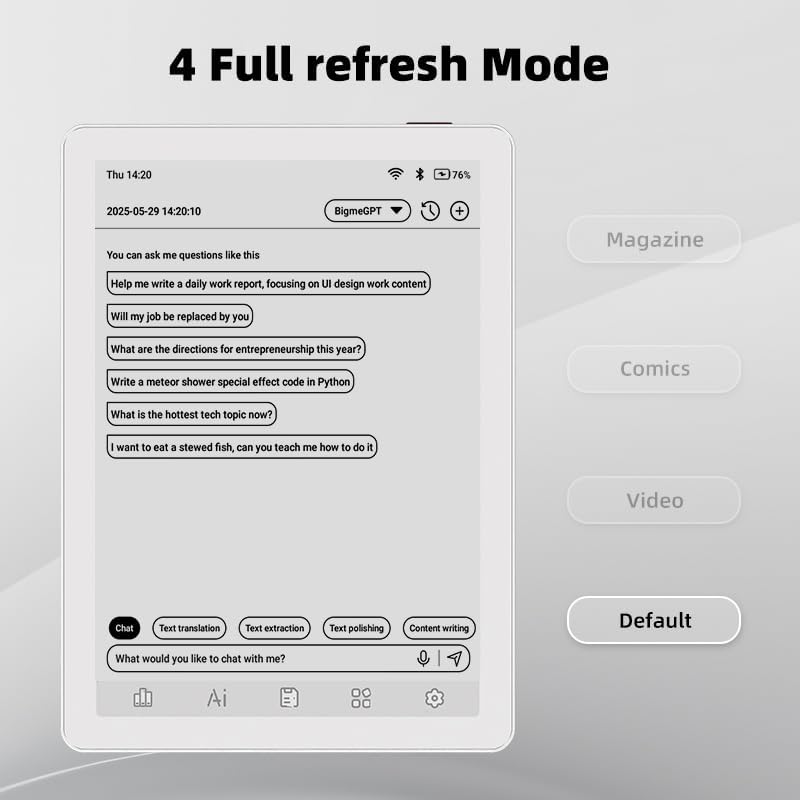
Image 4.1: The Bigme B6 home screen displaying various application icons.

Image 4.2: Accessing the Control Center for quick adjustments to device settings.
4.2 Reading eBooks
The Bigme B6 supports over 19 eBook formats, including PDF, TXT, EPUB, MOBI, and more. You can load books via USB or download them directly through reading applications.
- Open a reading application (e.g., the default reader or a downloaded app like Kindle or Libby).
- Select the book you wish to read from your library.
- Tap the left or right side of the screen to turn pages.
- Tap the center of the screen to access reading options (font size, line spacing, contrast, etc.).
- To highlight text: Press and hold on a word, then drag the selection handles to cover the desired text. Options for highlighting or notes will appear.

Image 4.3: Reading an eBook and highlighting text with color on the Bigme B6.
۲.۲ د اپلیکیشن مدیریت
As an Android 14 device, you can install applications from the Google Play Store or other compatible sources.
- د اپلیکیشنونو نصب کول: خلاص کړئ د اپلیکیشن پلورنځی icon (Google Play Store) on your home screen, search for the desired app, and follow the installation prompts.
- د اپلیکیشنونو غیر نصب کول: ورتګ ترتیبات> اطلاقات، اپلیکیشن غوره کړئ، او ټایپ کړئ غیر نصب کړئ.
4.4 Audiobooks and Media Playback
The device supports audiobook playback through its built-in Hi-Fi speakers or connected Bluetooth headphones.
- Playing Audiobooks: Use a compatible audiobook application.
- Connecting Bluetooth Headphones: ورتګ ترتیبات> وصل شوي وسایل> بلوتوث, enable Bluetooth, and pair with your headphones.

Image 4.4: The Bigme B6 supports audiobooks, allowing for hands-free listening.
4.5 Display Refresh Modes
The Bigme B6 offers multiple refresh modes to optimize display performance for different content types.
- Access refresh modes from the Control Center or Display Settings.
- عام طریقې عبارت دي له:
- ډیفالټ: Standard reading mode.
- مجله: Optimized for images and text in magazines.
- Comics: Enhanced for comic book viewing.
- ویډیو: Provides a smoother refresh rate for video content (note: e-paper displays have limitations for video).

Image 4.5: Selecting from various refresh modes to suit different content types.
5. ساتنه
5.1 د وسیلې پاکول
- د وسیلې سکرین او بدن په نرمۍ سره پاکولو لپاره یو نرم، لینټ نه پاک ټوکر وکاروئ.
- د سختو داغونو لپاره، لږ څهampد اوبو یا سکرین کلینر سره ټوکر چې په ځانګړي ډول د برقیاتو لپاره ډیزاین شوی.
- د سختو کیمیاوي موادو، خړوبونکو موادو، یا ډیر رطوبت کارولو څخه ډډه وکړئ.
5.2 د بیټرۍ پاملرنه
- وسیله په منظم ډول چارج کړئ، مګر د اوږدې مودې لپاره یې په بشپړه توګه چارج کولو څخه ډډه وکړئ.
- Do not expose the device to extreme temperatures, as this can affect battery life.
- Use only the provided or a certified charging cable and adapter.
5.3 ذخیره کول
When not in use for extended periods, store the device in a cool, dry place, away from direct sunlight and extreme temperatures. It is recommended to charge the device to about 50% before long-term storage.
6. ستونزه حل کول
| ستونزه | احتمالي لامل | د حل لاره |
|---|---|---|
| وسیله فعاله نه ده. | بیټرۍ ټیټه ده؛ وسیله کنګل شوې ده. | وسیله لږترلږه د 30 دقیقو لپاره چارج کړئ. د 10-15 ثانیو لپاره د بریښنا تڼۍ په نیولو سره جبري بیا پیل کړئ. |
| Screen is unresponsive or slow. | Temporary software glitch; too many apps running. | Restart the device. Close unnecessary background applications. Check for system updates. |
| د وائی فای سره وصل نشو. | غلط پټنوم؛ د روټر ستونزه؛ وای فای غیر فعال دی. | Ensure Wi-Fi is enabled and the password is correct. Restart your Wi-Fi router. Try connecting to a different network. |
| بیټرۍ په چټکۍ سره وچیږي. | High screen brightness; many background apps; frequent Wi-Fi/Bluetooth use. | Reduce screen brightness. Close unused applications. Disable Wi-Fi and Bluetooth when not needed. Adjust refresh mode settings. |
| Applications crash or freeze. | App incompatibility; insufficient memory. | Update the application. Clear the app's cache (Settings > Apps > [App Name] > Storage & cache). If issues persist, uninstall and reinstall the app. |
7. مشخصات
| د ماډل نوم | US-B6 |
| ښودل | 6-inch Color E-paper, Electronic Ink, 300 PPI |
| عملیاتي سیسټم | Android 14 |
| RAM | 4GB |
| داخلي ذخیره | 64GB |
| د پراخیدو وړ ذخیره | Micro-SD card (up to 1TB support) |
| ارتباط | بلوتوث ، وائی فای |
| بیټرۍ | ۱ غیر معیاري بیټرۍ (شامله ده) |
| ابعاد (L x W x Th) | ۱.۳۵" x ۳.۷۱" x ۳.۷۱" (۳.۴۳ سانتي متره x ۹.۴۲ سانتي متره x ۹.۴۲ سانتي متره) |
| د توکي وزن | 6.2 اونس (175.77 ګرامه) |
| د ای بک ملاتړ شوي بڼې | PDF, TXT, EPUB, EPUB3, HTML, HTM, AZW3, FB2, DOC, DOCX, MOBI, OEB, CBR, RPC, RTF, DJVU, ZIP |
8. تضمین او ملاتړ
8.1 د تضمین معلومات
Please refer to the warranty card included with your product for specific warranty terms and conditions. The warranty typically covers manufacturing defects for a specified period from the date of purchase.
8.2 د پیرودونکي ملاتړ
For technical assistance, troubleshooting not covered in this manual, or warranty claims, please contact Bigme customer support. Contact details can usually be found on the Bigme official webپه سایټ یا د محصول په بسته بندۍ کې.
تاسو کولی شئ د Bigme Store on Amazon د اضافي محصول معلوماتو او ملاتړ سرچینو لپاره.


