1. پیژندنه
Thank you for choosing the JYX T13 Portable Bluetooth Karaoke Machine. This device combines a powerful 40W speaker with a 5.25" woofer, two wireless microphones, and vibrant RGB lights to deliver an immersive audio experience. Designed for ease of use and portability, it is suitable for various occasions, from home parties to outdoor events. This manual provides detailed instructions for setup, operation, maintenance, and troubleshooting to ensure you get the most out of your karaoke machine.

Image: JYX T13 Portable Bluetooth Karaoke Machine with two wireless microphones and RGB lights, showcasing its compact design and vibrant lighting.
۲. په بکس کې څه دي؟
د خلاصولو پر مهال، مهرباني وکړئ ډاډ ترلاسه کړئ چې لاندې لیست شوي ټول توکي شتون لري او په ښه حالت کې دي:
- 1 x JYX T13 Karaoke Machine
- 2 x بې سیم مایکروفونونه
- 1 x ریموټ کنټرول
- 1 ایکس چارج کیبل (USB-C)
- ۱ x آډیو کیبل (AUX)
- 1 x اوږه پټه
- 1 x د کارونکي لارښود

Image: A visual representation of the JYX T13 package contents, including the main unit, two wireless microphones, remote control, and various cables.
۴. د تنظیم لارښوونې
- د کاراوکی ماشین چارج کول: Connect the provided USB-C charging cable to the machine's charging port and a suitable power adapter (not included). The power indicator will show charging status. A full charge provides approximately 8-20 hours of playtime, depending on volume and light usage. The device supports play-while-charging.
- Inserting Batteries into Microphones: Each wireless microphone requires 2 AA batteries (not included). Open the battery compartment at the bottom of the microphone and insert the batteries, ensuring correct polarity.
- فعالول: Press and hold the 'LED ON/OFF' button on the control panel or the power button on the remote control to turn on the karaoke machine.
- د مایکروفون جوړه کول: Turn on both wireless microphones. They should automatically pair with the karaoke machine. A successful connection is usually indicated by a steady light on the microphone.
- Attaching Shoulder Strap: For portability, attach the included shoulder strap to the designated loops on the sides of the karaoke machine.

Image: The JYX T13 Karaoke Machine with its two wireless microphones and charging cable, illustrating the components for initial setup.
4. عملیاتي لارښوونې
4.1 د کنټرول پینلview
The top panel of the JYX T13 features intuitive controls for easy operation:
- د ماسټر حجم نوب: د غږ ټولیز تولید تنظیموي.
- Mic Echo Knob: د مایکروفونونو لپاره د غږ اغیز کنټرولوي.
- د مایک حجم نوب: Adjusts the volume of the microphones independently.
- د LED آن/آف تڼۍ: Toggles the RGB lights on/off and cycles through light modes.
- د موډ تڼۍ: Switches between input sources (Bluetooth, AUX, USB, TF Card).
- د REC تtonۍ: Initiates or stops recording (requires USB drive or TF card).
- PREV/PLAY/PAUSE/NEXT Buttons: د رسنیو پلی بیک کنټرول کړئ.
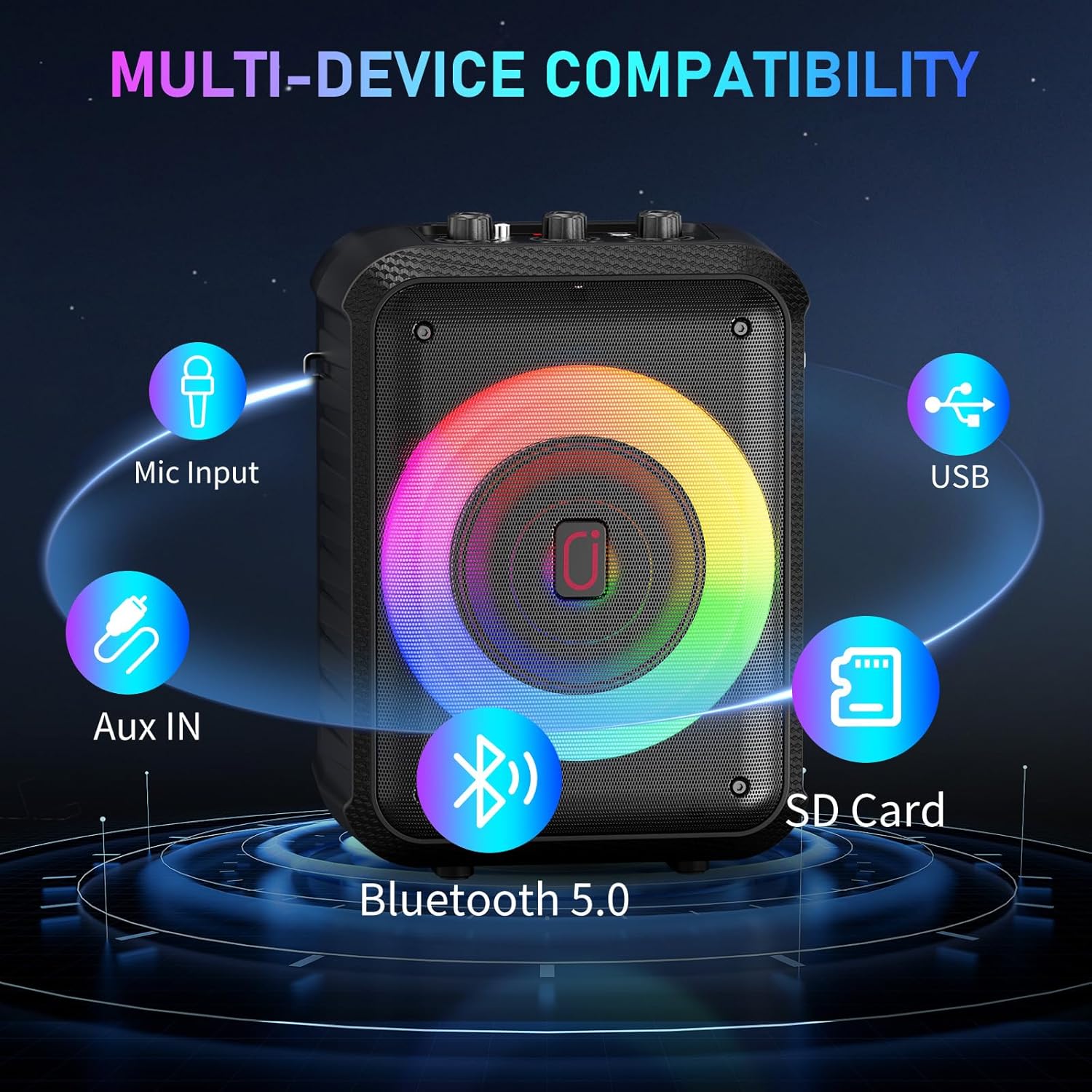
- د ننوتلو بندرونه: USB, SD Card, 5V/1A (USB-C charging), MIC (6.35mm wired mic input), AUX.
- د وسیلې لرونکی: A slot to securely hold your smartphone or tablet for lyric display.
انځور: یو مفصل view of the JYX T13 control panel, highlighting the master volume, microphone echo, microphone volume knobs, and various function buttons.
۴.۲ د ارتباط طریقې
The JYX T13 offers multiple ways to connect your audio source:
- بلوتوث 5.0: Press the 'MODE' button until 'BT' appears on the display. Enable Bluetooth on your device (smartphone, tablet, TV) and select 'JYX-T13' from the list of available devices to pair.
- AUX داخلول: Connect your audio device using the provided 3.5mm audio cable to the 'AUX' port. Press the 'MODE' button to select AUX input.
- USB/TF کارت: Insert a USB drive or TF card into the respective port. The machine will automatically detect and play compatible audio files (MP3, WMA). Use the playback control buttons to navigate tracks.
- وائر شوي مایکروفون داخلول: For a wired microphone, connect it to the 6.35mm 'MIC' input port.

Image: The side panel of the JYX T13, illustrating the USB, SD Card, and AUX input ports for diverse connectivity options.
۴.۳ د مایکروفونونو کارول
The two wireless microphones are designed for clear vocal performance:
- Ensure microphones are powered on and paired.
- Adjust 'MIC VOL' knob on the machine for microphone volume.
- Adjust 'MIC ECHO' knob for desired echo effect.
4.4 RGB څراغونه
Enhance your experience with dynamic RGB lighting:
- Press the 'LED ON/OFF' button to turn the lights on or off.
- Repeatedly press the 'LED ON/OFF' button to cycle through different light modes, including beat-synced patterns and steady glows.

Image: The JYX T13 Karaoke Machine with its front speaker illuminated by vibrant, multi-colored RGB LED lights, creating a party atmosphere.
5. مشخصات
| فیچر | مشخصات |
|---|---|
| د ماډل شمیره | T13 |
| د تولید بریښنا | 40W |
| د ووفر اندازه | 5.25 انچه |
| د ارتباط ټیکنالوژي | بلوتوث ۵.۳، AUX، USB، TF کارت |
| مایکروفون | 2 بې مزي مایکروفونونه |
| د بیټرۍ ظرفیت | ۴۰۰۰mAh (جوړ شوی) |
| د لوبې وخت | 8-20 hours (volume/lights dependent) |
| د چارج کولو وخت | 3-6 ساعته |
| ابعاد (L x W x H) | 7.87 x 6.38 x 10.85 انچه |
| د توکي وزن | ۷.۹۶ پونډه (۳.۶۲ کیلوګرامه) |
| مواد | اکریلونایتریل بوټاډین سټیرین (ABS) |
| آډیو ان پټ | Microphone, Bluetooth, AUX IN, TF Card, USB |

انځور: یوه چاودنه شوې view of the JYX T13 speaker, illustrating its internal components including the 5.25-inch woofer and DSP chip for superior sound.
6. ساتنه
To ensure the longevity and optimal performance of your JYX T13 Karaoke Machine, follow these maintenance guidelines:
- پاکول: Use a soft, dry cloth to clean the exterior of the machine and microphones. Avoid using harsh chemicals or abrasive cleaners.
- ذخیره کول: ماشین په یخ او وچ ځای کې د مستقیم لمر وړانګو او سختې تودوخې څخه لرې وساتئ.
- د بیټرۍ پاملرنه: If not used for extended periods, charge the machine and microphones periodically to maintain battery health.
- په احتیاط سره سمبالول: Avoid dropping the machine or microphones, as this can damage internal components.
7. ستونزه حل کول
If you encounter any issues with your JYX T13, refer to the following common problems and solutions:
| ستونزه | احتمالي لامل | د حل لاره |
|---|---|---|
| د سپیکر څخه هیڅ غږ نشته | حجم ډېر ټیټ دی؛ د ننوتلو ناسم حالت؛ وسیله نه ده وصل شوې. | Increase master volume; press 'MODE' to select correct input; re-pair Bluetooth or re-connect AUX/USB/TF. |
| مایکروفون کار نه کوي | Microphone off; low battery; not paired; mic volume too low. | Turn on microphone; replace batteries; re-pair microphones; increase 'MIC VOL' knob. |
| د بلوتوث پیوستون بې ثباته | وسیله ډېره لرې ده؛ مداخله؛ ټیټه بیټرۍ. | Move device closer to machine; avoid obstacles; ensure machine and device are charged. |
| د LED څراغونه کار نه کوي | Lights turned off; low battery. | Press 'LED ON/OFF' button; charge the machine. |
۶. د رسنیو ادغام
۴.۶ د محصول ویډیوګانې
Watch these official seller videos for a demonstration of the JYX T13 Karaoke Machine's features and performance:
Video: JYX Karaoke Machine in Action - Party Test & Sound Demo. This video demonstrates the karaoke machine's sound quality, microphone performance, and LED lights during a party setting.
Video: JYX Karaoke Machine Full Function Review & Performance. This video provides a comprehensive review of the karaoke machine's functions, controls, and overall performance.
9. تضمین او ملاتړ
JYX stands behind the quality of its products. The JYX T13 Karaoke Machine comes with a د ۳۶۹ ورځو تضمین خدمت. Additionally, we offer د ژوند تخنیکي ملاتړ د هرې پوښتنې یا ستونزې سره چې تاسو ورسره مخ شئ مرسته کولو لپاره.
For professional and timely assistance, please contact our customer support team:
بریښنالیک: service@jyxspeaker.com


