1. محصول ختم شوview
The Mars Gaming MC-3TCORELCD is an ATX gaming case designed for PC enthusiasts. It features an integrated 7.2-inch IPS screen, triple removable tempered glass panels, and a dual-chamber structure for efficient cable management and optimized airflow. This manual provides instructions for assembly, operation, and maintenance of the MC-3TCORELCD case.

Figure 1: Mars Gaming MC-3TCORELCD ATX Gaming Case.
2. ترتیب او نصب کول
This section details the steps for installing your components into the MC-3TCORELCD case.
۳.۱ د قضیې چمتو کول
- د غاړې تختې لرې کړئ: The MC-3TCORELCD features triple tempered glass panels that are removable without screws. Carefully detach the front, side, and central panels to access the interior.
- د لوازمو کټ: Locate the accessory kit containing screws, cable ties, and other mounting hardware.

Figure 2: Panoramic view with removable triple tempered glass for easy access.
2.2 د مادر بورډ نصب کول
The case supports ATX, MicroATX, and Mini-ITX motherboards, including those with inverted connectors.
- سټینډفونه نصب کړئ: Ensure the correct standoffs are installed for your motherboard form factor.
- د ماونټ مور بورډ: په احتیاط سره مدر بورډ په سټینډ آفونو کې ځای په ځای کړئ او د چمتو شوي پیچونو سره یې خوندي کړئ.
2.3 د ډرایو نصب کول
The case provides internal bays for storage devices.
- ۳.۵ انچه هارډ ډرایو: Up to 2x 3.5" HDDs can be installed.
- ۲.۵ انچه ایس ایس ډي: Up to 3x 2.5" SSDs can be installed.
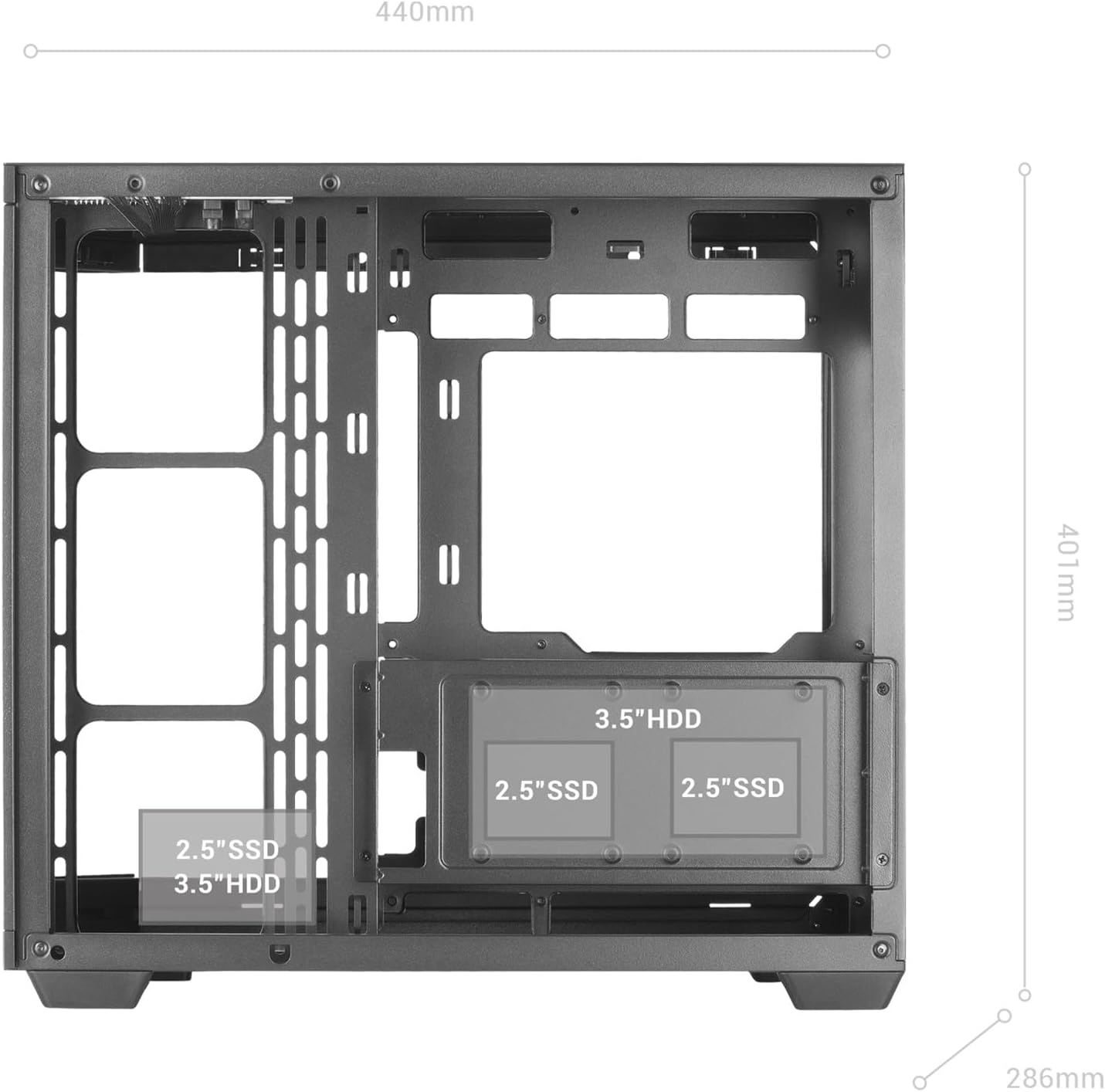
Figure 3: Internal layout indicating drive bay positions.
2.4 Power Supply and Cable Management
The dual-chamber design facilitates clean cable routing.
- د بریښنا رسولو نصب کول: Mount your ATX power supply in the designated bottom-mount area.
- د لارې کیبلونه: Utilize the dual-chamber structure to route cables behind the motherboard tray, minimizing clutter and improving airflow.

Figure 4: Double side chamber for efficient cable management.
۲.۶ د یخولو سیسټم نصبول
The case supports extensive air and liquid cooling solutions.
- مینه وال: Install up to 10x 120mm fans or a combination of 7x 120mm and 2x 140mm fans.
- د مایع یخ کول: Supports liquid cooling radiators up to 360mm.

Figure 5: Liquid cooling and fan installation options.
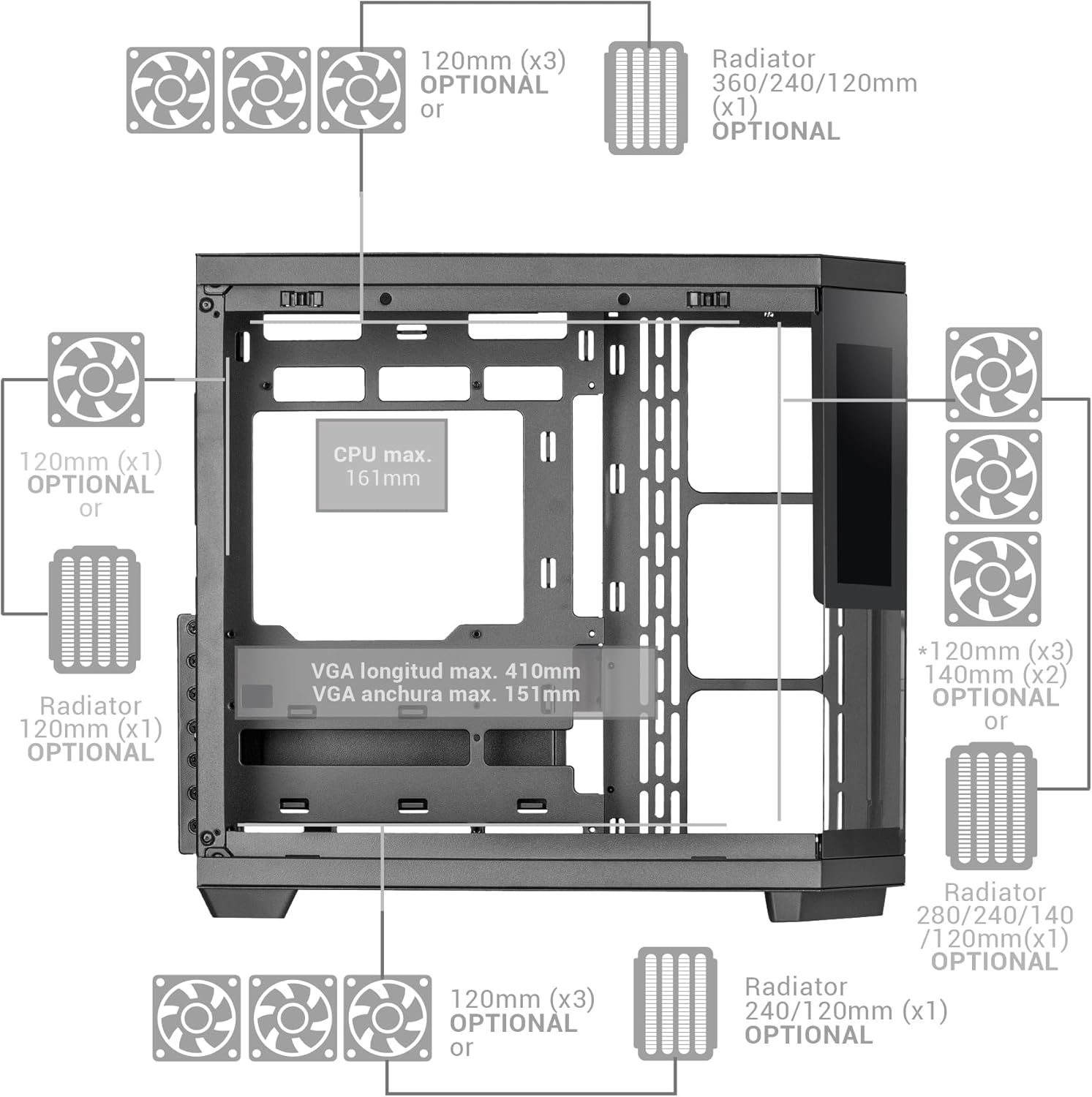
Figure 6: Detailed fan and radiator compatibility diagram.
2.6 Top Panel Connectivity
Connect the front panel headers from your motherboard to the corresponding ports on the case's top panel.
- د USB-C پورټ
- د USB 3.0 پورټ
- د USB 2.0 پورټ
- HD Audio + Microphone Jacks

Figure 7: Top panel connectivity ports.
3. Operating the IPS Screen
The integrated 7.2-inch IPS screen allows for real-time system monitoring and custom visual displays.
- د سافټویر نصب کول: Install the dedicated control software for the IPS screen (refer to the manufacturer's webد ډاونلوډ لپاره سایټ).
- ارتباط: Ensure the screen is properly connected to your motherboard or graphics card as per the installation guide.
- اصلاح کول: Use the software to display system telemetry (temperatures, usage), custom images, animations, or videos.

Figure 8: Customizable 7.2-inch IPS screen in operation.
4. ساتنه
منظم ساتنه ستاسو د کمپیوټر قضیې غوره فعالیت او اوږد عمر تضمینوي.
- د دوړو فلټرونه: The case includes two magnetic dust filters. Regularly remove and clean these filters to prevent dust buildup and maintain efficient airflow.
- د کور پاکول: With the removable tempered glass panels, the interior is easily accessible for cleaning. Use compressed air to remove dust from components and a soft, dry cloth for surfaces.
- د شیشې تختې: د تودوخې شیشې تختې د مایکرو فایبر ټوکر او د بریښنایی توکو لپاره مناسب شیشې پاکونکي سره پاک کړئ.
5. ستونزه حل کول
دا برخه هغه عامې ستونزې په ګوته کوي چې تاسو ورسره مخ کیدی شئ.
- د هوا ضعیف جریان: Ensure all fan positions are utilized effectively and dust filters are clean. Verify that cables are managed to not obstruct airflow.
- IPS Screen Not Displaying: Check all cable connections to the motherboard/graphics card. Ensure the control software is installed and running correctly. Consult the software's troubleshooting guide.
- د اجزاو د مناسبوالي مسلې: Refer to the specifications for maximum component dimensions (GPU length, CPU cooler height). Ensure components are correctly seated and secured.
6. مشخصات
| فیچر | تفصیل |
|---|---|
| برانډ | د مریخ لوبو |
| د ماډل نوم | MC3TCORELCD |
| رنګ | تور |
| د قضیې ډول | منځنی برج |
| مواد | ګرم شیشه |
| د مور بورډ مطابقت | ATX، مایکرو ATX، مینی ITX |
| د داخلي ډرایو خلیجونه | 2x 3.5" HDD / 3x 2.5" SSD |
| اعظمي GPU اوږدوالی | 410mm |
| Max GPU Width | 151mm |
| د اعظمي CPU کولر لوړوالی | 161mm |
| د فین ظرفیت | Up to 10x 120mm or 7x 120mm + 2x 140mm |
| د مایع کول کول | Up to 360mm radiators |
| د بریښنا رسولو د نصبولو ډول | Bottom Mount (ATX) |
| د یخولو طریقه | هوا |
| ځانګړي ځانګړتیاوې | Dust filter, 7.2" IPS Customizable Screen, Triple Removable Tempered Glass, Dual Chamber Structure |
| Top Panel Connectivity | USB-C, USB 3.0, USB 2.0, HD Audio + Mic |
| د توکي وزن | 6.58 کیلوګرامه |
7. د تضمین معلومات
دا محصول د الف سره راځي د جوړونکي دوه کلن تضمین. Please retain your proof of purchase for warranty claims. For detailed terms and conditions, refer to the official Mars Gaming webسایټ یا د پیرودونکي ملاتړ سره اړیکه ونیسئ.
8. ملاتړ
For further assistance, technical support, or to download the latest drivers and software for the IPS screen, please visit the official Mars Gaming webسایټ:
You may also contact Mars Gaming customer service through the contact information provided on their webسایټ


