1. پیژندنه
The Fender Mustang LTX100 is a 100-watt modeling combo amplifier designed for guitarists seeking versatile tone and performance. This ampد ژوند کولو ځانګړتیاوې 25 amp models, 25 studio-quality effects, and 100 preset slots for extensive sound customization. It is equipped with a 12-inch Celestion G12FSD-100 speaker, an integrated color display with a chromatic tuner, Bluetooth audio streaming, and USB-C connectivity for recording and app control. This manual provides essential information for the proper setup, operation, and maintenance of your Mustang LTX100 ampلايف

Figure 1.1: Fender Mustang LTX100 Ampد شاملو لوازمو سره لایفیر.
2. د خوندیتوب معلومات
Please read and understand all safety instructions before operating your Fender Mustang LTX100 ampژوندی کوونکی دا لارښود د راتلونکي حوالې لپاره وساتئ.
- خبرداری: To reduce the risk of fire or electric shock, do not expose this appliance to rain or moisture. Do not remove the cover. Refer servicing to qualified personnel only.
- احتیاط: د برقی شاک د مخنیوي لپاره، دا (قطبي) پلګ د تمدید کنډک، استخراج، یا بل ځای سره مه کاروئ پرته لدې چې بلیډونه د تیغ د افشا کیدو مخنیوي لپاره په بشپړ ډول دننه شي.
- خبرداری: دا محصول د کالیفورنیا ایالت ته پیژندل شوي کیمیاوي توکي لري چې د سرطان او زیږون نیمګړتیاو یا نورو زیږون زیان لامل کیږي.
- ډاډ ترلاسه کړئ ampلایفیر د ځمکې لاندې بریښنا سایټ سره وصل دی.
- Do not block ventilation openings. Maintain adequate space around the ampد مناسب هوا جریان لپاره لایفیر.
- د ځای په ځای کولو څخه ډډه وکړئ amplifier near heat sources such as radiators, heat registers, stoves, or other apparatus (including ampلایفیر) چې تودوخه تولیدوي.
- د بریښنا تار د چلولو یا پنچ کیدو څخه خوندي کړئ، په ځانګړې توګه په پلګونو، د اسانتیاو استخراج، او هغه ځای چې دوی د وسایلو څخه وځي.
- دا آله د بریښنا د طوفانونو په جریان کې یا کله چې د اوږدې مودې لپاره نه کارول کیږي خلاص کړئ.
3. ترتیب کول
3.1 پاکول او ځای پرځای کول
په دقت سره لرې کړئ amplifier and all accessories from the packaging. Inspect the unit for any signs of damage. Place the amplifier on a stable, level surface, ensuring adequate space for ventilation.
3.2 د بریښنا نښلول
- ډاډ ترلاسه کړئ ampد لایفیر د بریښنا سویچ په بند حالت کې دی.
- Connect the provided power cord to the INPUT POWER receptacle on the rear panel of the ampلايف
- Plug the other end of the power cord into a suitable grounded AC power outlet.
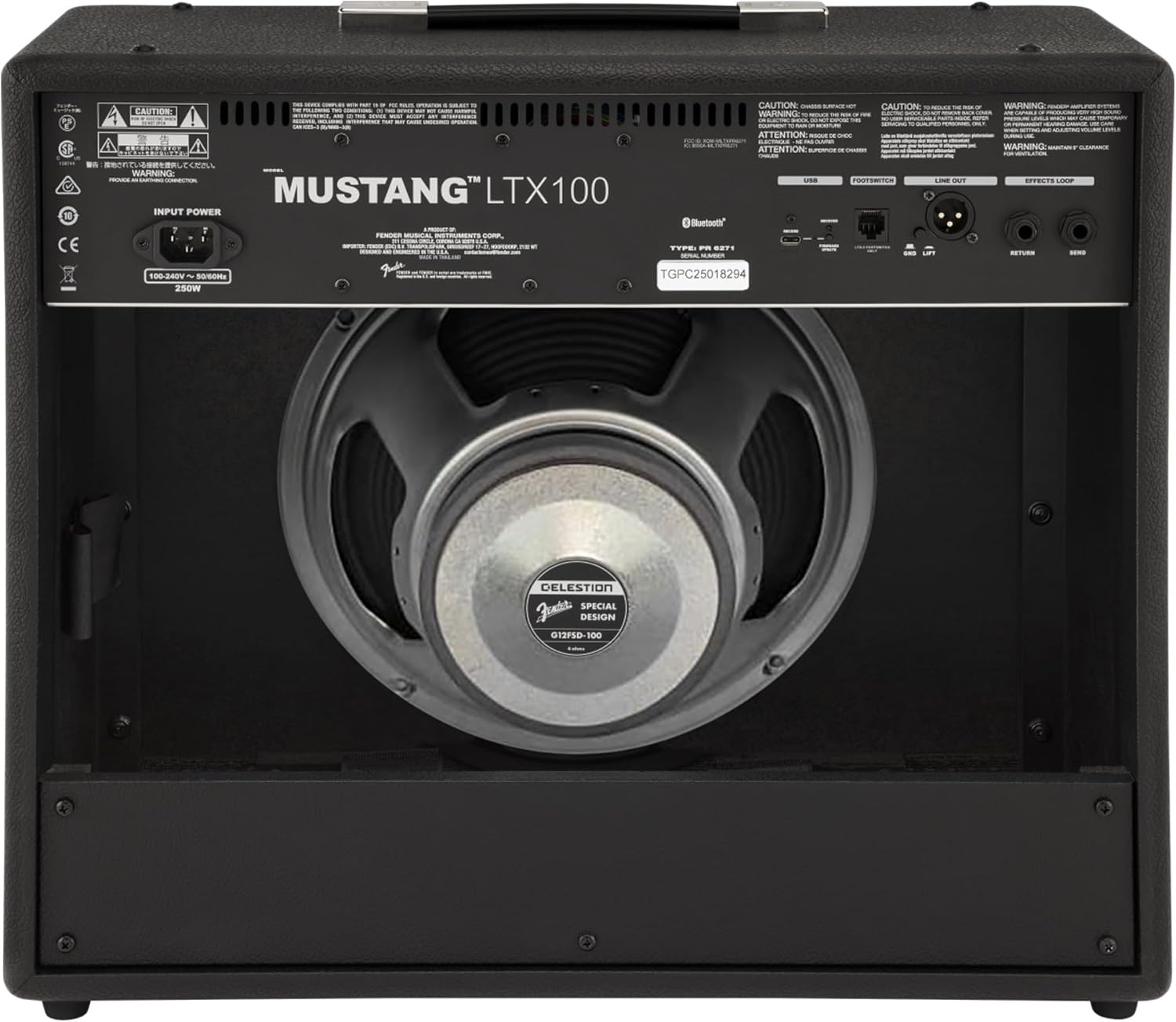
شکل 3.1: د شا پینل اړیکې
3.3 Instrument and Accessory Connections
- د وسیلې داخلول: Connect your guitar using a standard 1/4-inch instrument cable to the INPUT jack on the front panel.
- مرستندویه معلومات: For connecting external audio devices (e.g., MP3 player, phone), use a 3.5mm stereo cable to the AUX input on the front panel.
- د هیډفون محصول: For silent practice, connect headphones to the HEADPHONE OUT jack on the rear panel.
- د XLR لاین آوټ: For connecting to a PA system or recording interface, use XLR cables to the LINE OUT jacks on the rear panel. A ground lift switch is provided to eliminate hum.
- د اغیزو لوپ: External effects pedals can be connected via the SEND and RETURN jacks on the rear panel.
- USB-C: Connect to a computer for recording, firmware updates, and Fender Tone 3.0 app control.
4. عملیاتي لارښوونې
۳.۱ د مخکینۍ پینل کنټرولونهview

شکل ۱: د مخکینۍ پینل کنټرولونه
- پیژندنه: ستاسو د ګیتار د نښلولو لپاره ۱/۴ انچه جیک.
- AUX: د بهرني آډیو وسیلو لپاره 3.5 ملي میتر سټیریو ان پټ.
- ګټه: Controls the input level and amount of overdrive/distortion for the selected amp ماډل
- ولیم: Adjusts the output level of the selected amp ماډل
- سخت: د لوړې فریکونسۍ غبرګون تنظیموي.
- منځنی: د منځنۍ فریکونسۍ غبرګون تنظیموي.
- اساسات: د ټیټ فریکونسۍ غبرګون تنظیموي.
- ماسټر د ټولیز محصول حجم کنټرولوي ampلايف
- ښودنه: Color LCD screen for navigating menus, selecting amp models, effects, and viewing tuner.
- ENCODER KNOB: Used to scroll through menus and adjust parameters on the display. Press to select.
- شاته: مخکینی مینو یا سکرین ته راستنیږي.
- خوندي کول: Stores current settings as a preset.
- مینو: Accesses the main menu for system settings, global parameters, and more.
- ټایپ: Used for setting delay and modulation effect tempos. Hold to activate the chromatic tuner.
- آن/بند: د بریښنا سویچ لپاره ampلايف
۴.۱ د بریښنا فعالول او بنسټیز عملیات
- Ensure all connections are secure and the MASTER volume is set to a low level.
- Press the ON/OFF switch to power on the amplifier. The display will illuminate.
- یو انتخاب کړئ amp model and effect using the encoder knob and display.
- Adjust the GAIN, VOLUME, TREBLE, MIDDLE, and BASS knobs to shape your desired tone.
- Gradually increase the MASTER volume to achieve the desired listening level.
4.3 کارول Amp ماډلونه او اغیزې
The Mustang LTX100 offers 25 distinct amp models and 25 studio-quality effects. Use the encoder knob to browse through the available options on the display. Once an amp model or effect is selected, its parameters can be adjusted using the encoder knob or the dedicated tone knobs (Treble, Middle, Bass) if applicable.
4.4 مختاړي
د amplifier comes with 70 factory presets and allows for 100 user-defined presets. To save your custom settings:
- Dial in your desired amp model, effects, and tone settings.
- د خوندي کولو تڼۍ فشار کړئ.
- Use the encoder knob to select a user preset slot.
- Press the encoder knob to confirm and save your preset.
۵.۳ د بلوتوث آډیو سټریمینګ
To stream audio from a mobile device:
- په خپل ګرځنده وسیله کې بلوتوټ فعال کړئ.
- په amplifier, navigate to the Bluetooth menu via the display.
- Select "Pair New Device" and choose "Mustang LTX100" from your device's Bluetooth list.
- Once paired, you can play audio through the ampلايف
4.6 Fender Tone 3.0 App
The Fender Tone 3.0 app (available for iOS and Android) provides wireless control over your amplifier. It allows you to edit, save, and share presets, as well as access additional features. Connect your amplifier to your mobile device via Bluetooth to use the app.
5. ساتنه
5.1 پاکول
- تل یې وصل کړئ ampد پاکولو دمخه د بریښنا ساکټ څخه لایفیر.
- د بهرنۍ سطحې پاکولو لپاره نرم، وچ ټوکر وکاروئ.
- Do not use abrasive cleaners, solvents, or waxes, as these can damage the finish.
- Avoid spraying liquids directly onto the ampلايف
5.2 ذخیره کول
- ذخیره کول ampپه وچ، سړه چاپیریال کې، د مستقیم لمر وړانګو او سختو تودوخې څخه لرې.
- If storing for an extended period, cover the ampد دوړو څخه د ساتنې لپاره لایفیر.
6. ستونزه حل کول
| ستونزه | احتمالي لامل | د حل لاره |
|---|---|---|
| هیڅ ځواک نشته | د برېښنا تار نه دی تړل شوی؛ د برېښنا رسۍ فعاله نه ده؛ Ampد لایفیر بریښنا بندول | Check power cord connection; Test outlet with another device; Ensure power switch is ON |
| غږ نشته | Instrument cable faulty/disconnected; Guitar volume off; Amplifier volume/master low; Headphones connected | Check/replace instrument cable; Turn up guitar volume; Increase amplifier volume/master; Disconnect headphones |
| تحریف شوی غږ | Gain too high; Master volume too high; Faulty cable/instrument | Reduce GAIN; Reduce MASTER volume; Test with different cable/instrument |
| د بلوتوث پیوستون مسلې | وسیله د جوړې کولو حالت کې نه ده؛ Amplifier not discoverable; Interference | Ensure device is in pairing mode; Re-initiate pairing on amplifier; Move closer to amplifier; Restart both devices |
7. مشخصات
| فیچر | تفصیل |
|---|---|
| د ماډل نوم | Mustang LTX100 |
| د ماډل شمیره | 2311800000 |
| د بریښنا تولید | 100 واټ |
| سپیکر | 1 x 12″ Celestion G12FSD-100 |
| Amp موډلونه | 25 |
| اغیزې | 25 (distortion, overdrive, compression, modulation, delay, reverb, octave, etc.) |
| مخکینۍ | 70 factory presets + 100 user slots |
| ښودل | Color LCD with onboard chromatic tuner |
| ارتباط | Bluetooth audio, USB-C bidirectional audio |
| محصولات | XLR line out (with ground lift), headphone out |
| داخلونه | 1/4″ instrument input, 3.5 mm aux input |
| د اپلیکیشن ملاتړ | Fender Tone 3.0 app (iOS/Android) |
| ساختماني | کامبو amplifier, rugged build |
| د توکي وزن | ۲.۴۵ پونډه |
| د محصول ابعاد | 22.3 x 19.9 x 12.3 انچه |
| مواد | فلزي |
| د بریښنا سرچینه | د بریښنا تار شوی |
8. تضمین او ملاتړ
For detailed warranty information, product registration, and technical support, please visit the official Fender website. You can also find FAQs, software updates, and additional resources there.
Official Fender Store: په ایمیزون کې د فینډر پلورنځی


