پیژندنه
Welcome to the user manual for your new Lenovo IdeaPad 3 82KU laptop. This guide provides essential information to help you set up, operate, maintain, and troubleshoot your device. Please read this manual thoroughly to ensure proper use and to maximize your laptop's performance and longevity.
د خوندیتوب معلومات
Observe the following safety guidelines to prevent damage to your device or personal injury:
- یوازې چمتو شوي بریښنا اډاپټر او کیبلونه وکاروئ.
- لپ ټاپ د لوړې تودوخې، مستقیم لمر وړانګو، یا لوړې رطوبت سره مخ کیدو څخه ډډه وکړئ.
- په لپ ټاپ کې درانه شیان مه کېږدئ.
- د بریښنایی شاک یا زیان څخه د مخنیوي لپاره مایعات له وسیلې څخه لرې وساتئ.
- د هوا مناسبه هوا ورکول ډاډمن کړئ؛ د هوا لارې مه بندوئ.
- Do not attempt to disassemble or repair the laptop yourself. Contact authorized service personnel.
د بسته محتويات
ډاډ ترلاسه کړئ چې ټول توکي ستاسو په کڅوړه کې شتون لري:
- Lenovo IdeaPad 3 82KU Laptop
- 65W AC اډاپټر
- ۱۲۸ جي بي USB ډرایو
- د چټک پیل لارښود (که شامل وي)
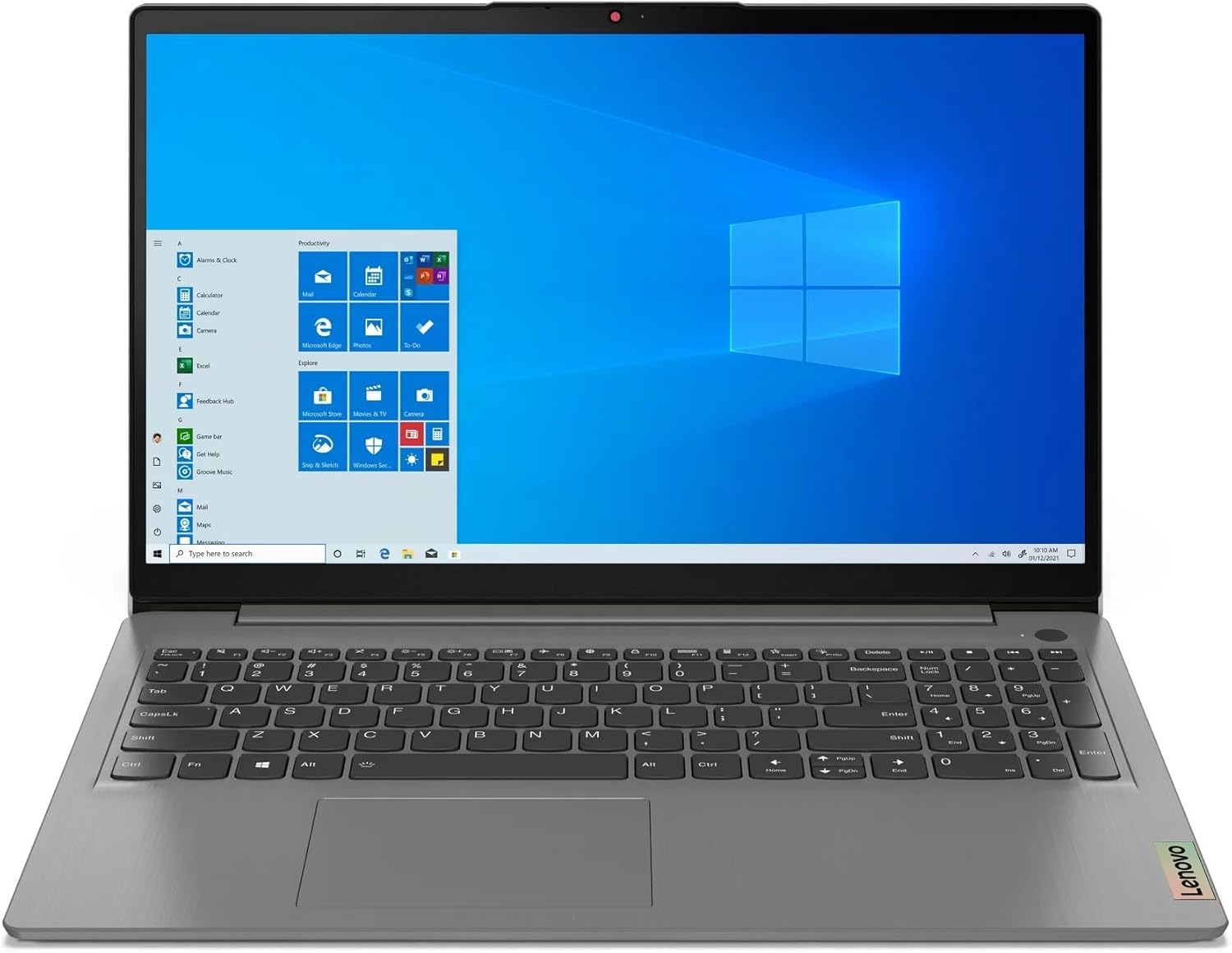
Image: Lenovo IdeaPad 3 82KU Laptop, showcasing د هغې ښکلی ډیزاین او ۱۶ انچه سکرین.
محصول پای ته ورسیدview
Familiarize yourself with the physical features and components of your Lenovo IdeaPad 3 82KU laptop.
مخکی View
The front features the 15.6-inch FHD (1920 x 1080) anti-glare display. Above the screen, you will find the 720p HD Camera with a privacy shutter for secure video conferencing.
کیڼ اړخ View
On the left side, the laptop includes a USB-C 3.2 Gen 1 port, a USB 3.2 Gen 1 port, an HDMI v1.4 port for external displays, and a headphone/microphone combo jack.
ښي خوا View
The right side typically houses a USB 2.0 port and the power connector.
کیبورډ او ټچ پیډ
The full-size keyboard features a numeric keypad and backlighting for comfortable typing in various lighting conditions. The integrated touchpad supports multi-touch gestures. A fingerprint reader is also integrated for secure login.
چمتو کول
Follow these steps to set up your laptop for the first time.
د لومړي ځل لپاره کارول
- لپ ټاپ خلاص کړئ: په احتیاط سره لپ ټاپ او ټول لوازم له بسته بندۍ څخه لرې کړئ.
- بریښنا وصل کړئ: Plug the AC adapter into the laptop's power port and then into a wall outlet. It is recommended to fully charge the battery before first use.
- پاور آن: Open the laptop lid and press the power button. The laptop will guide you through the initial Windows 11 Pro setup process.
- د وینډوز لومړنی تنظیم: Follow the on-screen instructions to configure your region, language, network connection, and user account.
د پردیو سره نښلول
You can connect external devices such as mice, keyboards, and external monitors using the available USB and HDMI ports. Refer to the 'Product Overview' section for port locations.
ستاسو د لپ ټاپ چلول
This section covers basic operation of your Lenovo IdeaPad 3 82KU.
پاور آن/بند
- د فعالولو لپاره: په لپ ټاپ کې موقعیت لرونکی د بریښنا تڼۍ فشار ورکړئ.
- د بندولو لپاره: په وینډوز کې د سټارټ تڼۍ کلیک وکړئ، بیا پاور > بندول غوره کړئ.
- د بیا پیلولو لپاره: په وینډوز کې د سټارټ تڼۍ کلیک وکړئ، بیا پاور> بیا پیل غوره کړئ.
- د خوب لپاره: Close the laptop lid or click the Start button in Windows, then select Power > Sleep.
د وینډوز ۱۰ پرو کارول
Your laptop comes pre-installed with Windows 11 Pro. For detailed instructions on using Windows 11, refer to the official Microsoft documentation or online help resources.
Keyboard and Touchpad Functions
Utilize the backlit keyboard for improved visibility. The numeric keypad allows for efficient data entry. The touchpad supports various gestures for navigation and control. The integrated fingerprint reader provides a convenient and secure way to log in to your system.
د وائی فای او بلوتوث سره نښلول
- وای فای: Click the network icon in the taskbar, select your desired Wi-Fi network, enter the password if prompted, and click Connect. Your laptop supports Wi-Fi 6.
- بلوتوث: To pair Bluetooth devices, go to Settings > Bluetooth & devices, turn on Bluetooth, and select your device from the list. Your laptop supports Bluetooth 5.1.
د HD کیمرې کارول
The 720p HD camera can be used for video calls and conferences. Ensure the privacy shutter is open when using the camera. You can access the camera through applications like Camera, Microsoft Teams, or Zoom.
ساتنه
Proper maintenance helps extend the life of your laptop.
د لپ ټاپ پاکول
- د نرم، لینټ پاک ټوکر څخه لږ څه کار واخلئampد ښودنې پاکولو لپاره د اوبو یا سکرین کلینر سره مینځل.
- د کیبورډ او چیسس لپاره، نرم ټوکر وکاروئ. د سختو کیمیاوي موادو څخه ډډه وکړئ.
- په دوره یي ډول د هوا له فشار څخه کار واخلئ ترڅو د هوا له لارې دوړې پاکې کړئ.
د بیټرۍ پاملرنه
- د بیټرۍ په مکرر ډول د بشپړ چارج کولو څخه ډډه وکړئ.
- که چیرې د اوږدې مودې لپاره نه کارول کیږي، نو لیپ ټاپ په یخ او وچ ځای کې وساتئ.
- بیټرۍ د لوړې تودوخې سره مه اخلئ.
د سافټویر تازه معلومات
Regularly check for and install Windows updates and driver updates to ensure optimal performance and security. Go to Settings > Windows Update to check for updates.
د ستونزو حل کول
دا برخه د هغو عامو ستونزو حلونه وړاندې کوي چې تاسو ورسره مخ کیدی شئ.
| مسله | احتمالي حل |
|---|---|
| لیپ ټاپ نه چالانېږي. | Ensure the AC adapter is securely connected and the power outlet is functional. Try a different outlet. Check if the battery is charged. |
| د وای فای اتصال ستونزې. | وګورئ چې ایا وای فای د وینډوز ترتیباتو کې فعال شوی دی. خپل روټر او موډیم بیا پیل کړئ. ډاډ ترلاسه کړئ چې تاسو د وای فای سیګنال په حد کې یاست. |
| ورو فعالیت. | Close unnecessary applications. Check for background processes. Ensure Windows and drivers are up to date. Consider running a disk cleanup. |
| د کیبورډ بیک لایټ کار نه کوي. | Check the function keys (Fn + Spacebar or other designated key) to toggle the backlight. Ensure drivers are updated. |
| Camera not detected. | Ensure the privacy shutter is open. Check device manager for camera drivers. Restart the laptop. |
مشخصات
Key technical specifications for your Lenovo IdeaPad 3 82KU laptop:
| فیچر | تفصیل |
|---|---|
| د ماډل نوم | IdeaPad 3 82KU |
| پروسیسر | AMD Ryzen 5 5500U (6-core, up to 4 GHz) |
| ګرافیک | د AMD Radeon ګرافیک (مدغم) |
| ښودل | 15.6-inch FHD (1920 x 1080) IPS, 60Hz, 250 nits, Anti-glare |
| RAM | ۱۶ جي بي ډي ډي آر ۴ ايس ډي آر اېم ۳۲۰۰ مېګاهرتز |
| ذخیره کول | ۱ ټې بي NVMe M.2 SSD |
| عملیاتي سیسټم | وینډوز 11 پرو |
| بې سیم ارتباط | MediaTek Wi-Fi 6 (802.11ax), Bluetooth 5.1 |
| بندرونه | 1x USB-C 3.2 Gen 1, 1x USB 3.2 Gen 1, 1x USB 2.0, 1x HDMI v1.4, 1x Headphone/Microphone Combo Jack |
| کیمره | د محرمیت شټر سره 720p HD کیمره |
| بیټرۍ | 45Wh Lithium Polymer (up to 6 hours average battery life) |
| ابعاد (LxWxH) | 14.12 x 9.33 x 0.81 انچه |
| وزن | ۱.۸۱ پونډه (تقریبا ۰.۸۲ کیلوګرامه) |
| کیبورډ | Backlit Keyboard with Numpad and Fingerprint Reader |
تضمین او ملاتړ
Your Lenovo IdeaPad 3 82KU laptop comes with a 12-month warranty covering manufacturing defects. For technical support, warranty claims, or service inquiries, please refer to the contact information provided with your purchase documentation or visit the official Lenovo support website. When contacting support, please have your laptop's model number (82KU) and serial number ready.
For additional resources and driver downloads, please visit the official Lenovo support portal.