1. پیژندنه
Welcome to the OUKITEL C68 SIM-Free Smartphone user manual. This guide provides essential information for setting up, operating, and maintaining your new device. The OUKITEL C68 is designed to offer a seamless and powerful smartphone experience with its large display, robust performance, and advanced camera capabilities.
This device features a 7.2-inch 120Hz display, an octa-core processor, 24GB RAM (including virtual memory), 256GB internal storage expandable up to 2TB, a 6000mAh battery with 18W fast charging, and a 64MP main camera. It runs on Android 15 and supports global SIM-free connectivity, NFC, GPS, and various security features like face and fingerprint recognition.
۲. په بکس کې څه دي؟
مهرباني وکړئ د خپل OUKITEL C68 کڅوړې مینځپانګې وګورئ. که کوم توکي ورک یا زیانمن شوي وي، مهرباني وکړئ خپل پرچون پلورونکي سره اړیکه ونیسئ.
- OUKITEL C68 Smartphone Body
- د سمارټ فون قضیه
- 18W چټک چارجر
- د ډول-C کیبل
- د سیم Ejector پن
- Instruction Manual (Japanese Version)
- د چټک پیل لارښود

Image: The OUKITEL C68 retail box contents, showing the smartphone, a protective case, an 18W fast charger, a Type-C cable, a SIM ejector pin, and documentation.
3. ترتیب کول
3.1. د سیم کارت نصب کول
Your OUKITEL C68 supports dual SIM cards (Nano+Nano) or one Nano SIM and one microSD card for expanded storage. Ensure the device is powered off before inserting or removing SIM/microSD cards.
- د خپل وسیلې په اړخ کې د سیم کارت ټری ومومئ.
- Insert the provided SIM ejector pin into the small hole next to the tray and press firmly until the tray pops out.
- خپل نانو سیم کارتونه او/یا مایکرو ایس ډی کارتونه په ټری کې ټاکل شوي سلاټونو کې ځای په ځای کړئ. ډاډ ترلاسه کړئ چې دوی په سمه توګه موقعیت لري.
- ټری په احتیاط سره بیرته وسیله ته فشار ورکړئ تر هغه چې دا ځای ته کلیک وکړي.
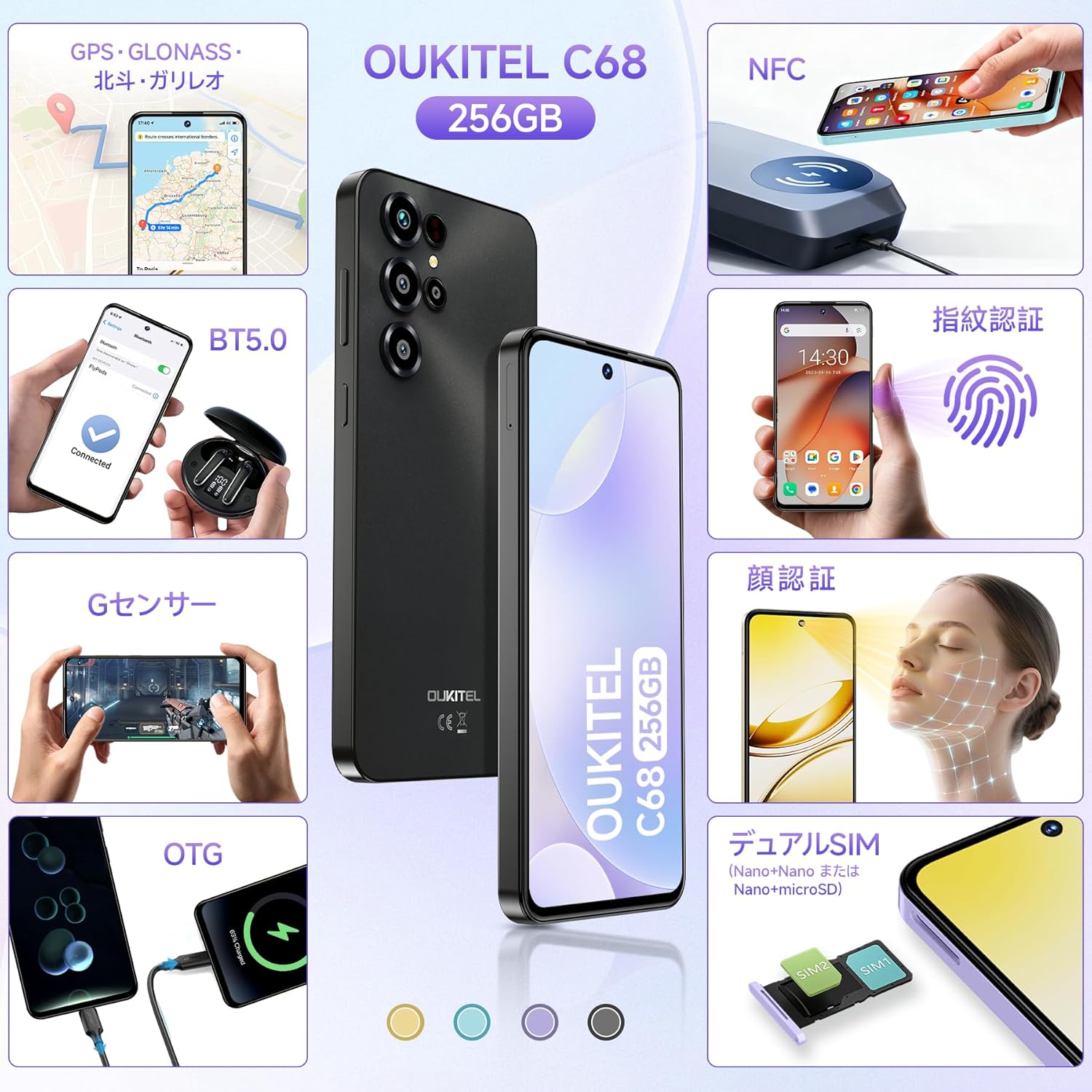
Image: An illustration demonstrating the correct placement of dual Nano SIM cards or a Nano SIM card and a microSD card into the OUKITEL C68's SIM tray.
۳.۲. د بریښنا لومړنی فعالول او تنظیم کول
د لومړي ځل لپاره خپل وسیله فعالولو لپاره:
- Press and hold the Power button located on the side of the device until the OUKITEL logo appears.
- د لومړني تنظیم بشپړولو لپاره د سکرین پرامپټس تعقیب کړئ، پشمول د خپلې ژبې غوره کول، د وای فای سره وصل کول، د خپل ګوګل حساب تنظیم کول، او د امنیتي ځانګړتیاوو تنظیم کول.

Image: The OUKITEL C68 displaying the Android 15 operating system with various application icons and a map interface, illustrating the user experience.
4. ستاسو وسیله چلول
4.1. ښکاره کول
The OUKITEL C68 features a large 7.2-inch display with a 120Hz refresh rate, providing smooth visuals and an immersive viewing experience. It offers 500 nits of brightness and a resolution of 720x1560 pixels, supporting 16.7 million colors.

Image: The OUKITEL C68 smartphone displaying a dynamic racing game, highlighting its 7.2-inch screen and 120Hz refresh rate for smooth visuals.
4.2. فعالیت
Equipped with a high-performance octa-core processor, the OUKITEL C68 handles daily tasks and demanding applications smoothly. It comes with 24GB of RAM (including 12GB of virtual memory) and 256GB of internal storage. Storage can be expanded up to 2TB using a microSD card, allowing ampد اپلیکیشنونو، عکسونو او ویډیوګانو لپاره ځای.

Image: The OUKITEL C68 displaying multiple applications and media content, emphasizing its 24GB RAM and 256GB ROM for efficient multitasking and storage.
4.3. بیټرۍ
The device is powered by a large 6000mAh battery, providing extended usage time. Under normal conditions, the battery can last for over 2 days. It supports 18W fast charging for quick power replenishment. Additionally, the OTG function allows the phone to act as a power bank to charge other devices like earphones or smartwatches.
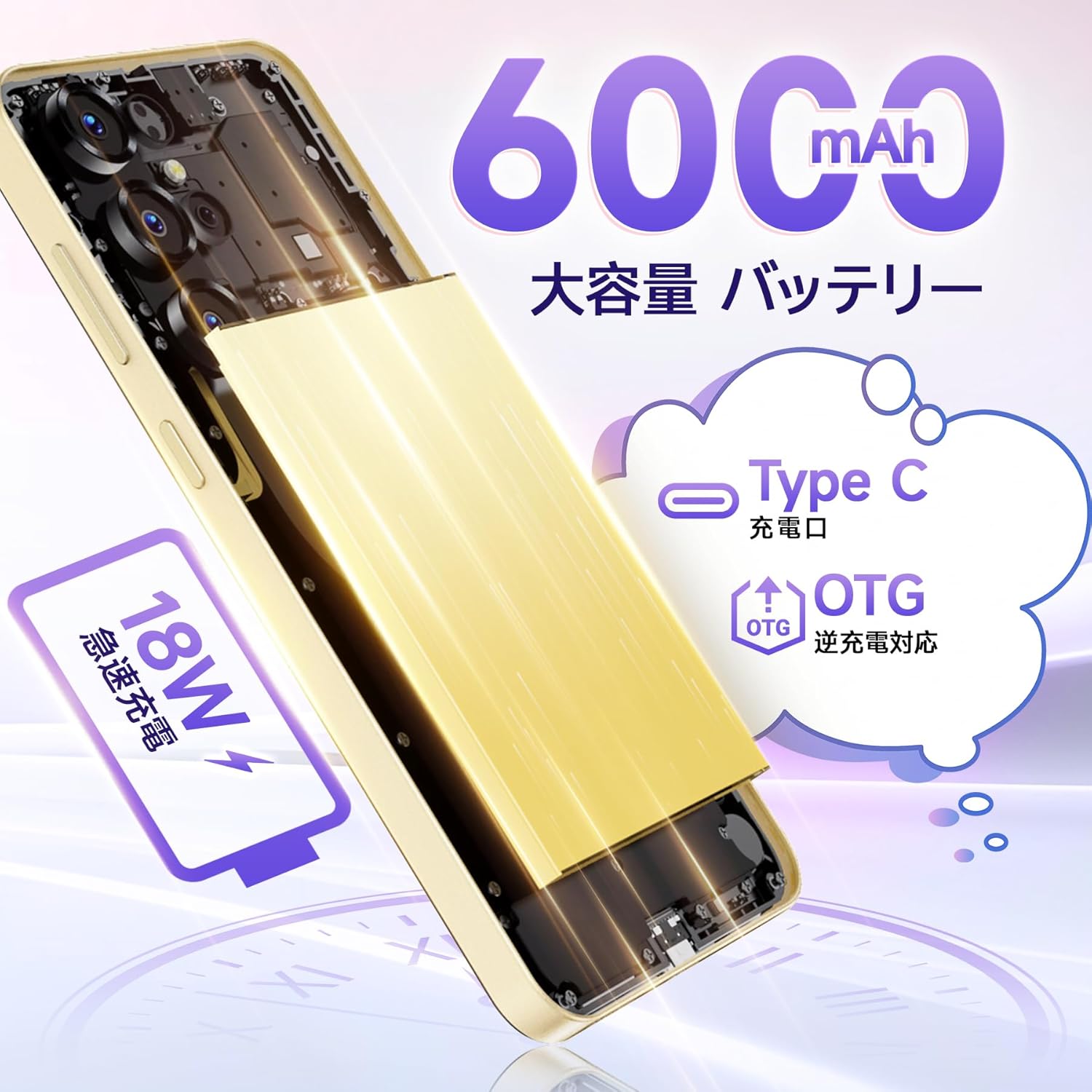
Image: An internal diagram of the OUKITEL C68, illustrating its 6000mAh large capacity battery and support for 18W fast charging and OTG reverse charging via its Type-C port.
4.4. کیمره
Capture high-quality photos and videos with the OUKITEL C68's multi-camera system. It features a 64MP main camera and an 8MP front camera. AI image processing ensures faithful reproduction of subjects, while AI beauty mode enhances natural skin tones. Other shooting modes include Night mode for low-light conditions, HDR mode for balanced exposure in challenging lighting, and a Manual mode for fine-tuned settings. The device also supports 1080p video recording.
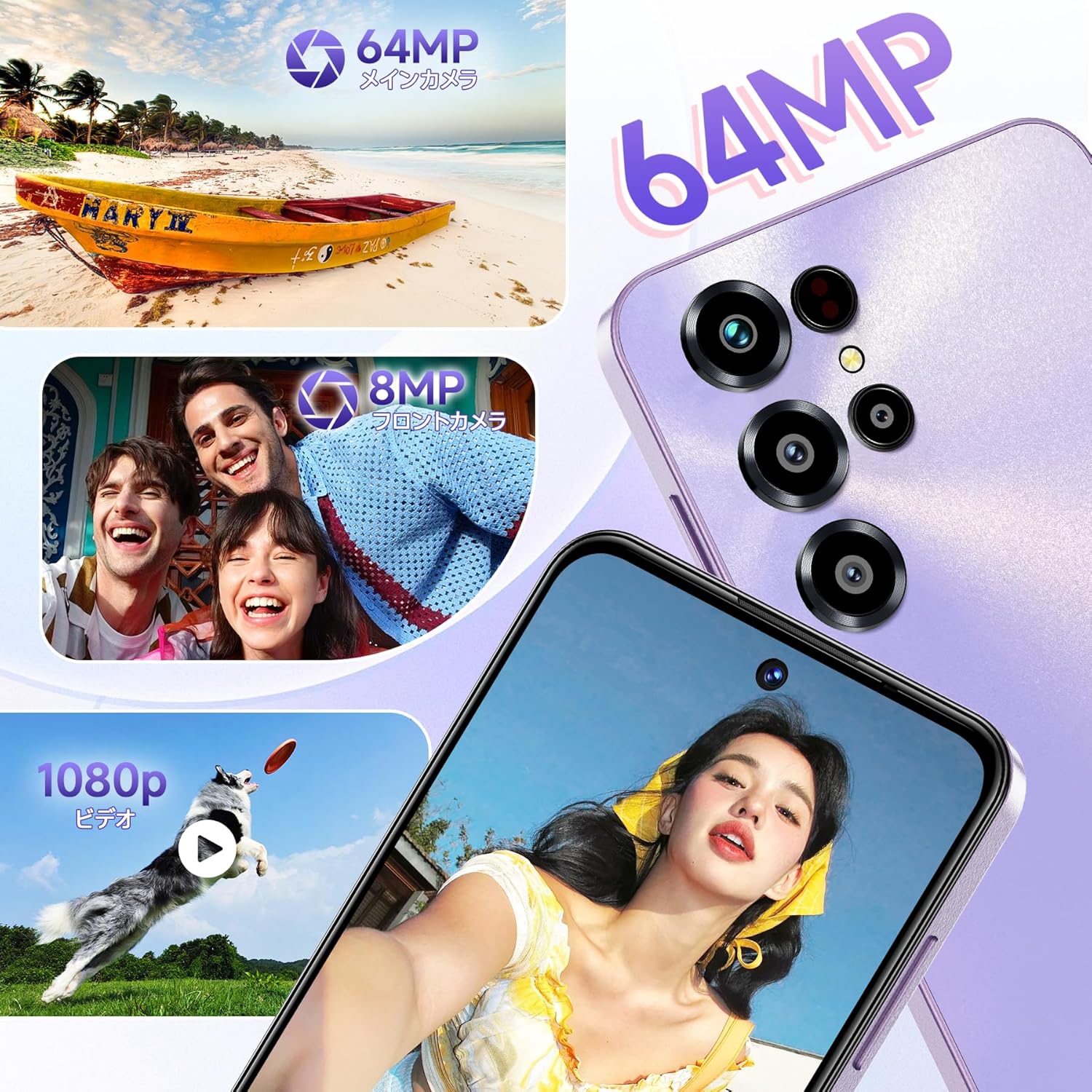
انځور: د کولاژ نندارتونasing the OUKITEL C68's camera capabilities, featuring a 64MP main camera, an 8MP front camera capturing smiling faces, and a dog catching a frisbee in a 1080p video frame.
۴.۷. اتصال او امنیت
The OUKITEL C68 is a global SIM-free model, compatible with major carriers. It supports Wi-Fi 5GHz for high-speed internet, NFC for electronic payments and transit cards (note: Felica is not supported), and high-precision GPS (GPS, GLONASS, BeiDou, Galileo) for accurate location tracking. For security, the device incorporates a side-mounted fingerprint sensor and face recognition technology, balancing convenience and safety.

Image: A visual representation of the OUKITEL C68's features, including GPS navigation, G-sensor for gaming, dual SIM card slots, NFC for contactless payments, face recognition, and fingerprint recognition.
5. ساتنه
د خپل OUKITEL C68 د اوږد عمر او غوره فعالیت ډاډمن کولو لپاره، د ساتنې دا لارښوونې تعقیب کړئ:
- پاکول: د وسیلې سکرین او بدن پاکولو لپاره د نرم، لینټ څخه پاک ټوکر وکاروئ. د سخت کیمیاوي موادو یا کثافاتو موادو کارولو څخه ډډه وکړئ.
- د سافټویر تازه معلومات: Regularly check for and install system updates to benefit from the latest features, security patches, and performance improvements. Go to Settings > System > System update.
- د بیټرۍ پاملرنه: Avoid exposing the device to extreme temperatures. Do not let the battery completely drain frequently. For long-term storage, charge the battery to around 50%.
- د ذخیرې مدیریت: په دوره یي ډول غیر ضروري پاک کړئ fileد ذخیره کولو ځای خالي کولو او د وسیلې سرعت ساتلو لپاره.
6. ستونزه حل کول
If you encounter issues with your OUKITEL C68, try the following solutions:
- وسیله ځواب نه ورکوي: د بریښنا تڼۍ د شاوخوا ۱۰-۱۵ ثانیو لپاره فشار ورکړئ او ونیسئ ترڅو بیا پیل کړئ.
- د بیټرۍ په چټکۍ سره وچول: Check background app usage in Settings > Battery. Reduce screen brightness and disable unnecessary features like Wi-Fi, Bluetooth, or GPS when not in use.
- د شبکې د اتصال مسلې: Ensure your SIM card is correctly inserted. Try toggling Airplane mode on and off. Check your network settings or contact your service provider.
- د اپلیکیشنونو کریش کول/کنګل کول: د ستونزې لرونکي اپلیکیشن کیش او ډیټا په ترتیباتو > ایپسونو کې پاک کړئ. که ستونزه دوام ومومي، اپلیکیشن غیر نصب او بیا نصب کړئ.
- ورو فعالیت: Close unused apps, clear cache, and ensure sufficient storage space. Consider a factory reset as a last resort (backup your data first).
7. مشخصات
Below are the detailed specifications for the OUKITEL C68 smartphone:
| فیچر | مشخصات |
|---|---|
| د سکرین اندازه | 7.2 انچه |
| د بیټرۍ ظرفیت | 6000 mAh |
| د دوامداره کارونې وخت | 2 ورځې |
| Compatible Carriers | Docomo, Au, SoftBank, Rakuten Mobile, etc. |
| رنګ | Blue (variant specific) |
| بیټرۍ پکې شامله ده | هو |
| د بیټرۍ کارول | هو |
| د برانډ نوم | OUKITEL |
| جوړونکی | OUKITEL |
| د محصول ماډل شمیره | C68 |
| د خوشې کولو کال | 2025 |
| لوازم شامل دي | Smartphone body |
| مطابقت لرونکی OS | Android 15 |
| نورې دندې | د ګوتو نښې پیژندنه |
| د ارتباط ټیکنالوژي | 4G |
| اندازه | 24GB + 256GB |
| د ښودلو ډول | HD+ |
| د محصول ابعاد | 0.9 x 8.5 x 5 سانتي متره؛ 450 جی |
| د نصب شوي RAM اندازه | 24 جي بي |
| د حافظې د ذخیره کولو ظرفیت | 256 جي بي |
۳.۳. د محصول رسمي ویډیو
د لید لید لپاره دا ویډیو وګورئview of the OUKITEL C68 smartphone's design and features in action.
ویډیو: د تبلیغاتو یوه لنډه ویډیو نندارهasing the OUKITEL C68 smartphone's design, camera capabilities, and user interface in various urban settings.
9. تضمین او ملاتړ
Your OUKITEL C68 smartphone comes with a one-year quality guarantee. The product has obtained the technical compliance mark for wireless devices, PSE, and GMS certifications.
د ملاتړ سره اړیکه:
- You can contact the seller directly through your Amazon account: Go to 'Order History', select the relevant order, and click 'Contact Seller'.
- Alternatively, visit the OUKITEL JP store page on Amazon and click 'Ask a question' in the upper right corner to send an email.
Customer support aims to respond within 24 hours on weekdays and within 48-72 hours on weekends and manufacturer-specified holidays.


