1. پیژندنه
The Hantek DSO2D50 is a high-performance digital storage oscilloscope designed for precise signal analysis and measurement. It features a 500MHz bandwidth, 2GSa/s real-time sampling rate, and an 80K memory depth. This instrument also integrates a 25MHz arbitrary waveform generator, making it a versatile tool for various electronic testing and development applications.
This manual provides essential information for the safe and effective operation of your DSO2D50 oscilloscope. Please read it thoroughly before use and retain it for future reference.
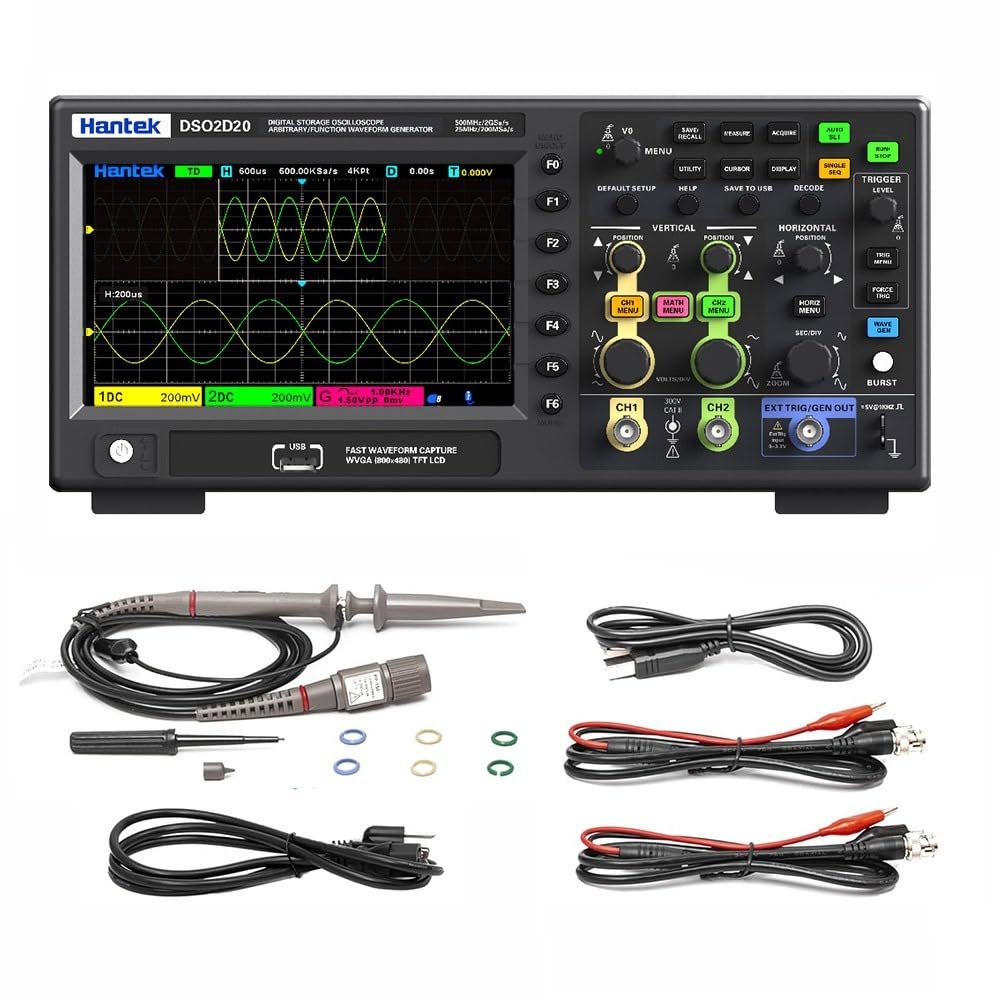
شکل 1.1: مخکی view of the Hantek DSO2D50 Digital Storage Oscilloscope.
کلیدي ځانګړتیاوې:
- 2 Analog Channels + 1 External Trigger Channel
- 500 MHz Bandwidth
- 2 GSa/s Real-time Sampد نرخ کچه
- 80K Memory Depth
- Built-in 25MHz Arbitrary Waveform Generator
- 32 Automatic Measurement Functions
- ۳.۶ د محرک حالتونه
- Supports 1MΩ/50Ω Impedance Switching
- Multiple Data Storage Options (CSV, images, waveforms)
- 7 انچه LCD ډسپلې
2. د خوندیتوب معلومات
خبرداری:
- To prevent electric shock, do not open the instrument casinج. ټول خدمات وړ پرسونل ته راجع کړئ.
- اوسیلوسکوپ په لوند یا وچ حالت کې مه چلوئamp شرایط
- د بریښنا رسولو حجم ډاډمن کړئtage د وسیلې اړتیاوې پوره کوي.
- یوازې د تولید کونکي لخوا مشخص شوي د بریښنا تار او لوازمو څخه کار واخلئ.
- Before making any connections, ensure the instrument is powered off.
- Always connect the ground lead of the probe to the circuit ground before connecting the probe tip to the test point.
- Observe all terminal ratings to prevent fire or electric shock.

Figure 2.1: Rear panel showing power input and safety warning.
خطرناک حجمtage inside, do not remove the cover unless by specified personnel.
3. د بسته محتويات
ډاډ ترلاسه کړئ چې ستاسو کڅوړه لاندې توکي لري:
- 1 x Hantek DSO2D50 Bench Digital Storage Oscilloscope
- 2 x Passive Probes (typically 1:1/10:1 switchable)
- 1 د بریښنا کارډ
- 1 x USB کیبل
- ۱ x د کارونکي لارښود (دا سند)
- 1 x Calibration Certificate (may vary)
If any items are missing or damaged, please contact your dealer or Hantek customer support immediately.
4. محصول ختم شوview
۴.۱ د مخکینۍ پینل کنټرولونه او نښلونکي
The front panel of the DSO2D50 features the display, control buttons, knobs, and input connectors for channels and the arbitrary waveform generator output.

شکل 4.1: مفصل view of the control panel and input connectors.
مهمې برخې عبارت دي له:
- د ښودلو ساحه: 7-inch TFT LCD for waveform display and menu navigation.
- د فعالیت تڼۍ (F0-F6): Context-sensitive buttons along the right side of the display.
- د مینو تڼۍ: Buttons like DEFAULT SETUP, UTILITY, CURSOR, DISPLAY, SAVE TO USB, DECODE, HELP.
- Vertical Controls: VOLTS/DIV knobs and CH1 MENU, CH2 MENU, MATH MENU buttons for adjusting vertical scale and channel settings.
- Horizontal Controls: SEC/DIV knob and HORIZ MENU, ZOOM buttons for adjusting horizontal scale and time base.
- د محرک کنټرولونه: TRIGGER LEVEL knob and TRIG MENU, FORCE TRIG buttons for setting trigger conditions.
- Arbitrary Waveform Generator (AWG) Controls: WAVE GEN button and EXT TRIG/GEN OUT connector.
- د چینل معلومات: CH1 and CH2 BNC connectors.
- External Trigger/AWG Output: EXT TRIG/GEN OUT BNC connector.
- د USB کوربه پورټ: د USB ذخیره کولو وسیلو سره د نښلولو لپاره.
4.2 د شا پینل نښلونکي
The rear panel includes the power input and ventilation.
- د AC بریښنا داخلول: د بریښنا تار د نښلولو لپاره.
- د وینټیلیشن فین: For cooling the instrument.
5. ترتیب کول
5.1 د بریښنا نښلول
- ډاډ ترلاسه کړئ چې د اوسیلوسکوپ د بریښنا سویچ په بند حالت کې دی.
- ورکړل شوی بریښنا تار د اوسیلوسکوپ په شا پینل کې د AC بریښنا ان پټ سره وصل کړئ.
- د بریښنا تار بله پای په ځمکه شوي AC بریښنا پلورنځي کې ولګوئ.
5.2 Probe Connection and Compensation
- Connect a passive probe to one of the CH1 or CH2 BNC input connectors.
- Set the probe attenuation switch (if applicable) to 10X.
- Connect the probe ground clip to the oscilloscope's ground terminal (usually a dedicated terminal or the ground ring of the BNC connector).
- Connect the probe tip to the probe compensation output (usually a square wave test signal output on the front panel).
- Power on the oscilloscope.
- فشار ورکړئ آټو سیټ button. The oscilloscope will automatically adjust settings to display the compensation signal.
- Adjust the compensation screw on the probe until a flat-top square wave is displayed on the screen. This ensures accurate measurements.
6. عملیاتي لارښوونې
۶.۱ د څپې بڼه اساسي ښودنه
- Power on the oscilloscope.
- Connect a compensated probe to CH1.
- Connect the probe tip to the signal source you wish to measure.
- فشار ورکړئ آټو سیټ button. The oscilloscope will automatically adjust the vertical, horizontal, and trigger settings to display a stable waveform.
- د کارولو VOLTS/DIV knob to adjust the vertical scale (ampادب).
- د کارولو SEC/DIV knob to adjust the horizontal scale (time base).
- د کارولو POSITION د څپې شکل په عمودي یا افقي ډول حرکت کولو لپاره غوټۍ.
6.2 1MΩ/50Ω Impedance Switching
The DSO2D50 supports switching between 1MΩ (high impedance) and 50Ω (low impedance) input impedance. This is crucial for adapting to different measurement scenarios and ensuring signal integrity, especially for high-frequency signals or when matching transmission lines.

Figure 6.1: Menu for selecting input impedance.
To switch impedance:
- فشار ورکړئ CH1 MENU or CH2 MENU button for the desired channel.
- Navigate through the menu options using the function buttons (F0-F6) until you find the "Impedance" setting.
- یو هم وټاکئ 1MΩ or 50Ω as required for your measurement.
- یادونه: When using 50Ω impedance, ensure your signal source is also 50Ω terminated to prevent reflections.
6.3 Measurement and Statistical Functions
The oscilloscope provides 32 automatic measurement functions and threshold measurement functions. These tools support statistical analysis, allowing you to display five measurement values: current value, average value, maximum value, minimum value, and standard deviation.

شکل 6.2: مثالample of automatic measurement display.
To access measurement functions:
- فشار ورکړئ اندازه کول تڼۍ
- Use the function buttons to select the desired measurement type (e.g., Frequency, Period, Vpp, Vmax, Vmin, Rise Time, Fall Time).
- The selected measurements will appear on the screen.
- ته view statistical values, navigate to the statistical menu within the MEASURE options.
6.4 Built-in Arbitrary Waveform Generator (AWG)
The DSO2D50 includes a 25MHz arbitrary waveform generator capable of outputting five standard waveforms: sine wave, square wave, triangle wave, exponential wave, noise, and DC. It also supports custom arbitrary waveform output.

Figure 6.3: Arbitrary Waveform Generator settings interface.
To use the AWG:
- Connect a BNC cable from the EXT TRIG/GEN OUT connector to the input of the device under test or an oscilloscope channel.
- فشار ورکړئ WAVE GEN تڼۍ
- Use the function buttons to select the desired waveform type (Sine, Square, Triangle, etc.).
- Adjust parameters such as Frequency, Amplitude, and Offset using the corresponding menu options and knobs.
- Ensure the AWG output is enabled within the menu.
۳.۶ د محرک حالتونه
The oscilloscope offers 9 triggering modes to stabilize and capture specific events in your waveform. Common modes include Edge, Pulse, Video, Slope, and more advanced options for serial bus decoding.
To set up a trigger:
- فشار ورکړئ TRIG MENU تڼۍ
- Select the desired trigger type (e.g., Edge, Pulse).
- Adjust the trigger source (CH1, CH2, EXT), slope (rising/falling edge), and level using the TRIGGER LEVEL knob and menu options.
- The trigger level is indicated by a horizontal line on the display.
۶.۵ د معلوماتو ذخیره کول او یادول
The DSO2D50 allows you to save and recall various data types, including CSV files, images, reference waveforms, and waveform data, to a USB storage device.
To save data:
- Insert a USB flash drive into the USB Host port on the front panel.
- فشار ورکړئ SAVE TO USB تڼۍ
- Select the desired save type (e.g., Image, Waveform, CSV) and file format from the menu.
- د خوندي کولو عملیات تایید کړئ.
6.7 پرمختللې دندې
- د ریاضی کارونه: Perform waveform arithmetic operations (e.g., A+B, A-B, A*B, A/B, FFT) and support cursor measurements for detailed analysis.
- FFT Scale Display: Provides a clear display for frequency domain analysis, making it easier to read results.
- XY حالت: Use XY mode to analyze the phase relationship between two signals. This is useful for Lissajous figures.
- Serial Protocol Triggering and Decoding: Supports protocols such as UART, LIN, CAN, SPI, and IIC, enabling easy analysis of serial bus data.
- SCPI Remote Control: Standard SCPI commands are supported for easy system setup and remote control via USB.
7. ساتنه
7.1 پاکول
- Clean the instrument's exterior with a soft cloth dampد معتدل صابون او اوبو سره تړل شوی.
- Do not use abrasive cleaners or solvents that may damage the casing یا ښودنه.
- Ensure no liquid enters the instrument.
7.2 ذخیره کول
- When not in use for extended periods, store the oscilloscope in a dry, dust-free environment.
- د خورا تودوخې او رطوبت څخه ډډه وکړئ.
- Disconnect all probes and the power cord before storage.
7.3 اندازه کول
The DSO2D50 is factory calibrated. For continued accuracy, periodic calibration by qualified service personnel is recommended, typically every 1-2 years depending on usage.
8. ستونزه حل کول
| ستونزه | احتمالي لامل | د حل لاره |
|---|---|---|
| له بریښنا وروسته نه ښودل. | Power cord not connected, power switch off, or power supply issue. | Check power cord connection. Ensure power switch is ON. Verify power outlet functionality. |
| هیڅ څپې بڼه نه ده ښودل شوې. | Probe not connected, signal source off, vertical/horizontal scale incorrect, or trigger not set. | Check probe connection. Ensure signal source is active. Press آټو سیټ. Adjust VOLTS/DIV and SEC/DIV. Check trigger settings. |
| Unstable waveform. | Incorrect trigger settings. | Adjust trigger level. Change trigger type (e.g., from Auto to Normal). Check trigger source. |
| اندازه کول ناسم دي. | Probe compensation incorrect, probe attenuation setting mismatch, or incorrect impedance. | Perform probe compensation. Ensure probe attenuation (1X/10X) matches oscilloscope setting. Verify input impedance (1MΩ/50Ω). |
| USB storage not recognized. | Incompatible USB drive, drive not formatted correctly, or drive issue. | Try a different USB drive. Ensure drive is formatted to FAT32. |
9. مشخصات
The following table outlines the key specifications for the Hantek DSO2D50 Digital Storage Oscilloscope.
| پیرامیټر | مشخصات |
|---|---|
| ماډل | DSO2D50 |
| چینلونه | 2 Analog Channels + 1 External Trigger Channel |
| بانډ ویت | 500 MHz |
| Sampد نرخ کچه | 2 GSa/s (Real-time) |
| د حافظې ژوروالی | 80 Kpts |
| خپلمنځي څپې جنراتور | 25 MHz (Sine, Square, Triangle, Exponential, Noise, DC) |
| عمودی حساسیت | 500 µV/div - 10 V/div |
| د ننوتلو خنډ | 1 MΩ ±2% || 15 pF ±5 pF; 50 Ω ±2% |
| د میکس داخلي حجمtage | 300 V CAT II (1MΩ) |
| ښودل | د 7 انچ TFT LCD |
| د محرک حالتونه | Edge, Pulse, Video, Slope, Overtime, Window, Pattern, Interval, UART, LIN, CAN, SPI, IIC |
| Automatic Measurements | 32 types, with statistical analysis |
| انٹرفیس | USB Host, USB Device |
| د بریښنا رسول | 100-240V AC، 50/60Hz |
| د بریښنا مصرف | < 50W |
| ابعاد | (Refer to package dimensions, typically 5.91 x 3.94 x 0.79 inches for package, actual unit size will be larger) |
| وزن | 12.1 پونډه (د توکي وزن) |
یادونه: Specifications are subject to change without notice. For the most current specifications, please refer to the manufacturer's official webسایټ
9.1 ماډل پرتله کول
The Hantek DSO2D50 is part of a series of oscilloscopes. The following table provides a comparison with other models in the series, highlighting key differences.

Figure 9.1: Model comparison table for Hantek oscilloscopes.
This table helps to understand the DSO2D50's position within the product line, specifically noting its 500MHz bandwidth, 2GSa/s sampling rate, 80K storage depth, and integrated arbitrary function generator (AFG).
10. تضمین او ملاتړ
10.1 د تضمین معلومات
Hantek products are typically covered by a limited warranty against defects in materials and workmanship. The specific warranty period and terms may vary by region and product. Please refer to the warranty card included with your product or visit the official Hantek webد تفصيلي تضمین معلوماتو لپاره سایټ.
د تضمین ادعاوو لپاره د پیرود ثبوت په توګه د پیرود رسید وساتئ.
10.2 د پیرودونکي ملاتړ
For technical assistance, troubleshooting, or service inquiries, please contact Hantek customer support:
- جوړونکی: Qingdao Hantek Electronic Co., Ltd
- پته: #35 Building, No. 780 Baoyuan Road, High-tech Zone, Qingdao, Shandong, China 266114
- Webسایټ: (Please refer to the official Hantek website for contact forms or email addresses)
When contacting support, please have your product model (DSO2D50) and serial number ready.


