پیژندنه
This manual provides detailed instructions for setting up, operating, maintaining, and troubleshooting your GEEKOM GeekBook X14 Pro laptop. Please read this manual thoroughly before using your device to ensure proper functionality and longevity. Keep this manual for future reference.
په بکس کې څه دي
Upon unboxing your GEEKOM GeekBook X14 Pro, verify that all the following items are included:
- GEEKOM GeekBook X14 Pro Laptop
- GEEKOM GeekBook X14 Pro Premium Packaging
- 65W PD GaN Fast Charger
- USB-C ته USB-C کیبل
- د ډاکینګ سټیشن
- د کارن لارښود

محصول پای ته ورسیدview
The GEEKOM GeekBook X14 Pro is an ultra-light and thin laptop designed for professionals. It features a magnesium alloy unibody chassis, weighing only 999g and tapering to 6mm at its thinnest point.

کلیدي ځانګړتیاوې:
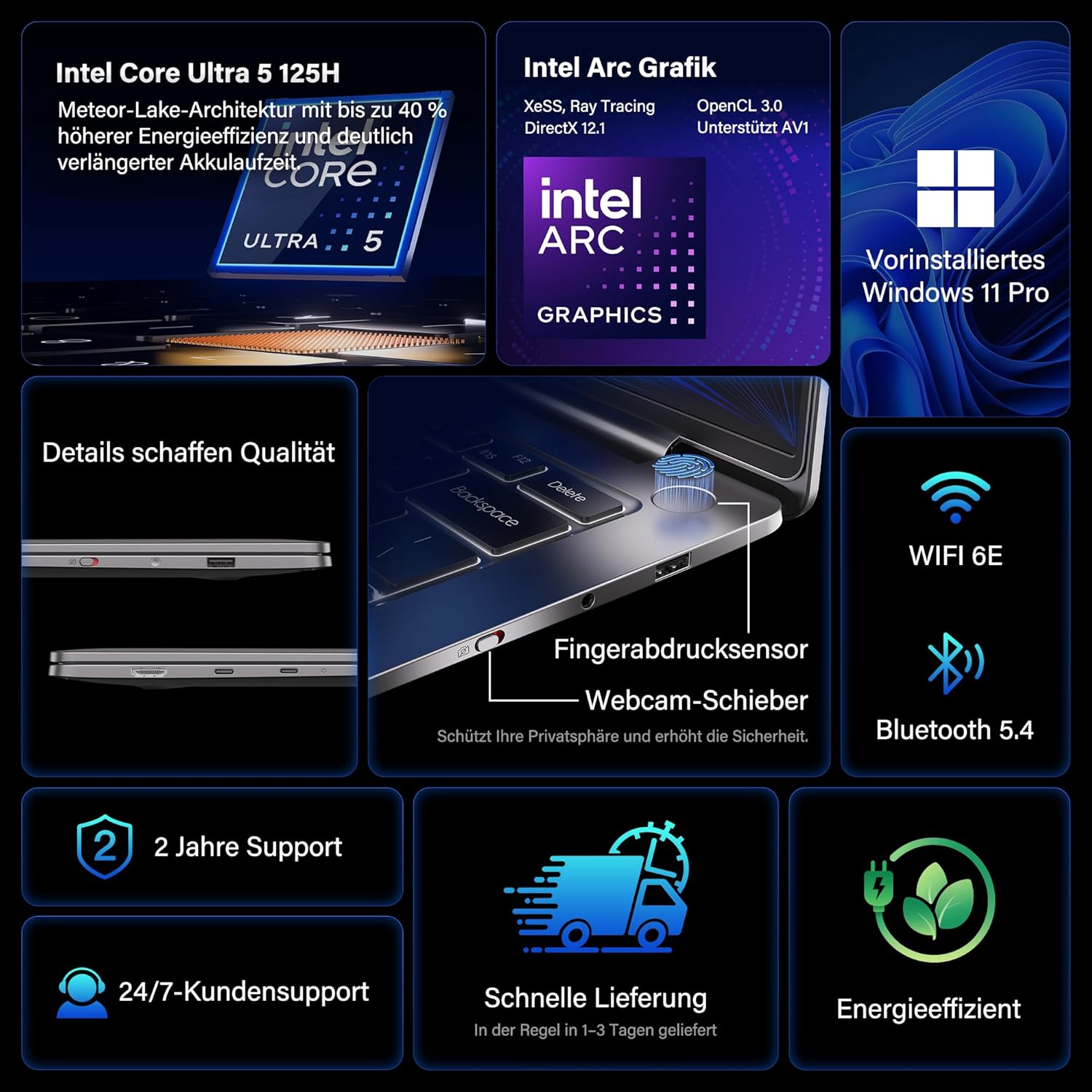
- پروسیسر: Intel Core Ultra 5 125H (14 cores, 18 threads, up to 4.5 GHz)
- ګرافیک: Intel Arc Graphics with Xe-LPG architecture
- ښکاره کول: 14-inch 2.8K OLED (2880 x 1800) with 120Hz refresh rate, 100% DCI-P3, up to 450 nits brightness
- حافظه: 32GB LPDDR5x RAM (7500 MT/s)
- ذخیره کول: 1TB PCIe 4.0 NVMe SSD
- عملیاتي سیسټم: مخکې له مخکې نصب شوی وینډوز ۱۱ پرو
- ارتباط: 2x USB4 (40 Gbps), 1x USB 3.2 Gen 1 Type-A (5 Gbps), HDMI 2.0, Wi-Fi 6E, Bluetooth 5.4
- امنیت: Fingerprint sensor in power button, physical webcam slider
- آډیو: DTS:X Ultra Audio
- بیټرۍ: 72 Wh, up to 16 hours battery life, 65W USB-C fast charging
- یخ کول: GEEKOM IceBlade 2.0 cooling system with adjustable fan profiles

بندرونه او نښلونکي:
- 2x USB4 (40 Gbps)
- 1x USB 3.2 Gen 1 Type-A (5 Gbps)
- 1x HDMI 2.0
- ۱x ۳.۵ ملي متره آډیو جیک
- Power Input (via USB-C)

چمتو کول
۳.۲. د بریښنا لومړنی فعالول او چارج کول
- Connect the 65W PD GaN Fast Charger to a power outlet and then to one of the USB-C ports on your laptop.
- لیپ ټاپ ته اجازه ورکړئ چې د لومړني کارونې دمخه لږترلږه 30 دقیقې چارج شي، یا تر هغه چې د بیټرۍ شاخص کافي چارج وښيي.
- د لپ ټاپ د چالانولو لپاره د بریښنا تڼۍ (د ګوتو نښې سینسر سره مدغم شوی) فشار ورکړئ.
۲. د وینډوز ۱۱ پرو تنظیم کول
د وینډوز ۱۰ پرو لومړني تنظیم بشپړولو لپاره په سکرین کې لارښوونې تعقیب کړئ. پدې کې شامل دي:
- ستاسو د سیمې او کیبورډ ترتیب غوره کول.
- د Wi-Fi شبکې سره وصل کول.
- د مایکروسافټ حساب سره لاسلیک کول یا محلي حساب جوړول.
- د محرمیت ترتیبات تنظیم کول.
۴. د ګوتو نښې سینسر تنظیم کول
For enhanced security and quick login, set up the fingerprint sensor:
- ورتګ ترتیبات > حسابونه > د ننوتلو اختیارونه.
- د "د ننوتلو لارې" لاندې، غوره کړئ د ګوتو نښې پیژندنه (د وینډوز هیلو) او د خپلو ګوتو نښو ثبتولو لپاره لارښوونې تعقیب کړئ.
عملیاتي لارښوونې
د ښودلو ځانګړتیاوې
The 14-inch 2.8K OLED display offers vibrant colors and sharp details. With a 120Hz refresh rate, scrolling and animations are smooth. The display covers 100% DCI-P3 color gamut and reaches up to 450 nits brightness, ensuring clear visibility in various lighting conditions.

فعالیت
Equipped with an Intel Core Ultra 5 125H processor, 32GB LPDDR5x RAM, and a 1TB PCIe 4.0 NVMe SSD, the GeekBook X14 Pro delivers efficient performance for demanding tasks, quick application launches, and seamless multitasking.

ارتباط
The laptop supports Wi-Fi 6E for fast and stable wireless internet connections and Bluetooth 5.4 for connecting peripherals. The two USB4 ports offer high-speed data transfer (40 Gbps) and support up to three 4K external displays simultaneously via the included mini docking station or direct connection.
آډیو
Experience clear and spatial audio with DTS:X Ultra technology, enhancing your video calls, movies, and music playback.
Cooling System (GEEKOM IceBlade 2.0)
The GEEKOM IceBlade 2.0 cooling system ensures optimal performance even under sustained load. It features a quiet fan and a dual-heatpipe design to efficiently dissipate heat. You can switch between three intelligent fan profiles (Silent, Standard, Performance) by pressing Fn + P to balance noise and cooling efficiency.

بیټرۍ او چارج کول
The 72 Wh battery provides up to 16 hours of usage. The included 65W USB-C PD GaN fast charger can charge the battery up to 80% in approximately one hour, allowing for quick power-ups on the go.

Webcam Privacy Slider
For enhanced privacy, the laptop includes a physical slider to cover the webcam کله چې نه کارول کیږي.
ساتنه
پاکول
- د سکرین او چیسس پاکولو لپاره نرم، لینټ نه پاک ټوکر وکاروئ.
- د سختو داغونو لپاره، په نرمۍ سرهampټوکر د اوبو یا د سکرین خوندي پاکولو محلول سره ومینځئ.
- د سختو کیمیاوي موادو، خړوبونکو موادو، یا ډیر رطوبت کارولو څخه ډډه وکړئ.
- د پاکولو دمخه ډاډ ترلاسه کړئ چې لپ ټاپ بند دی او پلګ شوی دی.
د سافټویر تازه معلومات
Regularly check for and install Windows updates and driver updates to ensure optimal performance, security, and compatibility. You can check for Windows updates via ترتیبات > د وینډوز تازه کول.
د ستونزو حل کول
لیپ ټاپ نه چالانېږي
- Ensure the charger is securely connected to both the laptop and a working power outlet.
- Allow the laptop to charge for at least 30 minutes.
- Try a different power outlet or USB-C port if available.
د ښودلو مسلې
- If the screen is black, ensure the laptop is powered on and not in sleep mode. Press any key or the power button briefly.
- Check display settings in Windows if external monitors are not detected or showing incorrect resolution.
ورو فعالیت
- هغه غیر ضروري غوښتنلیکونه بند کړئ چې په شاليد کې روان دي.
- ډاډ ترلاسه کړئ چې وینډوز او ډرایورونه تازه دي.
- په SSD کې د کافي وړیا ذخیره کولو ځای وګورئ.
- Monitor CPU/RAM usage in Task Manager to identify resource-intensive processes.
د نښلولو ستونزې
- وای فای: خپل روټر او لیپ ټاپ بیا پیل کړئ. ډاډ ترلاسه کړئ چې وای فای د وینډوز ترتیباتو کې فعال شوی دی.
- بلوتوث: Ensure Bluetooth is enabled and devices are in pairing mode. Remove and re-pair devices if issues persist.
- USB/HDMI: Ensure cables are securely connected. Test with different cables or ports if possible.
د نورو مرستو لپاره، د تضمین او ملاتړ برخې ته مراجعه وکړئ.
مشخصات
| فیچر | تفصیل |
|---|---|
| برانډ | GEEKOM |
| د ماډل نوم | GeekBook X14 Pro |
| د ماډل شمیره | NX14CM |
| رنګ | د تیتانیم خړ |
| د فارم فکتور | Ultra-portable and Ultra-light Notebook |
| د سکرین اندازه | ۷۸۷ انچه |
| د سکرین ریزولوشن | 2.8K (2880 x 1800 pixels, 16:10) |
| د پروسیسر ډول | د انټل کور الټرا ۵ ۱۲۵ ایچ |
| د پروسیسر سرعت | تر 4.5 GHz پورې |
| د RAM اندازه | 32 جي بي |
| د رام ټیکنالوژي | LPDDR5x |
| د حافظې ساعت سرعت | 7500 MHz |
| د هارډ ډیسک اندازه | 1 TB |
| د هارډ ډیسک ډول | SSD (PCIe x4) |
| د ګرافیک کاپروسیسر | د انټیل آرک ګرافیک |
| بې سیم ډول | 802.11ax (Wi-Fi 6E), Bluetooth 5.4 |
| USB بندرونه | 2x USB4, 1x USB 3.2 Gen 1 Type-A |
| د HDMI بندرونه | 1 (HDMI 2.0) |
| عملیاتي سیسټم | وینډوز 11 پرو |
| د اوسط بیټرۍ ژوند | Up to 16 Hours (72 Wh) |
| د توکي وزن | 999g (Laptop only) |
| ځانګړي ځانګړتیاوې | Fingerprint sensor, Webcam privacy slider, DTS:X Ultra Audio, GEEKOM IceBlade 2.0 cooling, Mini docking station included |
تضمین او ملاتړ
The GEEKOM GeekBook X14 Pro comes with a 2 کلن تضمین. GEEKOM provides د پیرودونکو ۲۴/۷ ملاتړ for any technical assistance or inquiries you may have.
For support, please visit the official GEEKOM webسایټ ته مراجعه وکړئ یا مستقیم د دوی د پیرودونکو خدماتو سره اړیکه ونیسئ. د ملاتړ سره د اړیکې نیولو پر مهال د خپل پیرود رسید او د محصول سریال شمیره په لاس کې وساتئ.
The product undergoes extensive reliability testing, including thermal shock, vibration, humidity, and impact tests, to ensure durability and high quality.


