1. پیژندنه
This manual provides detailed instructions for the setup, operation, and maintenance of your GEEKOM Mini PC IT12. This compact desktop computer is equipped with a 12th Gen Intel Core i7-1260P processor, 32GB of DDR4 RAM, and a 1TB NVMe PCIe 4.0 SSD, running Windows 11 Pro. Its design focuses on efficient performance and versatile connectivity for various applications.
2. د تنظیم کولو لارښود
2.1. ان باکسینګ او ابتدايي معاینه
په احتیاط سره د بسته بندۍ څخه ټولې برخې لرې کړئ. ډاډ ترلاسه کړئ چې ټول هغه توکي چې "په بکس کې څه دي" برخه کې لیست شوي دي شتون لري او زیانمن شوي ندي.
- 1x GEEKOM Mini PC IT12
- 1x HDMI کیبل
- ۱x VESA ماونټ
- 1x بریښنا اډاپټر
- 1x کارن لارښود
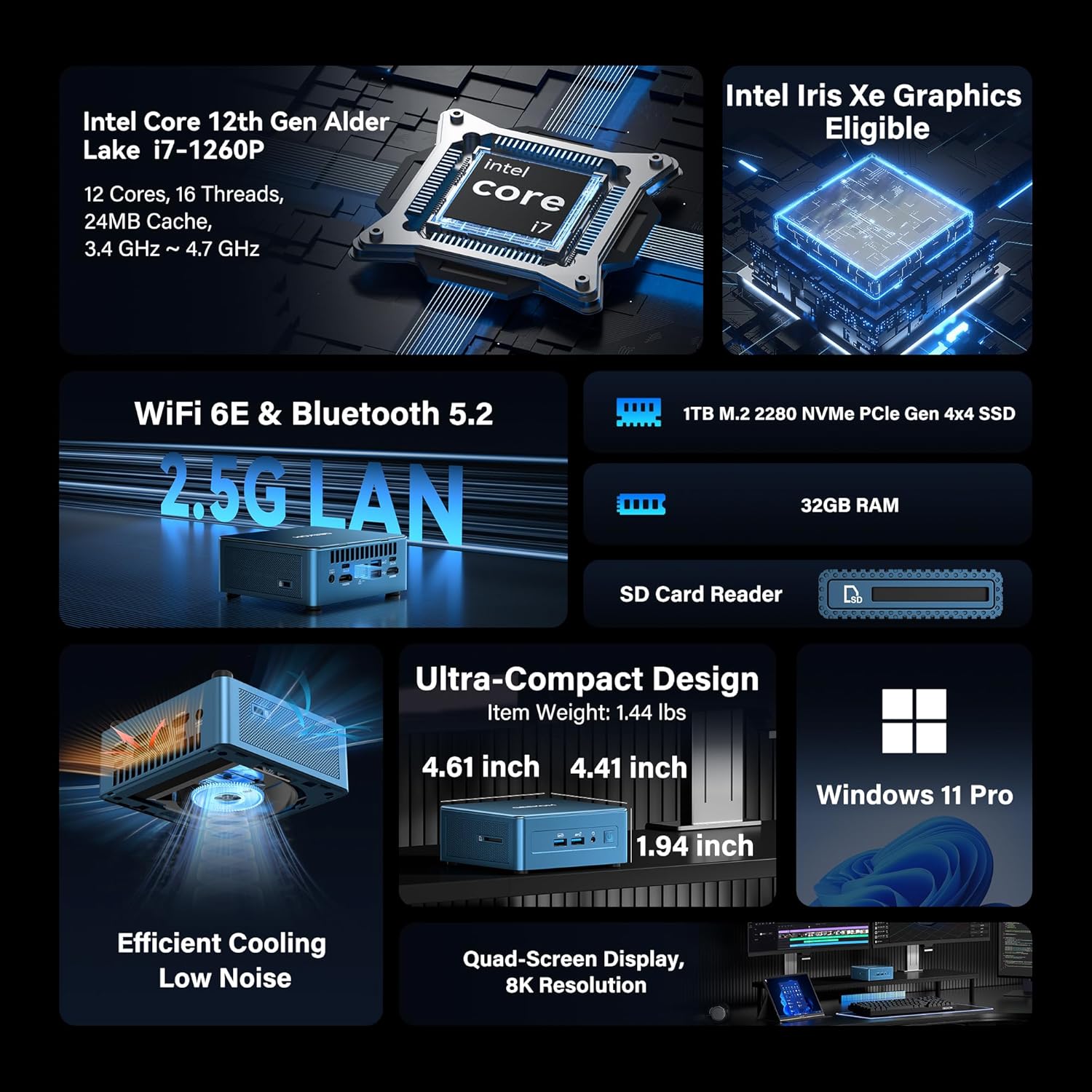
Image: GEEKOM Mini PC IT12 and its accessories, including the mini PC unit, power adapter, HDMI cable, and VESA mount.
د ان باکسینګ ویډیو لارښود
Video: A hands-on unboxing of the GEEKOM Mini PC, showing the contents of the box and the initial presentation of the device and its accessories.
2.2. د پردیو نښلول
- د نښلولو ښودنه: Use the provided HDMI cable to connect your monitor to one of the HDMI 2.0 ports on the back of the Mini PC. Alternatively, use a USB4 port for DisplayPort output.
- کیبورډ او موږک سره وصل کړئ: Plug your USB keyboard and mouse into the available USB 3.2 Gen 2 ports on the front or USB ports on the back.
- بریښنا وصل کړئ: د مینی کمپیوټر په شا کې د DC-in پورټ سره د بریښنا اډاپټر وصل کړئ، بیا اډاپټر د بریښنا آوټ لیټ سره وصل کړئ.
- د شبکې پیوستون: For a wired connection, connect an Ethernet cable to the 2.5GbE LAN port. For wireless, ensure the Wi-Fi antenna is connected (if external) or rely on the internal Wi-Fi 6E.

انځور: شاته view of the GEEKOM Mini PC IT12, showing the arrangement of ports including DC-in, USB4, HDMI, 2.5GbE LAN, USB 3.2, and USB 2.0. Cables are connected to some ports.
۳. لومړی بوټ
Press the power button on the front of the Mini PC. The system will boot into Windows 11 Pro. Follow the on-screen instructions to complete the initial Windows setup.
3. عملیاتي لارښوونې
3.1. بریښنا فعال/بند
- پاور آن: په مخکینۍ پینل کې د بریښنا تڼۍ فشار ورکړئ.
- بندول: په وینډوز کې د سټارټ تڼۍ کلیک وکړئ، بیا پاور > بندول غوره کړئ.
- بیا پیل کول: په وینډوز کې د سټارټ تڼۍ کلیک وکړئ، بیا پاور> بیا پیل غوره کړئ.
۱. د ښودلو ترتیب
The GEEKOM Mini PC IT12 supports up to four displays simultaneously via its dual USB4 (8K DP1.4) and dual HDMI 2.0 (4K@120Hz) ports. To configure multiple displays in Windows 11:
- په ډیسټاپ کې ښیې کلیک وکړئ او "د ښودلو ترتیبات" غوره کړئ.
- د "څو ښودنې" لاندې، تاسو کولی شئ خپل ښودنې کشف، وپیژنئ او تنظیم کړئ.
- Choose your preferred display mode (e.g., Extend these displays, Duplicate these displays).

Image: A GEEKOM Mini PC IT12 connected to two large monitors and a tablet, demonstrating its quad-display capability for a multi-screen workstation.
۴. شبکه او اتصال
- تار لرونکی LAN: The 2.5Gb Ethernet port provides high-speed internet access.
- Wi-Fi 6E: Connect to wireless networks for fast and stable internet.
- بلوتوث 5.2: Pair with compatible Bluetooth devices such as keyboards, mice, and headphones.
۴. ساتنه او لوړول
4.1. د یخولو سیسټم
The IT12 Mini PC features an upgraded IceBlast cooling system with an all-copper module and a silent fan. To ensure optimal performance and longevity, keep the ventilation grilles clear of obstructions. Regularly clean dust from the vents using compressed air.

انځور: یوه چاودنه شوې view diagram illustrating the internal components of the GEEKOM Mini PC IT12, highlighting the IceBlast cooling system with its fan and copper heat pipes.
۶.۲. د ذخیره کولو او حافظې پراخول
The GEEKOM Mini PC IT12 offers flexible upgrade options:
- رام: The 32GB DDR4 RAM can be expanded up to 96GB.
- NVMe SSD: The 1TB NVMe PCIe 4.0 SSD can be expanded up to 4TB.
- اضافي ذخیره: The unit includes additional slots for M.2 2242 SATA SSD (up to 2TB) and 2.5" SATA HDD (up to 4TB) expansion.
For detailed instructions on how to access internal components for upgrades, please refer to the official GEEKOM support resources or consult a qualified technician.

انځور: یو مفصل ډیاګرام ښیېasing the expandable storage options within the GEEKOM Mini PC IT12, illustrating slots for M.2 NVMe PCIe SSD, M.2 SATA SSD, and a 2.5-inch SATA HDD/SSD.
5. ستونزه حل کول
5.1. هیڅ ځواک نشته
- ډاډ ترلاسه کړئ چې د بریښنا اډاپټر په خوندي ډول د مینی کمپیوټر او د کار کولو بریښنا سایټ دواړو سره وصل دی.
- د بل وسیلې په لګولو سره د بریښنا آوټ لیټ فعال دی تصدیق کړئ.
- د هر ډول لیدل شوي زیان لپاره د بریښنا اډاپټر وګورئ.
۶.۲. د ښودنې محصول نشته
- Confirm the display cable (HDMI or USB4) is firmly connected to both the Mini PC and the monitor.
- ډاډ ترلاسه کړئ چې مانیټر فعال دی او سم ان پټ سرچینې ته تنظیم شوی دی.
- که شتون ولري، نو د ښودنې بل کیبل یا مانیټر هڅه وکړئ.
۲. د شبکې د اتصال مسلې
- وایر شوی: د ایترنیټ کیبل اتصال او د روټر حالت وګورئ.
- بې سیم: Verify Wi-Fi is enabled in Windows settings and you are connected to the correct network. Restart your router if necessary.
۷.۴. د سیسټم د فعالیت مسلې
- ډاډ ترلاسه کړئ چې مینی کمپیوټر کافي هوا لري او ډیر ګرم نه وي.
- هغه غیر ضروري غوښتنلیکونه بند کړئ چې په شاليد کې روان دي.
- د شته وینډوز تازه معلوماتو او ډرایور تازه معلوماتو لپاره وګورئ.
6. مشخصات
| فیچر | تفصیل |
|---|---|
| پروسیسر | 12th Gen Intel Core i7-1260P (12 Cores, 16 Threads, up to 4.70 GHz, 24MB Cache) |
| ګرافیک | د انټل ایرس ایکس ای ګرافیک (مدغم) |
| RAM | ۱۶ جي بي ډي ډي آر ۴ (تر ۶۴ جي بي پورې د غځېدو وړ) |
| ذخیره کول | 1TB NVMe PCIe 4.0 SSD (Expandable to 4TB) + M.2 2242 SATA SSD slot (up to 2TB) + 2.5" SATA HDD (up to 4TB) |
| عملیاتي سیسټم | وینډوز 11 پرو |
| د ویډیو تولید | 2x USB4 (8K DP1.4), 2x HDMI 2.0 (4K@120Hz) - Supports Quad Display |
| USB بندرونه | 2x USB4, 3x USB 3.2 Gen 2, 1x USB 2.0 |
| شبکه | 2.5Gb Ethernet, Wi-Fi 6E, Bluetooth 5.2 |
| د کارت لوستونکی | SD Card Reader (UHS-II) |
| ابعاد (LxWxH) | 4.6 x 4.4 x 1.9 انچه |
| وزن | ۲.۴۵ پونډه |
7. د انرژي موثریت
The GEEKOM Mini PC IT12 is designed for low power consumption, making it an energy-efficient alternative to traditional desktop PCs. Its 12th Gen Intel Core P-series CPU (28W single-CPU power draw) consumes significantly less power than high-performance H/HK series processors (45W+), reducing electricity costs and enabling 24/7 reliable operation with a quiet experience.
Video: A comparison demonstrating the energy consumption between a traditional desktop PC and the GEEKOM Mini PC IT12 under both light and heavy workloads.
8. تضمین او ملاتړ
Your GEEKOM Mini PC IT12 comes with a 3-year limited warranty. For technical assistance or warranty claims, please contact GEEKOM support through the following channels:
- د ایمیزون پلورونکي ملاتړ: Log into your Amazon buyer's account, find your order, and click "Get help" for product assistance.
- د بریښنالیک ملاتړ: Send an email to the After-sales Team at shirley.li@geekom.tw.
GEEKOM is committed to providing dedicated US-based technical support and ensures full certification including CE, FCC, CB, and CC for guaranteed safety and compliance.


