1. پیژندنه
This manual provides essential information for the safe and efficient use of your DOOGEE Note56 Android 16 smartphone. Please read it thoroughly before using your device.

انځور: مخ او شا view of the DOOGEE Note56 smartphone, showcasing its design and key specifications like 6150mAh battery, Android 16, 6.56-inch display, and 90Hz refresh rate.
2. ترتیب کول
2.1. د بسته محتويات
ډاډ ترلاسه کړئ چې ستاسو کڅوړه لاندې توکي لري:
- DOOGEE Note56 Smartphone
- د بریښنا اډاپټر
- USB کیبل
- د سیم Ejector وسیله
- محافظتي قضیه
- د چټک پیل لارښود (دا لارښود)
۲. د سیم کارت او TF کارت نصبول
The DOOGEE Note56 supports dual SIM cards and a TF (microSD) card for expandable storage.
- د وسیلې په اړخ کې د سیم کارت ټری ومومئ.
- د سیم ایجیکټر وسیله د ټرې تر څنګ په کوچني سوري کې دننه کړئ او په نرمۍ سره فشار ورکړئ تر هغه چې ټرې بهر راشي.
- Place your Nano-SIM cards and/or TF card into the designated slots on the tray. Ensure the gold contacts face downwards.
- ټری په احتیاط سره تلیفون ته بیا دننه کړئ تر هغه چې په خپل ځای کې کلیک وکړي.
۳.۲. د بریښنا لومړنی فعالول او اساسي ترتیب
- د بریښنا تڼۍ فشار ورکړئ او ونیسئ تر هغه چې د DOOGEE لوګو څرګند شي.
- د خپلې ژبې د غوره کولو، د وای فای شبکې سره د وصل کیدو او د خپل ګوګل حساب د تنظیمولو لپاره په سکرین کې موجود لارښوونې تعقیب کړئ.
- Configure security settings such as screen lock (PIN, pattern, password) and face recognition.
2.4. د وسیلې چارج کول
Connect the USB cable to the power adapter and then to the phone's charging port. Plug the adapter into a power outlet. The battery indicator will show charging status. For optimal battery life, use the provided charger.
3. عملیاتي لارښوونې
۲. د Android ۱۳ عملیاتي سیسټم
The DOOGEE Note56 runs on the latest Android 16 system, offering an optimized and intuitive user experience. It features improved application launch speeds, enhanced responsiveness, and a refined user interface. A new Privacy Space function allows for hiding sensitive data and applications, ensuring secure usage.

انځور: اوورview of the Android 16 operating system interface, displaying various applications, settings menus, and system information.
۴. د ښودلو ځانګړتیاوې
The device is equipped with a 6.56-inch IPS waterdrop display, providing a smooth visual experience with a 90Hz high refresh rate. The 720x1612 HD+ resolution and 90% screen-to-body ratio enhance viewing of movies and videos. Two eye-friendly modes are included to reduce eye strain during prolonged use.

انځور: نږدې انځور view of the DOOGEE Note56's 6.56-inch IPS display, illustrating its vibrant colors and the smooth 90Hz refresh rate.
۷. د کیمرې دندې
Capture vivid and beautiful photos with the 8MP main camera and take clear selfies with the 5MP front camera. The device utilizes AI functions for enhanced photography, including:
- د مصنوعي ذهانت صحنه پیژندنه: Automatically detects and optimizes settings for 12 different scenes.
- د شپې حالت: په ټیټ رڼا شرایطو کې د عکس کیفیت ښه کوي.
- د انځور حالت: د تیاره شالیدونو سره مسلکي ښکاري عکسونه جوړوي.
- HDR: Enhances dynamic range for balanced exposure.
- پرو حالت: Offers manual control over camera settings.
- د مسکا نیول: کله چې موسکا وموندل شي په اتوماتيک ډول عکس اخلي.
- پینورما: د پراخې زاویې منظره لرونکي عکسونه اخلي.
- دوامداره ډزې: په چټکۍ سره څو عکسونه اخلي.
- Fun Filters: Apply various creative effects to your photos.

Image: Diagram illustrating the 8MP rear camera and 5MP front camera specifications, along with icons representing various AI scene recognition modes.

Image: The camera interface of the DOOGEE Note56, highlighting features like HDR, Pro Mode, Smile Capture, Panorama, Continuous Shooting, Night Mode, and Fun Filters, with a sample photo.

Image: The 5MP front camera's capabilities for selfies, demonstrating Beauty Mode and Portrait Effect for bright, natural, and shareable self-portraits.
3.4. حافظه او ذخیره کول
The DOOGEE Note56 is equipped with 24GB RAM (3GB physical RAM + 21GB extended RAM) and 64GB of internal storage (ROM). It supports TF card expansion up to 2TB, providing ample space for photos, videos, and applications. This powerful memory configuration ensures smooth multitasking and minimizes lag during gaming or heavy app usage.

انځور: یو داخلي view diagram highlighting the 64GB ROM and 24GB RAM (composed of 3GB physical and 21GB extended RAM) for seamless performance.
۳. اتصال او نیویګیشن
The device supports Bluetooth 4.2 for stable wireless connections and 4G Dual SIM for broad network compatibility both domestically and internationally. For navigation, it integrates three major positioning systems: GPS, GLONASS, and Galileo, ensuring accurate location services from urban areas to remote locations.
۴. نورې سمارټ ځانګړتیاوې
- Instant Face Recognition: Unlock your device quickly and securely using your face.
- ایف ایم راډیو: Enjoy local radio stations without an internet connection.
- د 3.5mm هیډفون جیک: Connect your wired headphones for audio playback and calls.
- Smart Body Sensor: (Specific functionality not detailed, refers to general smart sensor capabilities).
- دوه ګونی سیسټم حالت: Allows for separate user environments.
- سوپر کلپ بورډ: د کلپ بورډ فعالیت ښه شوی.
- Screen Optimization & Color Customization: Adjust display settings for personal preference.

Image: Visual representation of instant face recognition, accurate GPS navigation, and the FM radio interface on the DOOGEE Note56.

انځور: د کولاژ نندارتونasing various smart OS features of the DOOGEE Note56, including smart body sensor, dual system mode, super clipboard, RAM expansion, screen optimization, and screen color customization.
4. ساتنه
4.1. د بیټرۍ مدیریت
The DOOGEE Note56 features a 6150mAh large capacity battery, designed for extended use. It supports approximately 1000 charge/discharge cycles and offers up to 4 years of durable battery life. The device also supports 5W reverse charging, allowing it to act as a power bank for other devices.
- د بیټرۍ د ژوند د اعظمي کولو لپاره، د سختې تودوخې څخه ډډه وکړئ.
- بیټرۍ په منظم ډول په بشپړه توګه مه خارجوئ.
- Use the original charger for optimal charging performance.
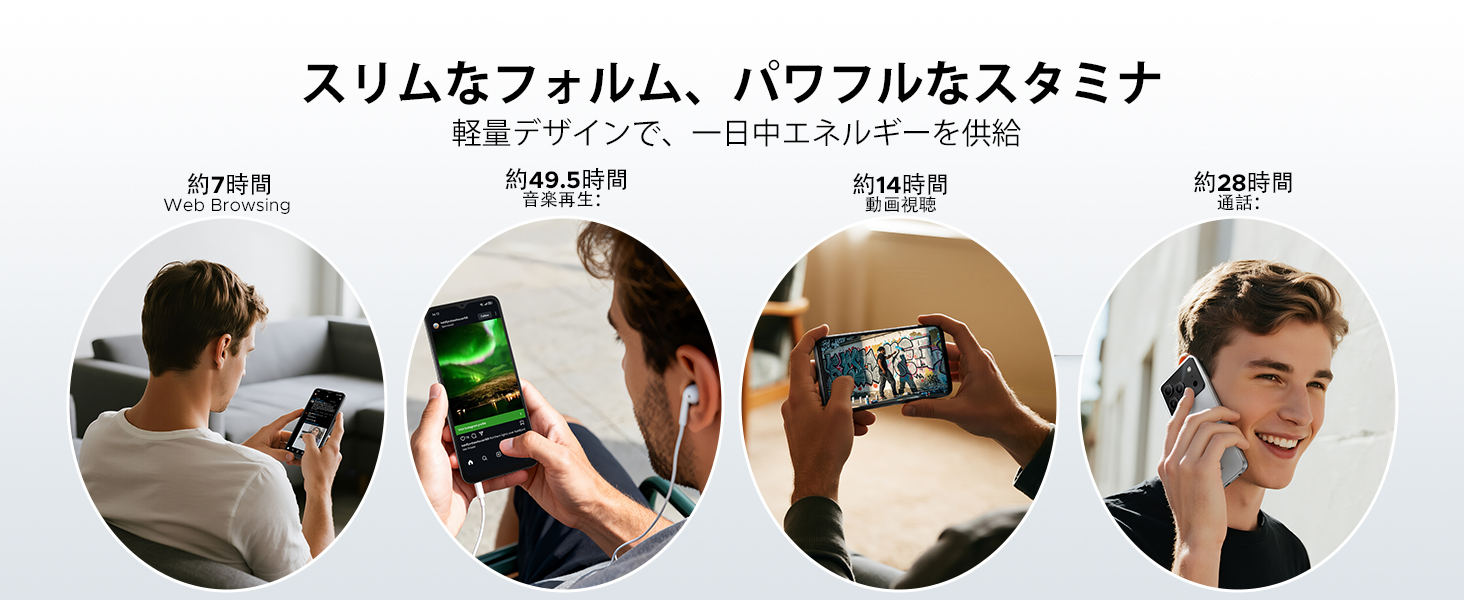
Image: Diagram illustrating the 6150mAh silicon-carbon battery, highlighting its features such as 1000 charge cycles, 4 years of durability, 20% smaller size, and 5W reverse charging capability.

Image: Infographic showing estimated battery life for different activities on the DOOGEE Note56: approximately 7 hours for web browsing, 49.5 hours for music playback, 14 hours for video watching, and 28 hours for calls.
4.2. پاکول او ساتنه
- د وسیلې سکرین او بدن پاکولو لپاره نرم ، لینټ پاک ټوکر وکاروئ.
- د سختو کیمیاوي موادو یا خړوبولو موادو کارولو څخه ډډه وکړئ.
- وسیله له ډیر دوړو او رطوبت څخه لرې وساتئ.
4.3. د سافټویر تازه معلومات
Regularly check for and install software updates to ensure your device has the latest features, security patches, and performance improvements. You can usually find this option in the device's settings under 'System' or 'About phone'.
5. ستونزه حل کول
If you encounter issues with your DOOGEE Note56, refer to the following common troubleshooting steps:
- وسیله نه فعاله کیږي: ډاډ ترلاسه کړئ چې بیټرۍ چارج شوې ده. د بیا پیلولو لپاره د بریښنا تڼۍ لږترلږه د 10-15 ثانیو لپاره فشار ورکړئ او ونیسئ.
- د اپلیکیشنونو خرابېدل یا کنګل کېدل: Close and reopen the app. Clear the app's cache and data in Settings > Apps. If the issue persists, uninstall and reinstall the app.
- د شبکې د اتصال ستونزې: Check if Airplane Mode is off. Restart the device. Verify your SIM card is correctly inserted and your mobile data plan is active. For Wi-Fi, try forgetting the network and reconnecting.
- د چارج کولو ستونزې: Ensure the charging cable and adapter are securely connected and undamaged. Try a different outlet or charger. Clean the charging port gently.
- ورو فعالیت: غیر ضروري شالید ایپسونه بند کړئ. په منظم ډول کیش پاک کړئ. د ذخیره کولو ځای خالي کولو په اړه فکر وکړئ.
For more complex issues, please refer to the support section.
6. مشخصات
| فیچر | مشخصات |
|---|---|
| د سکرین اندازه | 6.56 انچه |
| د بیټرۍ ظرفیت | 6150 mAh |
| رنګ | Black (other variants available) |
| د برانډ نوم | DOOGEE |
| جوړونکی | DOOGEE |
| د خوشې کولو کال | 2025 |
| شاملې برخې | د بریښنا اډاپټر |
| مطابقت لرونکی OS | Android 16 |
| نور ځانګړتیاوې | SIM-free |
| د ماډل نوم | نوټ 56 |
| د ښودلو ډول | IPS |
| د کڅوړې ابعاد | 19.3 x 10.5 x 5.1 سانتي متره؛ 410 جی |
| د تولید کونکي حواله | نوټ 56 |
| د نصب شوي RAM اندازه | 24 جي بي |
| د حافظې د ذخیره کولو ظرفیت | 64 جي بي |
7. تضمین او ملاتړ
7.1. د تضمین معلومات
The DOOGEE Note56 comes with a 1 کلن تضمین from the date of purchase, ensuring peace of mind for your usage. This warranty covers manufacturing defects under normal use conditions.
۸.۱. د ملاتړ سره څنګه اړیکه ونیسئ
In the unlikely event of a product defect or if you require technical assistance, please contact our support team through the following methods:
- Via Amazon Purchase History: Navigate to your Amazon purchase history and contact our store directly regarding your order.
- Via Product Page: On the product page, click on the store name located below the 'Add to Cart' button. Then, click the 'Ask a Question' button displayed in the upper right corner to send us an inquiry.


