1. پیژندنه
This manual provides essential information for the safe and efficient operation of your Panasonic TH-55PX735DX 55-inch 4K Ultra HD Smart LED TV. Please read these instructions thoroughly before using the television and retain them for future reference.
The Panasonic TH-55PX735DX is a 55-inch 4K Ultra HD Smart LED TV designed to enhance your home entertainment experience. It features a bezel-less display and a High Bright Panel, delivering vibrant colors, deep contrast, and sharp detail. The television supports HDR10+ and Dolby Vision for optimized visuals and Dolby Atmos for immersive audio. It integrates smart TV functionalities with Google TV, offering access to various streaming applications and connectivity options including Bluetooth and Dual-Band WiFi.
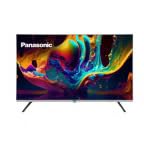
انځور 1.1: مخکی view of the Panasonic TH-55PX735DX Smart LED TV. This image displays the television's bezel-less design and its screen displaying vibrant colors.
۱.۱. د خوندیتوب مهم معلومات
د زیان مخنیوي او خوندي عملیات ډاډمن کولو لپاره لاندې خوندیتوب احتیاطي تدابیر په پام کې ونیسئ:
- د بریښنا سرچینه: Connect the TV only to an AC 230V, 50/60Hz power supply.
- وینټیلیشن: د تلویزیون شاوخوا مناسب هوا ورکول ډاډمن کړئ. د هوا د بهیدو لارې مه بندوئ.
- اوبه او رطوبت: تلویزیون باران یا رطوبت ته مه ښکاره کوئ. په تلویزیون کې د مایعاتو ډک شیان مه ځای پر ځای کوئ.
- پاکول: د پاکولو دمخه د تلویزیون پلګ خلاص کړئ. نرم او وچ ټوکر وکاروئ. د مایع پاکوونکو څخه ډډه وکړئ.
- ځای په ځای کول: Place the TV on a stable, level surface or mount it securely to a wall according to instructions.
- خدمت کول: د تلویزیون د خدمت کولو هڅه مه کوئ. ټولې خدمتونه وړ خدماتو پرسونل ته راجع کړئ.
۲. په بکس کې څه دي؟
ډاډ ترلاسه کړئ چې لاندې ټولې برخې ستاسو په کڅوړه کې شاملې دي:
- 1 LED TV (Panasonic TH-55PX735DX)
- ۱ د میز سر ولاړ
- ۱ د کارونکي لارښود (دا سند)
- 1 د تضمین کارت
- 1 ریموٹ کنټرول
- دوه AAA بیټرۍ (د ریموټ کنټرول لپاره)
4. د تنظیم کولو لارښود
۴.۱ د میز د سر سټینډ نښلول
- د تلویزیون سکرین په احتیاط سره په نرم او فلیټ سطح کې کیږدئ ترڅو د زیان مخه ونیول شي.
- د میز د سر سټینډ د تلویزیون په ښکته برخه کې د نصب شوي سوري سره سم کړئ.
- د ورکړل شویو پیچونو په کارولو سره سټینډ خوندي کړئ. ډاډ ترلاسه کړئ چې سټینډ په کلکه سره وصل دی.
Alternatively, for wall mounting, consult a professional installer and refer to the wall mount kit's instructions.
۲.۳ د بهرنیو وسایلو نښلول
Your TV offers various connectivity options. Refer to the back panel for port locations.
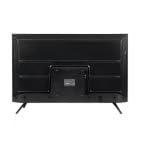
انځور 4.1: شاته view of the Panasonic TH-55PX735DX Smart LED TV, illustrating the location of various input and output ports.
- HDMI: Connect Blu-ray players, gaming consoles, or set-top boxes using HDMI cables. The TV supports multiple HDMI inputs.
- USB: د میډیا پلې بیک لپاره د USB ذخیره کولو وسایل وصل کړئ.
- انتن/کیبل: خپل انتن یا کیبل تلویزیون فیډ وصل کړئ.
- ځواک: د برېښنا تار له تلویزیون سره وصل کړئ او بیا د دیوال له لارې وصل کړئ.
۳.۳ د بریښنا پیل او د شبکې تنظیم
- تلویزیون د بریښنا په سوري کې ولګوه.
- په ریموټ کنټرول یا تلویزیون کې د بریښنا تڼۍ فشار ورکړئ.
- د خپلې ژبې، هیواد د غوره کولو او د چینل د لومړني سکین کولو لپاره د سکرین لارښوونې تعقیب کړئ.
- Connect to your Wi-Fi network by selecting your network name and entering the password. The TV supports Dual-Band WiFi.
- Log in with your Google account to access Google TV features and apps.
5. ستاسو د تلویزیون چلول
5.1 د ریموټ کنټرول فعالیتونه
The included remote control provides intuitive navigation. Insert the two AAA batteries into the remote control, observing polarity.
- د بریښنا تڼۍ: تلویزیون چالان یا بند کړئ.
- د نیویګیشن پیډ: د مینو نیویګیټ کولو لپاره د تیر کیلي وکاروئ او د انتخابونو تایید لپاره د OK تڼۍ وکاروئ.
- حجم +/-: د حجم کچه تنظیموي.
- چینل +/-: د تلویزیون چینلونه بدلوي.
- د کور تڼۍ: د ګوګل تلویزیون کور سکرین ته لاسرسی لري.
- د ننوتلو تڼۍ: د ننوتلو سرچینې (HDMI، USB، او نور) غوره کوي.
- د اپلیکیشن تڼۍ: Dedicated buttons for popular streaming services like Netflix, Prime Video, YouTube, and JioCinema.
۵.۲ د سمارټ تلویزیون ځانګړتیاوې (ګوګل تلویزیون)
Your Panasonic TH-55PX735DX runs on Google TV, providing a personalized entertainment experience.
- اپلیکیشن ته لاسرسی: Download and stream content from a wide range of applications available on the Google Play Store.
- د غږ کنټرول: Use the built-in Google Assistant (via remote control microphone) to search for content, control smart home devices, and get information.
- د منځپانګې سپارښتنې: Google TV learns your preferences and suggests movies, shows, and live TV from your subscriptions.
۳.۳ د انځور او غږ ترتیبات
خپل اصلاح کړئ viewد تلویزیون د ترتیباتو مینو له لارې د ډاونلوډ او اوریدلو تجربه.
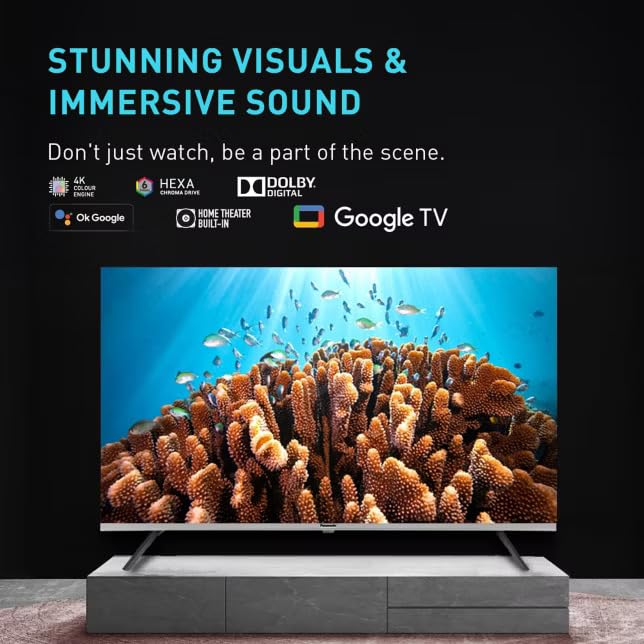
Image 5.1: The TV screen showcasing its capability for stunning visuals and immersive sound, highlighting features like 4K Hexa Chroma Drive, Dolby Digital, and Google TV integration.
- د انځور طریقې: Select from various preset picture modes (e.g., Standard, Vivid, Cinema, Game) or customize settings like brightness, contrast, color, and sharpness. The TV features a High Bright Panel and supports HDR10+ and Dolby Vision for enhanced picture quality.
- د غږ طریقې: Choose sound modes (e.g., Standard, Music, Movie, Speech) or adjust equalizer settings. Experience immersive audio with Dolby Atmos support.
- د لوبې حالت: Activate Game Mode for reduced input lag, ideal for gaming.
5.4 د بلوتوت ارتباط
Connect Bluetooth-enabled devices such as headphones or soundbars wirelessly to your TV.
- د تلویزیون د ترتیباتو مینو ته لاړ شئ.
- Navigate to 'Remotes & Accessories' or 'Bluetooth Settings'.
- Enable Bluetooth and put your device in pairing mode.
- Select your device from the list on the TV screen to pair.
6. ساتنه او پالنه
- د سکرین پاکول: په نرمۍ سره سکرین د نرم، لینټ نه پاک ټوکر سره پاک کړئ. د سختو نښو لپاره، یو څه لږampټوکر د اوبو یا ځانګړي سکرین کلینر سره ومینځئ (مستقیم په سکرین مه سپری کوئ).
- د کابینې پاکول: د تلویزیون کابینه د نرم او وچ ټوکر سره پاک کړئ.
- خړوبول: د هوا د تودوخی د مخنیوي لپاره په منظم ډول د هوا د خلاصیدو لارې خاورې کړئ.
- د بریښنا تار: د بریښنا تار په دوره یي ډول د هر ډول زیان لپاره وګورئ.
7. ستونزه حل کول
که تاسو په خپل تلویزیون کې ستونزې سره مخ شئ، لاندې عام حلونو ته مراجعه وکړئ:
| ستونزه | احتمالي حل |
|---|---|
| هیڅ ځواک نشته | ډاډ ترلاسه کړئ چې د برېښنا تار په خوندي ډول د تلویزیون او دیوال ساکټ دواړو سره وصل دی. وګورئ چې د برېښنا ساکټ کار کوي که نه. |
| انځور نشته، خو غږ شته | د ننوتلو سرچینه وګورئ. ډاډ ترلاسه کړئ چې بهرني وسایل فعال دي او په سمه توګه وصل دي. |
| غږ نشته، خو انځور شته | Check the volume level. Ensure mute is not activated. Verify audio cables for external devices. |
| ریموټ کنټرول کار نه کوي | د AAA بیټرۍ بدل کړئ. ډاډ ترلاسه کړئ چې د ریموټ او تلویزیون ترمنځ هیڅ خنډ شتون نلري. |
| د وائی فای سره وصل نشو | Ensure your router is on and within range. Re-enter the Wi-Fi password. Restart the TV and router. |
| د سمارټ تلویزیون ایپسونه نه پورته کیږي | Check your internet connection. Clear the app's cache or reinstall the app. Update the TV's software. |
8. تخنیکي مشخصات
| فیچر | مشخصات |
|---|---|
| برانډ | Panasonic |
| ماډل | TH-55PX735DX |
| د سکرین اندازه | 55 Inches (139 Centimetres) |
| ټیکنالوژي ښکاره کول | LED, IPS Panel |
| قرارداد | ۴K الټرا ایچ ډي (۳۸۴۰ x ۲۱۶۰ پکسلز) |
| د تازه کولو نرخ | 60 Hz |
| د HDR ملاتړ | ډولبي ویژن، HDR10+ |
| آډیو ټیکنالوژي | ډولبي اتموس، جوړ شوی سپیکر |
| عملیاتي سیسټم | ګوګل تلویزیون |
| د حافظې د ذخیره کولو ظرفیت | 16 جي بي |
| ارتباط | Bluetooth, HDMI, USB, Wi-Fi (Dual-Band) |
| ځانګړي ځانګړتیاوې | Bezel-Less Design, High Bright Panel, Game Mode, Micro Dimming, ALLM |
| د محصول ابعاد (LxWxH) | 123.6 x 6.8 x 71.8 سانتي متره |
| د توکي وزن | 20 کیلو ګرامه |
| والیtage | 230 ولټه |
| واټtage | 150 واټ |
| د ماډل کال | 2025 |
9. تضمین او ملاتړ
9.1 د تضمین معلومات
Your Panasonic TH-55PX735DX Smart LED TV comes with a د یو کال تضمین پاملرنه from the date of purchase. Please refer to the included Warranty Card for detailed terms and conditions, including coverage and exclusions.
9.2 د پیرودونکي ملاتړ
For technical assistance, service requests, or warranty claims, please contact Panasonic customer support. Contact details can be found on the Panasonic official webسایټ یا ستاسو د تضمین کارت کې.
جوړونکی: د پاناسونیک لایف سولیوشنز انډیا پرائیویټ لمیټډ


