


د کیتلي اتوماتیک ځانګړتیا سیسټم اساسي نسخه سافټویر

مشخصات
| د سند شمیره | 077187601 |
|---|---|
| نیټه | اکتوبر ۲۰۲۲ |
کیتلي وسایل
د ACS بنسټیز نصب او د پیل کولو ستونزې حل کولو لارښود
پیژندنه
This document provides information on installing the Automated Characterization System Basic Edition (ACS Basic) software and tips on troubleshooting installation and startup issues.
You must be able to run applications as an Administrator to install and run ACS Basic.
د ACS بنسټیز نصب کړئ
To install ACS Basic:
په .exe کې file, right-click and select د مدیر په توګه چلول.

Run ACS Basic
To start ACS Basic if your Windows account has administrative privileges:
- Double-click the ACS Basic icon.
To start ACS Basic without administrative privileges:
- Right-click the ACS Basic icon and select د مدیر په توګه چلول.
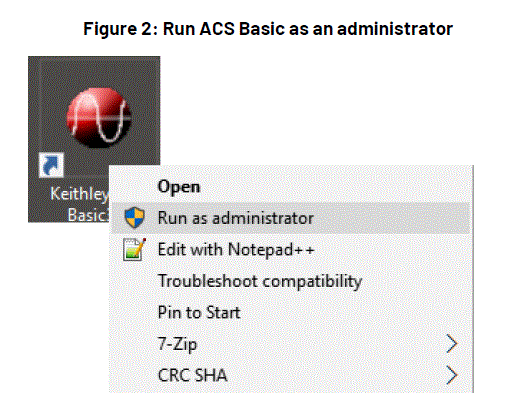
Set ACS Basic to Always Run as Administrator
- Right-click the ACS Basic icon and select ملکیتونه.
- غوره کړئ مطابقت ټب
- وټاکئ Run this program as an administrator.

GPIB Driver Installation
If you are using ACS Basic on a 4200A-SCS, do not install the NI GPIB driver. The KUSB-488B GPIB driver is installed by default.
If you are using ACS Basic on a computer that does not have a GPIB driver and want to use the KUSB-488 driver:
- During KUSB-488B GPIB driver installation, select کیتلي کمانډ مطابقت لري.
- وټاکئ بل نصبولو ته دوام ورکولو لپاره.
- If you are using ACS Basic on a computer that does not have a GPIB driver and want to use the NI GPIB driver, keep the default selections to complete the installation.
- If you are using ACS Basic on a computer that has a KUSB-488B GPIB driver and want to use the NI GPIB driver, after installing the NI GPIB driver, manually copy the file
C:\ACS_BASIC\HotFix\ieee_32m.dllتهC:\Windows\SysWOW64\فولډر.

If you uninstall the KUSB-488B GPIB driver or NI GPIB driver after you install ACS Basic, you must reinstall ACS Basic. If you do not reinstall ACS Basic, it cannot be started because of the GPIB driver uninstall.
Windows Update Setting
- Disable Automatic Windows Update to prevent the interruption of ACS tests, or set the updates schedule outside testing hours.
- It’s recommended that the Windows system be updated on schedule to maintain security.
 د وینډوز ™ تازه معلومات په وخت سره ترسره کړئ
سپارښتنه کیږي چې د وینډوز سیسټم په مهالویش سره تازه شي ترڅو سیسټم خوندي وي او امنیت وساتل شي.
هغه ستونزه غوره کړئ چې د غلطۍ سره مطابقت لري، او د حل مناسب لارښوونې به ښکاره شي.
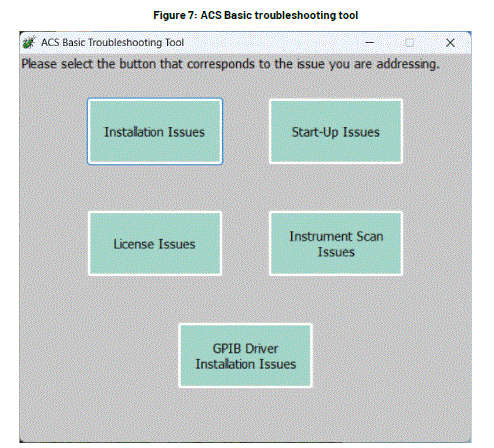
د نصب کولو مسلې
د نصبولو ستونزو لپاره دوه ډوله حالتونه شتون لري:
- د لومړي ځل لپاره ACS نصب کړئ
- ACS لوړ کړئ یا بیا نصب کړئ
هغه ستونزه غوره کړئ چې د غلطۍ سره مطابقت لري، او د حل مناسب لارښوونې به ښکاره شي.
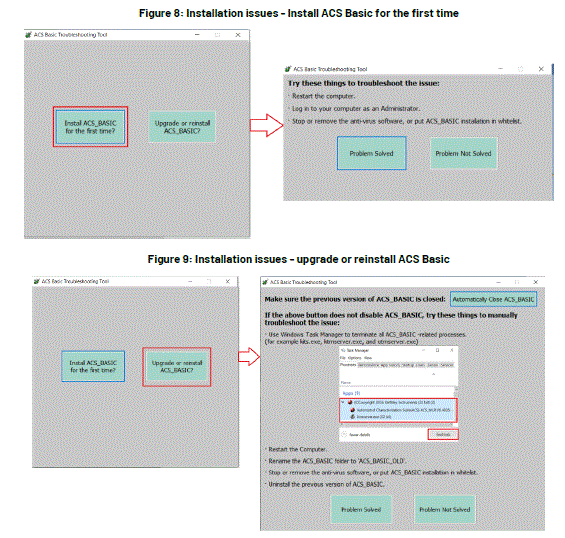
If the problem is solved, select the button ستونزه حل شوه. The instruction window will be closed, and it goes back to the main window of the troubleshooting tool.
Problem Not Solved
If the problem is not solved, select the button Problem Not Solved. Support information will be packed as a zip file named with year_month_date_hour_minute_second in the path C:\ACS\KATS\support_info\. A notice will be shown asking you to contact your Field Application Engineer (FAE) and send this zip file.

د پیل مسلې
There are two types of situations for Start-up Issues:
- ناسم پټنوم یا ناسمه پروژه File ستونزه
- د سټارټ اپ ټکر
Select the button according to the situation, and the instructions of the solution will be shown.

د جواز مسلې
Instructions for License Issues are shown in the following picture:

Instrument Scan Issues
Instructions for Instrument Scan Issues are shown in the following figure.
 ستونزه حل شوې او ستونزه نه حل شوې، مهرباني وکړئ د نصبولو مسلو برخې کې لارښوونو ته مراجعه وکړئ.
GPIB Driver Installation Issues
Instructions for Instrument Scan Issues are shown in the following figure:
 ستونزه حل شوې او ستونزه نه حل شوې، مهرباني وکړئ د نصبولو مسلو برخې کې لارښوونو ته مراجعه وکړئ.
Troubleshooting TekAMS License Issues
The ACS Basic license can become invalid if the Host ID of the computer changes. This can occur if the computer system or hardware is changed or if the computer is broken.
- Get a new license:
- د خپل ساحوي غوښتنلیک انجینر (FAE) سره اړیکه ونیسئ. د نړیوالو اړیکو شمیرو لپاره، لیدنه وکړئ tek.com/contact-tek.
- FAE به بیاview خپل کمپیوټر تنظیم کړئ او د کوربه ID ترلاسه کړئ.
- The FAE will give the new host ID to the Customer Service Representative (CSR). The CSR will reset the license record on TEKAMS, get a new license file د نوي کوربه ID سره وصل کړئ، او FAE ته یې ورکړئ.
- The FAE will provide you with a new license file.
- نوی جواز نصب کړئ file د ستونزې د حل لپاره:
- In ACS, select مرسته، بیا وټاکئ جواز.
- وټاکئ نصب کړئ د جواز غوره کولو لپاره file.
Troubleshooting Antivirus Software Blocking Issues
- If the ACS Basic installation process is blocked by antivirus software, select خلاصول in the dialog.
- Add ACS Basic to the trusted list in the antivirus software.
- If ACS Basic is blocked while running, identify the .exe fileهغه فایلونه چې د انټي ویروس سافټویر لخوا بند شوي وي او هغه .exe اضافه کړي fileد انټي ویروس سافټویر باوري لیست کې راځي.
Troubleshooting an Invalid Password, Error Message, or Login Crashes
که د KATS_Pref.ini file is corrupt, you may see one of the following issues when you log into ACS Basic:
- د خبرداري پیغام "ناسم پټنوم. مهرباني وکړئ بیا هڅه وکړئ!" تل ښکاره کیږي، که څه هم د کارونکي نوم او پټنوم سم دي.
- د تېروتنې پیغام "ناسم پروژه" file”ښودل شوی.
- ACS Basic crashes.
د دې مسلې د حل لپاره:
- Rename or delete the
C:\ACS_BASIC\KATS\KATS_pref.inifile. - Restart ACS Basic to reset
KATS_Pref.ini.
که دا ستونزه حل نه کړي، نو د خپل ساحوي غوښتنلیک انجینر (FAE) سره اړیکه ونیسئ. د نړۍ په کچه د اړیکو شمیرو لپاره، لیدنه وکړئ tek.com/contact-tek.
Troubleshooting Tool
When an error occurs while starting ACS, a troubleshooting button may appear in the error-reporting window.
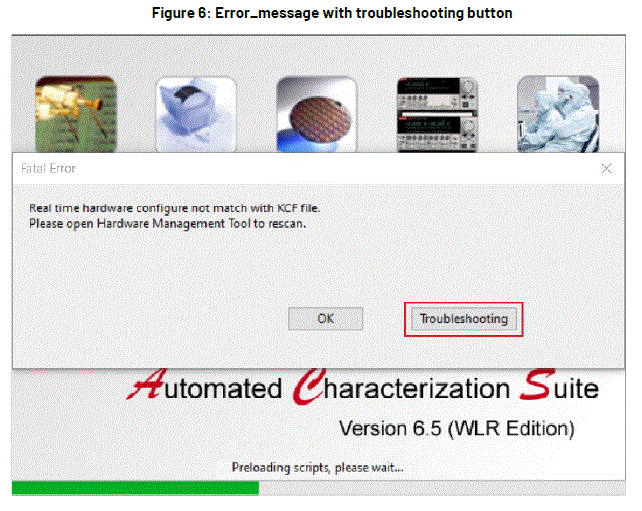
تڼۍ غوره کړئ او د ستونزو حل کولو وسیله به پیل شي. پنځه ستونزې شتون لري چې کشف کیدی شي:
- د نصبولو مسلې
- د پیل مسلې
- د جواز مسلې
- د وسیلې سکین ستونزې
- د GPIB ډرایور نصبولو ستونزې
موږ سره اړیکه ونیسئ
- د 28775 اورا روډ
- کلیولینډ، اوهایو 44139
- 1-800-833-9200
- tek.com/keithley
FAQ
-
What should I do if ACS Basic does not start?
Ensure you are running the application as an administrator. If issues persist, use the troubleshooting tool to identify the problem.
How do I resolve license issues?
Contact your field application engineer to get a new license file if the Host ID has changed.
What if my antivirus software blocks ACS Basic?
Add ACS Basic to the trusted list in your antivirus software and unblock any .exe files that are blocked.
How can I prevent Windows updates from interrupting ACS tests?
Disable automatic Windows updates or schedule them outside testing hours.
اسناد / سرچینې
 |
د کیتلي اتوماتیک ځانګړتیا سیسټم اساسي نسخه سافټویر [pdf] د نصبولو لارښود د اتوماتیک ځانګړتیا سیسټم اساسي نسخه سافټویر، د ځانګړتیا سیسټم اساسي نسخه سافټویر، د اساسي نسخه سافټویر، سافټویر |